16
H
OW TO USE HEART RATE PROGRAMS
Put on the optional chest pulse sensor (see
page 23).
You must wear the optional chest pulse sensor
to use a heart rate program.
Insert the key fully into the console.
See HOW TO TURN ON THE POWER on
page 12.
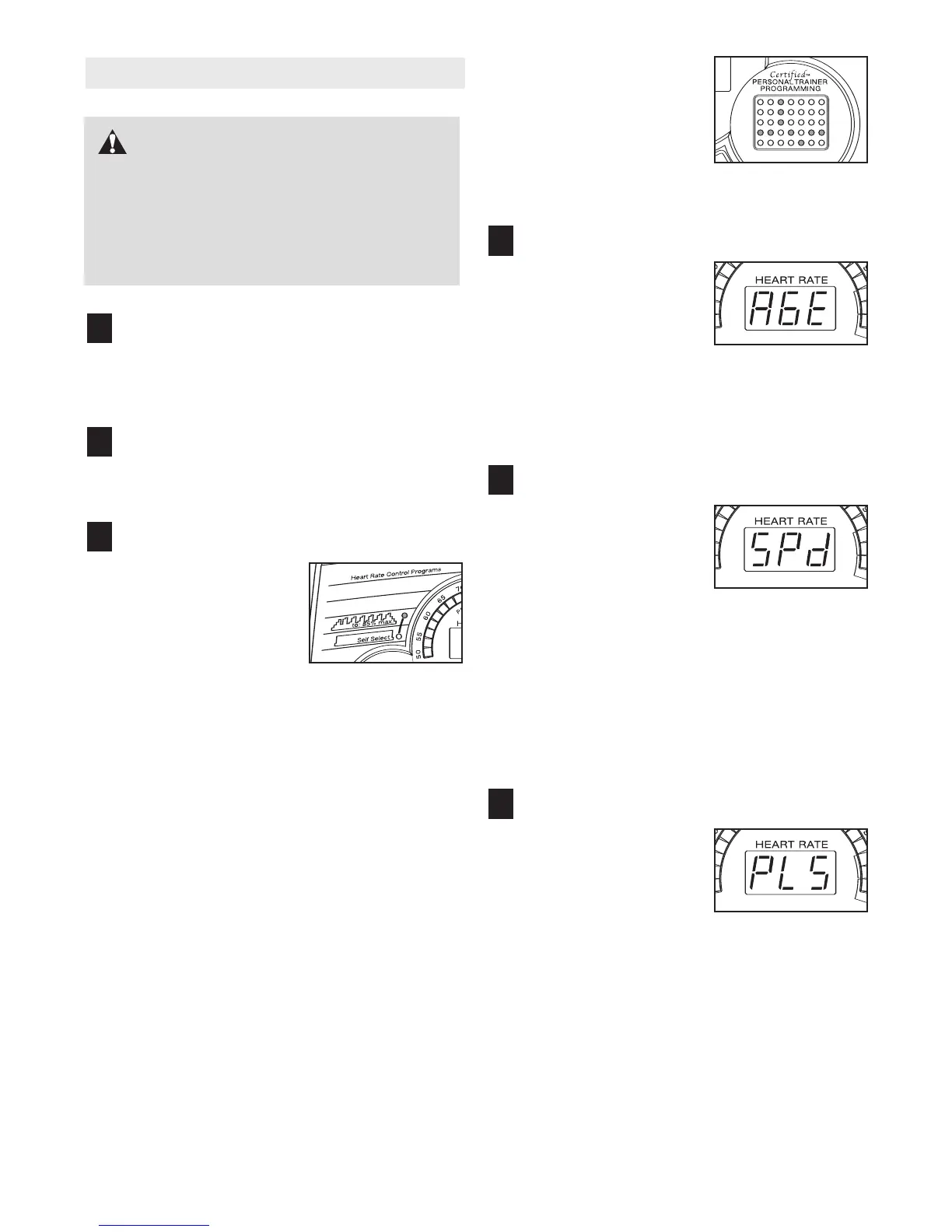
Select a heart rate program.
When the key is in-
serted, the manual
mode will be selected.
To select a heart rate
program, press the left
Select Program button
repeatedly until one of
the two heart rate program indicators lights.
The diagrams beside the heart rate program indi-
cators show how the target heart rate will change
during the programs. During the 85% Max. pro-
gram, your heart rate will reach approximately
85% of your
estimated maximum heart rate;
dur-
ing the Self Select program, your heart rate will re-
main near a level that you select
.
Note: Your estimated maximum heart rate is de-
termined by subtracting your age from 220. For
example, if you are 30 years old, your estimated
maximum heart rate is 190 beats per minute
(220 – 30 = 190).
During heart rate pro-
grams, the matrix will
s
how a moving graphic
that represents your
h
eart rate. Each time a
heartbeat is detected,
an additional peak will
appear.
Enter your age.
When a heart rate pro-
gram is selected, the
word “AGE” and the cur-
rent age setting will flash
in the Heart Rate dis-
play. If you have already
entered your age, simply press the Enter button. If
you have not entered your age, press the + and –
buttons beside the Enter button to enter your age.
Then, press the Enter button.
Enter a maximum speed.
After you have entered
your age, the letters
“SPd” and the maximum
speed setting of the pro-
gram will flash in the
Heart Rate display. If
desired, press the + and – buttons beside the
Enter button to change the maximum speed set-
ting. When the desired setting is shown, press the
Enter button.
If the 85% Max. program is selected, go to step
7. If the Self Select program is selected, go to
step 6.
Enter a target heart rate.
After you have entered a
maximum speed setting,
the letters “PLS” and the
target heart rate setting
for the program will flash
in the Heart Rate dis-
play. If desired, press the + and – buttons beside
the Enter button to change the target heart rate
setting. When the desired setting is shown, press
the Enter button.
6
5
4
3
2
1
CAUTION: If you have heart prob-
lems, or if you are over 60 years of age and
have been inactive, do not use the heart rate
programs. If you are taking medication regu-
l
arly, consult your physician to find whether
the medication will affect your exercise heart
rate.





 To Next Page