9
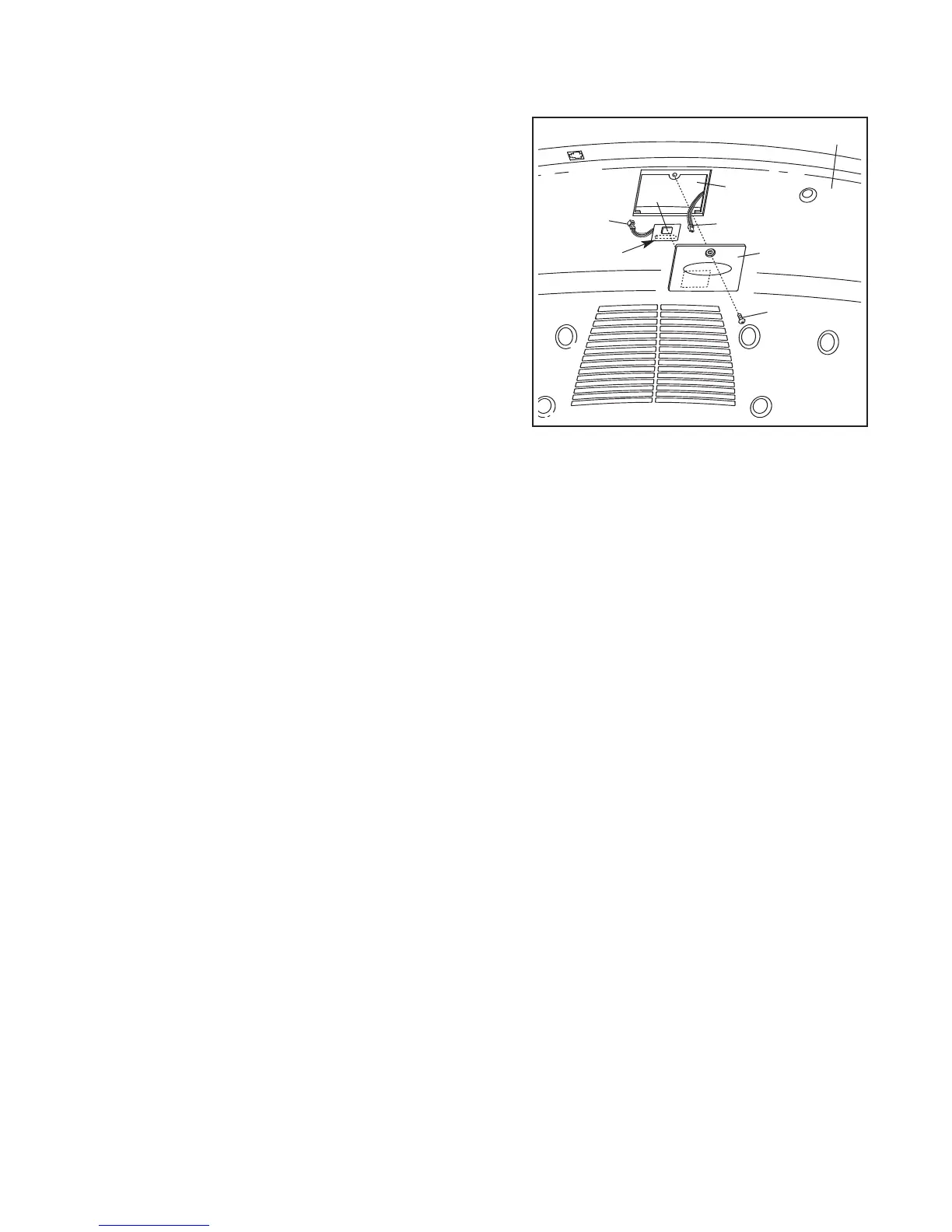
1. Make sure that the power cord is unplugged. Remove
the indicated 3/4” Screw (6) and the Access Door (94) from
the back of the Console Back (95).
2. Remove the paper from the adhesive pad on the back of
t
he receiver (A). H
old the receiver so the small cylin-
der is near the lower edge of the receiver and is fac-
ing the Console (88) as shown. Firmly press the re-
ceiver onto the indicated corner of the Access Door (94).
Connect the wire on the receiver to the indicated wire ex-
tending from the Console.
3.
Make sure that no wires are pinched. Reattach the
Access Door (94) with the 3/4” Screw (6). The other wires
included with the receiver may be discarded.
If you purchase the optional chest pulse sensor (see page 23), follow the steps below to install the re-
ceiver and the short jumper wire included with the chest pulse sensor.
A
6
94
Cylinder
9
5
88
Wire
Wire






 To Next Page