8
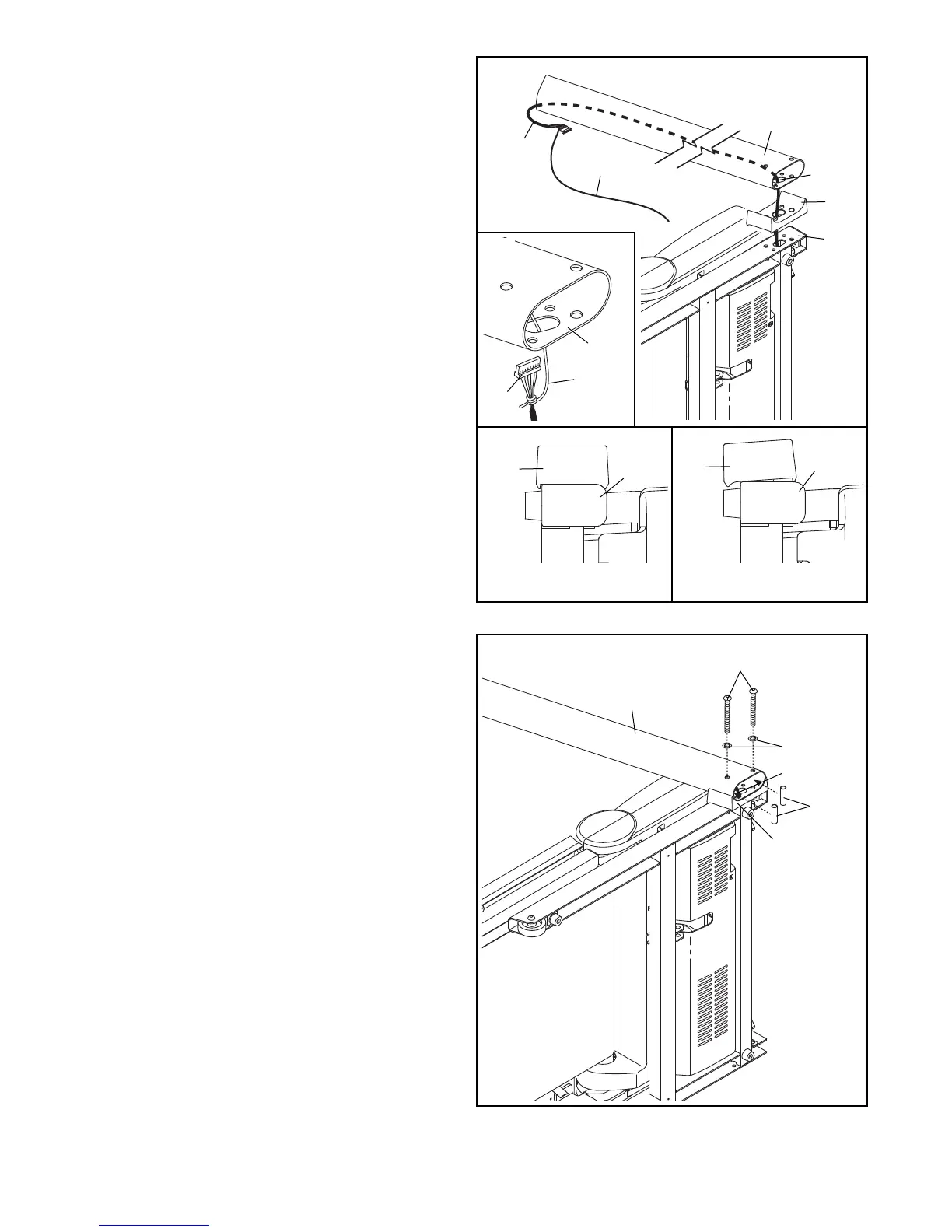
4. Hold a Screw Spacer (14) inside the lower end
of the Right Upright (85). Insert a 3/8" x 4" Patch
Screw (7) with a 3/8" Star Washer (11) into the
Right Upright and the Screw Spacer. Repeat
this step with a second Screw Spacer (14),
3/8" x 4" Patch Screw (7), and 3/8" Star
Washer (11).
Hold the Right Upright (85) against the Right
Upright Spacer (91). Be careful not to pinch
the Upright Wire (87). Tighten the 3/8" x 4"
Patch Screws (7) until the heads of the Patch
Screws touch the Right Upright; do not fully
tighten the Patch Screws yet.
91
85
87
11
14
7
4
3
. Identify the Right Upright (85) and the Right
Upright Spacer (91), which are marked with
“Right” stickers.
I
nsert the Upright Wire (87) through the Right
Upright Spacer (91) as shown. Then, set the
Right Upright Spacer on the Base (95). See
inset drawings B and C. Make sure that the
R
ight Upright Spacer sits flush against the
Base. If necessary, turn the Right Upright
Spacer and try again.
Have a second person hold the Right Upright
(85) near the Base (95). See inset drawing A.
Tie the wire tie in the Right Upright securely
around the end of the Upright Wire (87). Then,
pull the other end of the wire tie until the Upright
Wire is routed through the Right Upright.
95
W
ire Tie
8
7
85
91
87
91
Correct
Incorrect
91
95
95
3
Wire
Tie
85
87
B
C
A





 To Next Page