9
8a
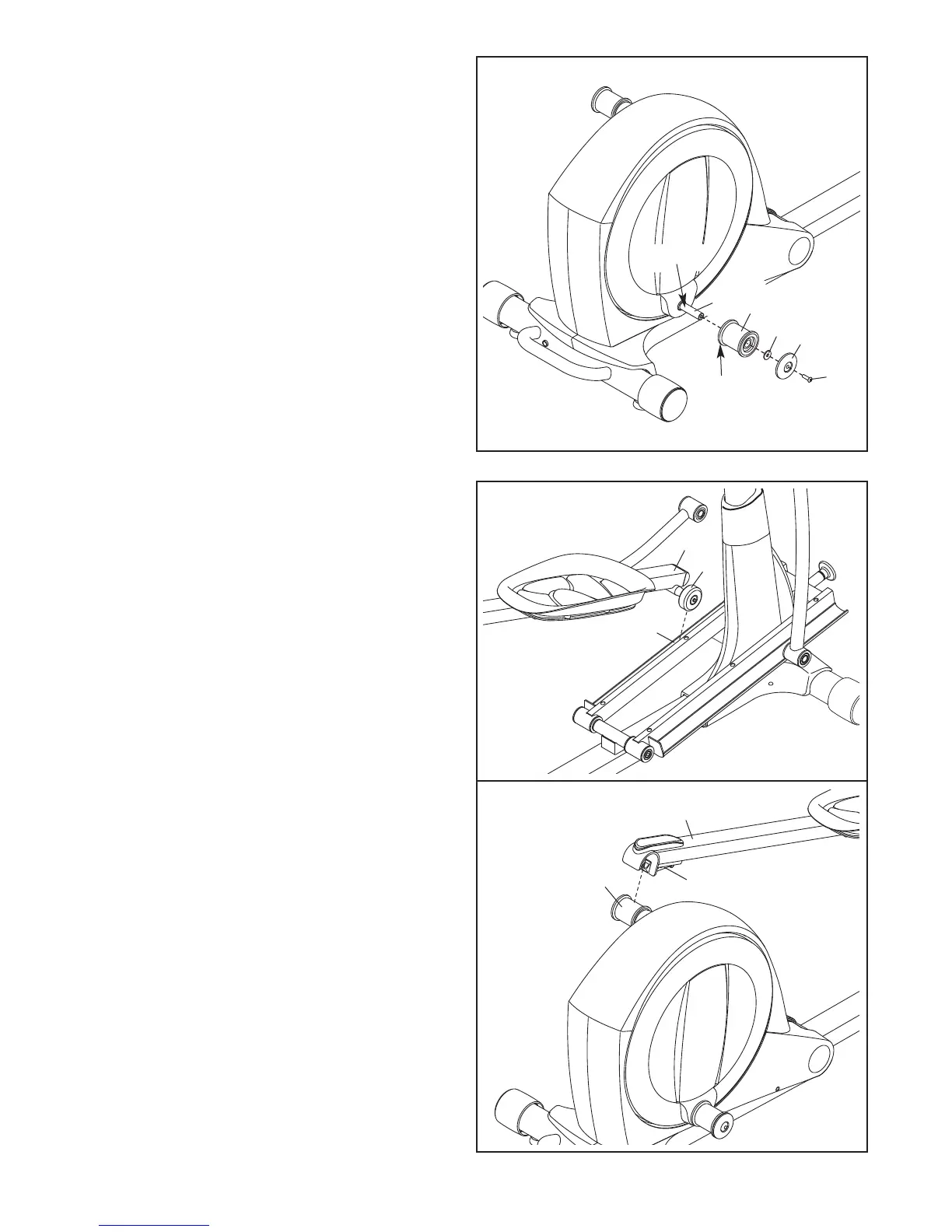
8. See drawing 8a. Locate the Pedal Arm Roller
(32) on the Left Pedal Arm (13).
Set the Pedal Arm Roller (32) on the left side of
the Ramp (130).
See drawing 8b. Pull upward on the Latch (50)
on the Left Pedal Arm (13).
Press the Left Pedal Arm (13) onto the left
Pedal Arm Sleeve (46). Make sure that the
Left Pedal Arm latches into place.
Repeat this step on the other side of the
elliptical.
32
13
130
7. Apply grease to the axle on the right Crank Arm
(39).
O
rient a Pedal Arm Sleeve (46) so that the flat
side is facing the elliptical. Slide the Pedal Arm
S
leeve onto the axle on the right Crank Arm
(39).
Attach the Pedal Arm Sleeve (46) with an M8 x
25mm Patch Screw (121), a Large Axle Cover
(113), and an M8 Washer (95). Tip: Avoid
damaging the Large Axle Cover when tight-
ening the Patch Screw.
Repeat this step on the other side of the
elliptical.
8b
46
13
50
7
95
113
Flat
Side
121
39
Grease
46




 To Next Page