178
HOW TO USE PROGRAMS DIRECTLY FROM
OUR INTERNET SITE
Our new internet site at www.iFit.com allows you to
access a large selection of programs that interactively
control your treadmill to help you achieve your specific
exercise goals. In addition, you can play iFit.com audio
and video programs directly from the internet. Explore
www.iFit.com for details.
To use programs from our internet site, the treadmill
must be connected to your home computer. See HOW
TO CONNECT YOUR COMPUTER on page 14. In ad-
dition, you must have at least a 56K modem and an
account with an internet service provider. A list of addi-
tional system and software requirements will be found
on our internet site.
Next, make sure that the
on/off switch near the
power cord is in the on
position. In addition,
make sure that the power
cord is properly plugged
in (see HOW TO PLUG IN THE POWER CORD on
page 8).
Follow the steps below to use a program from our
internet site.
Insert the key fully into the console.
When the key is
inserted, the four dis-
plays and various indi-
cators on the console
will light.
Press the PROGRAM button.
When the key is in-
serted, the manual
mode will be selected.
To use a program from
our internet site, press
the PROGRAM button.
The iFit.com indicator
will light.
Go to your computer and start an internet
connection.
Start your web browser, if necessary, and go to
our internet site at www.iFit.com.
Follow the desired links on our internet site to
select a program.
Read and follow the on-line instructions for using a
program.
Follow the on-line instructions to start the
program.
When you start the program, an on-screen count-
down will begin.
Return to the treadmill and stand on the foot
rails. Find the clip attached to the key and slide
the clip onto the waistband of your clothing.
When the on-screen countdown ends, the program
will begin and the walking belt will begin to move.
Hold the handrails, step onto the walking belt, and
begin walking.
During the program, an electronic ÒchirpingÓ sound
will alert you when the speed and/or incline of the
treadmill is about to change. CAUTION: Always
listen for the ÒchirpÓ and be prepared for speed
and/or incline changes.
If the speed or incline settings are too high or too
low, you can manually override the settings at any
time by pressing the SPEED or INCLINE buttons
on the console. However, when the next ÒchirpÓ
is heard, the speed and/or incline will change
to the next settings of the program.
To stop the program at any time, press the STOP
button on the console. The TIME/INCLINE/SEG
TIME display will begin to flash. To restart the pro-
gram, press the START button or the SPEED
▲▲
button on the console. After a moment, the walk-
ing belt will begin to move at 1.0 mph. When the
next ÒchirpÓ is heard, the speed and incline
will change to the next settings of the
program.
When the program is completed, the walking belt
will stop and the TIME/INCLINE/SEG TIME display
will begin to flash. Note: To use another program,
press the STOP button and go to step 5 above.
Note: If the speed or incline of the treadmill
does not change when a ÒchirpÓ is heard, make
sure that the iFit.com indicator is lit and that
the TIME/INCLINE/SEG TIME display is not
flashing. In addition, make sure that the audio
cable is properly connected, that it is fully
plugged in, and that it is not wrapped around a
power cord.
7
6
5
4
3
2
1
On
Position
THE PERFORMANT LUBE
TM
WALKING BELT
Your treadmill features a walking belt coated with PERFORMANT LUBE
TM
, a high-performance lubricant. IMPOR-
TANT: Never apply silicone spray or other substances to the walking belt or the walking platform. They will
deteriorate the walking belt and cause excessive wear.
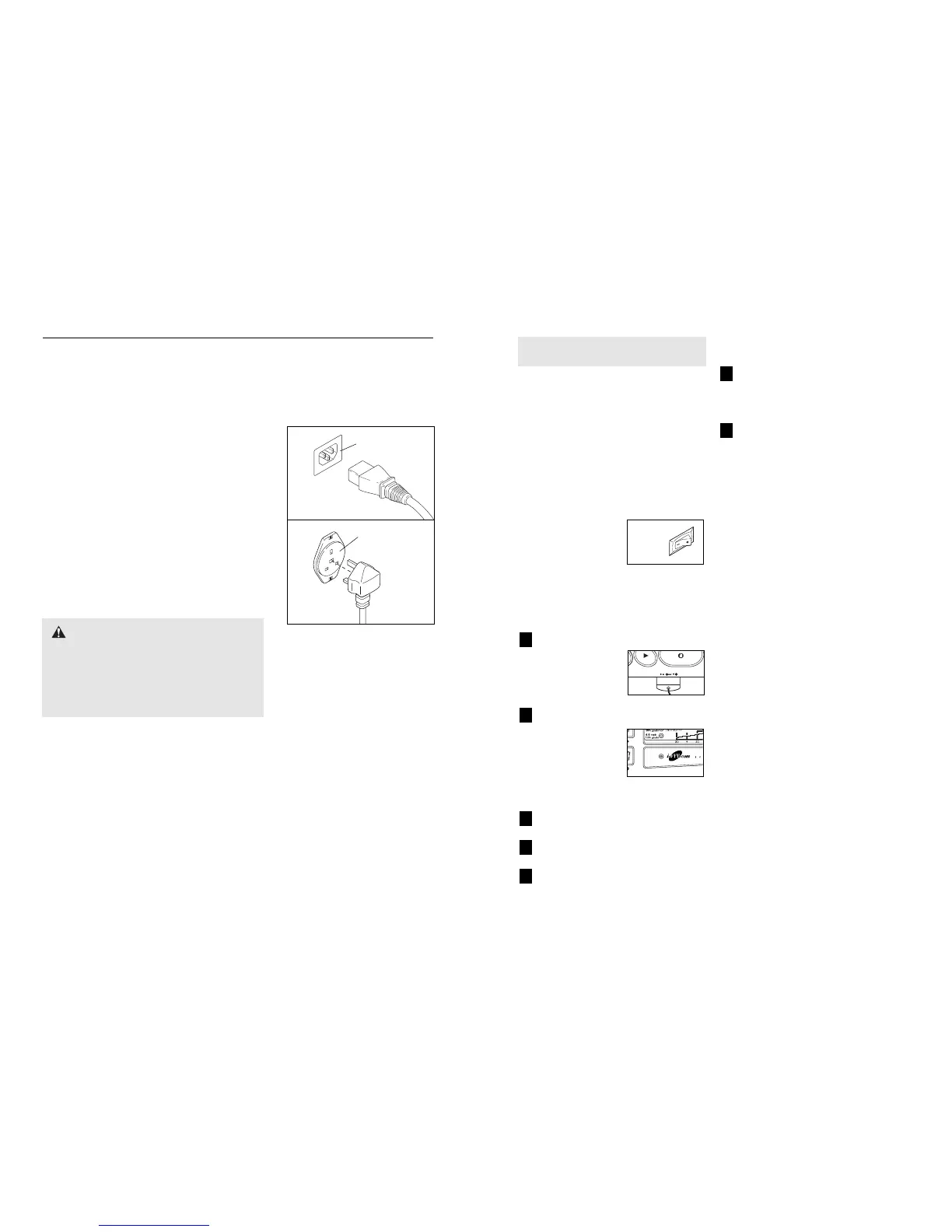
HOW TO PLUG IN THE POWER CORD
This product must be earthed. If it should malfunction or break
down, earthing provides a path of least resistance for electric cur-
rent to reduce the risk of electric shock. This product is equipped
with a cord having an equipment-earthing conductor and a earth-
ing plug.
Two power cords are included. Select the one that will fit your
outlet. Refer to drawing 1. Plug the indicated end of the
power cord into the socket on the treadmill. Refer to drawing
2. Plug the power cord into an appropriate outlet that is prop-
erly installed and earthed in accordance with all local codes
and ordinances. Note: In Italy, an adapter (not included) must
be used between the power cord and the outlet. Important: The
treadmill is not compatible with GFCI-equipped outlets.
Use only a power cord type H05VV-F with a conductor of at least
1mm2, with a country recognised plug and an appliance coupler.
DANGER: Improper connection of the
equipment-earthing conductor can result in an in-
creased risk of electric shock. Check with a qualified
electrician or serviceman if you are in doubt as to
whether the product is properly earthed. Do not mod-
ify the plug provided with the productÑif it will not fit
the outlet, have a proper outlet installed by a qualified
electrician.
OPERATION AND ADJUSTMENT
Socket on treadmill
Outlet
1
2



 To Next Page