HOW TO USE PERSONAL TRAINER PROGRAMS
i]
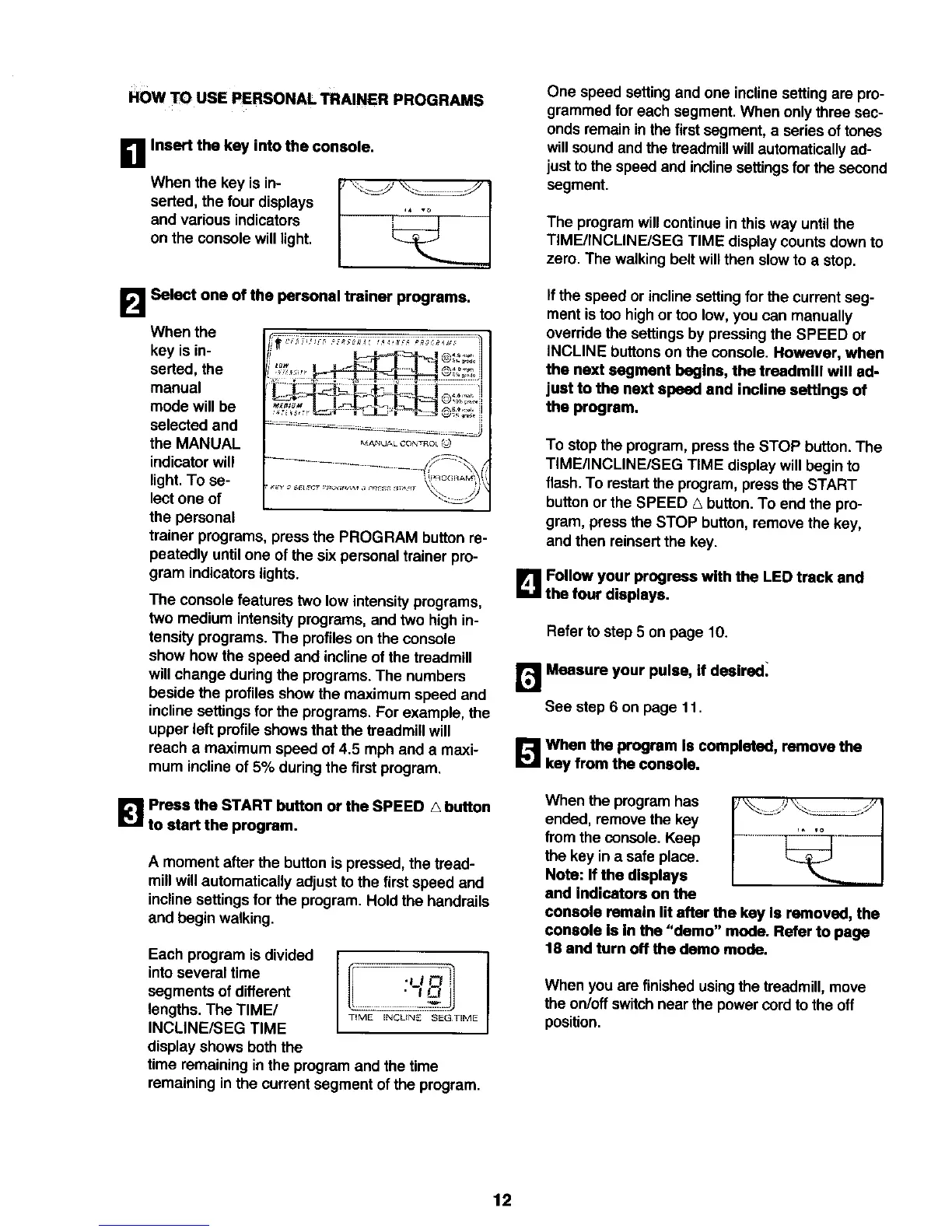
When the key is in-
serted, the four displays
and various indicators
on the console willlight.
Insert the key into the console.
B
Select one of the personal trainer programs.
When the
key is in-
serted, the
manual
mode will be
selected and
the MANUAL
indicator will
light.To se-
lect one of
the personal
i _b-?." -_-.!(®II;;I
MN_;UA k CO_,TNOL (_
, F,II©GR¢_M_ ,'
x:2._ 2J
trainer programs, press the PROGRAM button re-
peatedly untilone of the six personal trainer pro-
gram indicators lights.
The console features two low intensity programs,
two medium intensityprograms, and two high in-
tensity programs. The profileson the console
show how the speed and incline of the treadmill
will change duringthe programs. The numbers
beside the profiles show the maximum speed and
incline settings for the programs. For example, the
upper left profile showsthat the treadmillwill
reach a maximum speed of 4.5 mph and a maxi-
mum incline of 5% during the first program.
[]Press the START button or the SPEED A button
to start the program.
A moment after the buttonis pressed, the tread-
millwill automatically adjust tothe firstspeed and
inclinesettingsfor the program. Hold the handrails
and begin walking.
Each program is divided
intoseveral time
segments of different
lengths. The TIME/
INCLINE/SEG TIME
display shows boththe
time remaining in the program and the time
remaining in the current segment of the program.
I "LI
TIME INCL_NZ SEGTI,ME
One speed setting and one incline setting are pro-
grammed for each segment. When only three sec-
ondsremain in the firstsegment, a series of tones
willsound and the treadmill will automatically ad-
just tothe speed and inclinesettings for the second
segment.
The program will continue in this way untilthe
TIME/INCLINE/SEG TIME display counts downto
zero. The walking belt will then slow to a stop.
If the speed or incline setting for the current seg-
ment istoo highor too low, you can manually
override the settings by pressingthe SPEED or
INCLINE buttonson the console. However, when
the next segment bogins, the treadmill will ad-
just to the next speed and incline settings of
the program.
To stop the program, press the STOP button.The
TIME/INCLINE/SEG TIME display willbegin to
flash. To restartthe program, pressthe START
button or the SPEED A button.To end the pro-
gram, press the STOP button, remove the key,
and then reinsertthe key.
B Follow your progress with the LED track and
the four displays.
Refer to step5 on page 10.
r.,1 Measura your pulse, if desired:
See step 6 on page 11.
[]When the program Is completed, remove the
key from the console.
When the program has
ended, remove the key
from the console. Keep
the key in a safe place.
Note: If the displays
end Indicators on the
%. _)'C..
console remain lit after the key Is removed, the
console Is In the "demo" mode. Refer to page
18 and turn off the demo mode.
When you are finished usingthe treadmill, move
the on/off switchnear the power cord to the off
position.
12






 To Next Page