TROUBLE-SHOOTING
Most treadmill problems can be solved by following the simple steps below. Find the symptom that
applies, and follow the steps listed. If further assistance is needed, call our toll-free HELPLINE at
1-800-736-6879, Monday through Saturday, 7 a.m. until 7 p.m. Central Time (excluding holidays).
PROBLEM: The power does not turn on
SOLUTION: a. Make surethat the power cordis plugged into a surge suppressor, and that the surge suppressor
is plugged intoa propedy grounded outlet (see page 7). Use only a single-outlet surge suppressor
that is UL 1449 listed as a transient voltage surge suppressor (TVSS). The surge suppressor
must have a UL suppressed voltage rating of 400 volts or less and a minimum surge dissipation
of 450 joules. The surge suppressor mustbe electricallyrated for 120 voltsAC and 15 amps.
b. After the power cord has been plugged in, make sure that the key is fully inserted into the con-
sore. See step I on page 10.
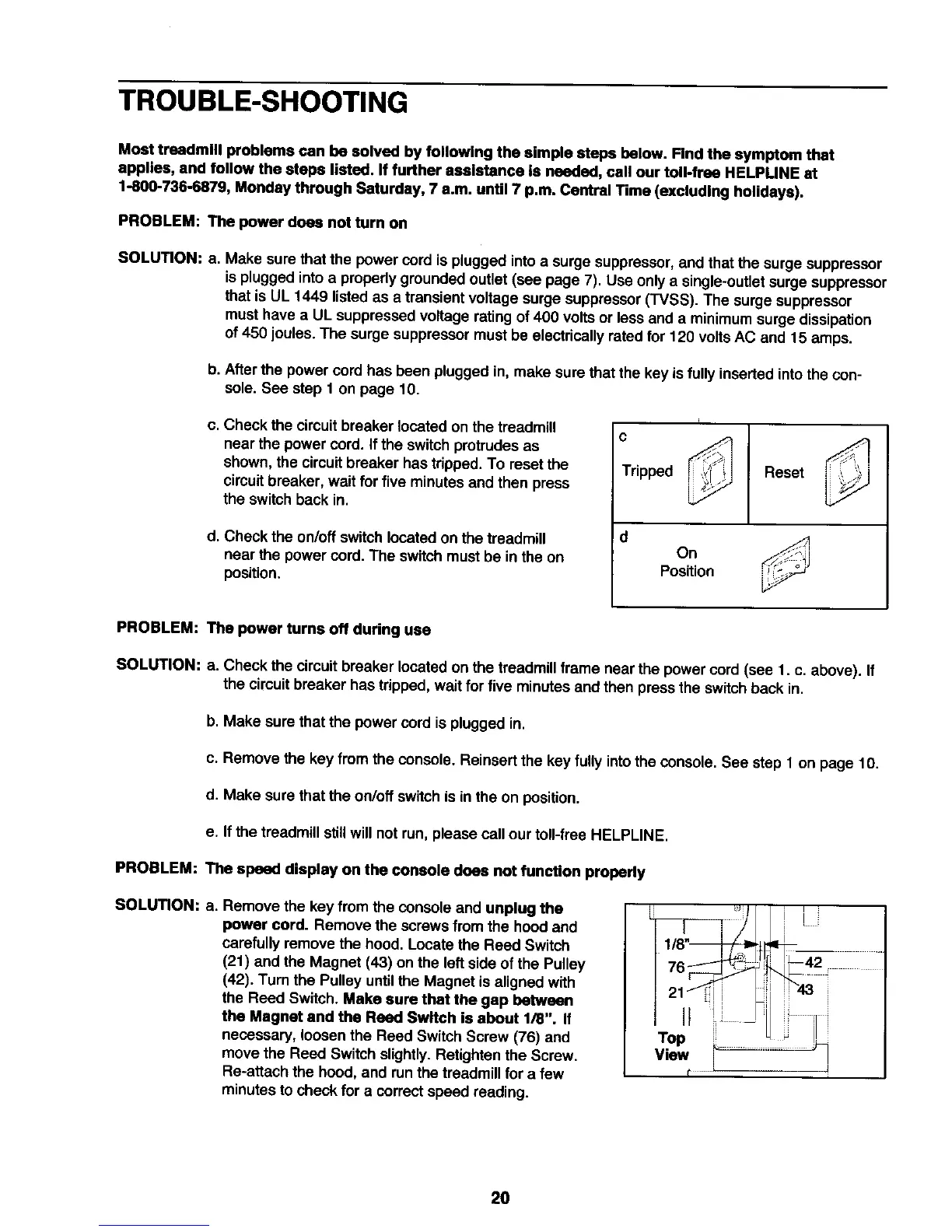
c. Check the circuit breaker located on the treadmill
near the power cord. If the switchprotrudes as
shown, the circuitbreaker has tripped. To reset the
circuitbreaker, wait for five minutes and then press
the switch back in.
d. Check the on/off switch located on the treadmill
near the power cord. The switchmust be in the on
position.
c
Tripped
Reset
On
Position
PROBLEM: The power turns off during use
SOLUTION: a. Check the circuit breaker located on the treadmill frame near the power cord (see 1. c. above). If
the circuitbreaker has tripped, wait for five minutes and then press the switch back in.
b. Make sure that the power cord is plugged in.
c. Remove the key from the console. Reinsert the key fully into the console. See step 1 on page 10.
d. Make sure that the on/off switchis in the on position.
e, If the treadmill s_illwill not run, please call our toll-free HELPLINE,
PROBLEM: The speed display on the console does not function properly
SOLUTiON: a. Remove the key from the console and unplug the
power cord. Remove the screws from the hood and
carefully remove the hood. Locate the Reed Switch
(21) and the Magnet (43) on the leftside of the Pulley
(42). Turn the Pulley untilthe Magnet is aligned with
the Reed Switch. Make sure that the gap between
the Magnet and the Reed Switch is about 1/8". If
necessary, loosen the Reed Switch Screw (76) and
move the Reed Switch slightly. Retightenthe Screw.
Re-attach the hood, and run the treadmill for a few
minutes to check for a correct speed reading.
L_ i
1/8" i
2O






 To Next Page