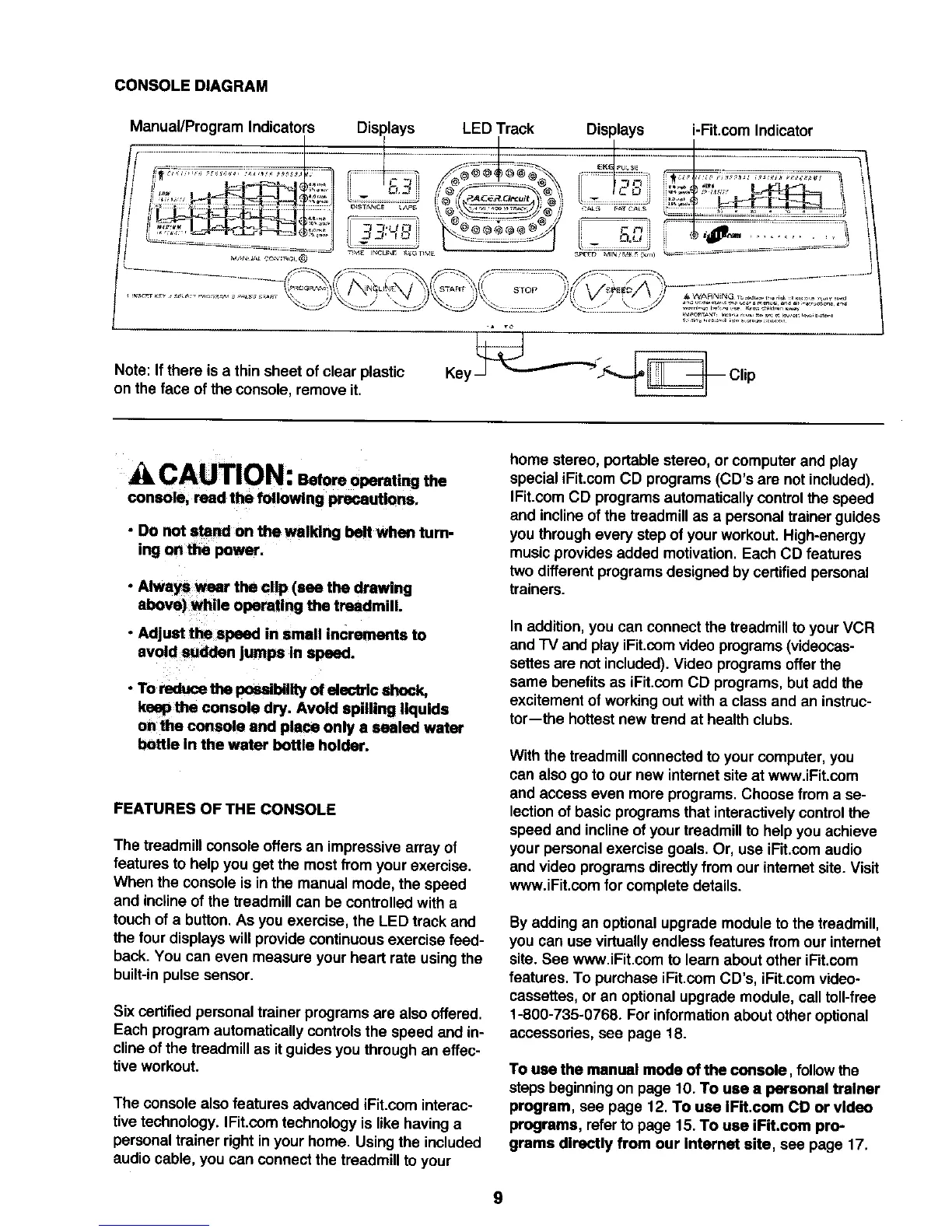
CONSOLEDIAGRAM
Manual/Program Indicators Displays LED Track Displays i-Fit.com Indicator
t
.............. j _.s ..... ., !. -J _,.............. !l
_TOP
Note: If there is a thin sheet of clear plastic
on the face of the console, remove it.
CAUTION:., oreoperatingthe
console, read the following precautions.
• Do not stand on the walldng belt when turn-
ing on the pewer,
• Always wear the clip (see the drawing
above) while operating the treadmill.
• Adjust the speed in smell increments to
avoid sudden jumps in speed.
• To reduce the possibility of electric shock,
keep the console dry. Avoid spilling liquids
on the console end piece only a sealed water
bottle in the water bottle holder.
FEATURES OF THE CONSOLE
The treadmill console offers an impressive array of
features to help you get the most from your exercise.
When the console is inthe manual mode, the speed
and inclineof the treadmill can be controlledwith a
touch of a button. As you exercise, the LED track and
the four displays will provide continuous exercise feed-
back. You can even measure your heart rate using the
built-inpulse sensor.
Six certifiedpersonal trainer programs are also offered.
Each program automatically controls the speed and in-
cline of the treadmill as it guides you through an effec-
tive workout.
The console also features advanced iFit.com interac-
tive technology. IFit.com technology is like having a
personaltrainer right in your home. Using the included
audio cable, you can connect the treadmillto your
home stereo, portable stereo, or computer and play
special iFit.com CD programs (CD's are not included).
IFit.com CD programs automatically control the speed
and incline of the treadmill as a personal trainer guides
you through every step of your workout. High-energy
music provides added motivation. Each CD features
two different programs designed by certified personal
trainers.
In addition,you can connect the treadmillto your VCR
and "IV and play iFit.comvideo programs (videocas-
settes are not included).Video programs offer the
same benefits as iFit.com CD programs, butadd the
excitement of working out with a class and an instruc-
tor-the hottestnew trend at health clubs.
With the treadmill connected to your computer, you
can also go to our new internet site at www.iFit.com
and access even more programs. Choose from a se-
lectionof basic programs that interactivelycontrolthe
speed and inclineof your treadmill to help you achieve
your personalexercise goals. Or, use iFit.com audio
and video programsdirectly from our internet site. Visit
www.iFit.com for complete details.
By adding an optional upgrade module to the treadmill,
you can use virtually endless features from our internet
site. See www.iFit.com to learn about other iFit.com
features. To purchase iFit.com CD's, iFit.com video-
cassettes, or an optional upgrade module, call toll-free
1-800-735-0768. For informationabout other optional
accessories, see page 18.
To use the manual mode of the console, follow the
steps beginningon page 10. To use a personal trainer
program, see page 12. To use IFit.com CD or video
programs, referto page 15.To use iFit.com pro-
grams directly from our internet site, see page 17.
9






 To Next Page