EasyManua.ls Logo

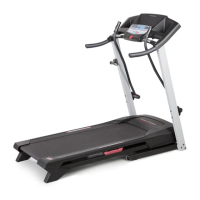
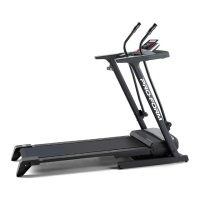
ProForm C500 PFTL57105.2 - User Manual

ProForm C500 PFTL57105.2
30 pages
Print Icon
To Next Page IconTo Next Page
Loading...
Serial
Number
Decal
Model No. PFTL57105.2
S
erial No.
CAUTION
Read all precautions and instruc-
tions in this manual before using
this equipment. Save this manual
for future reference.
USER'S MANUAL
QUESTIONS?
As a manufacturer, we are com-
mitted to providing complete
customer satisfaction. If you
have questions, or if parts are
damaged or missing, PLEASE
CONTACT OUR CUSTOMER
SERVICE DEPARTMENT DI-
RECTLY.
CALL TOLL-FREE:
1-888-533-1333
Mon.–Fri., 6 a.m.–6 p.m. MST
ON THE WEB:
www.proformservice.com
Visit our website at
www.proform.com
new products, prizes,
fitness tips, and much more!
V

Questions and Answers

  • P
    Peter TuckerJul 29, 2025
    What to do if my ProForm C500 PFTL57105.2 power does not turn on?
    • A
      Anthony YoungJul 30, 2025
      First, ensure the power cord is properly plugged into a surge suppressor, and that the surge suppressor is connected to a grounded outlet. It's important to use a surge suppressor meeting the specifications on page 11. Note that the treadmill isn't compatible with GFCI outlets. Also, check that the key is fully inserted into the console after plugging in the power cord. Finally, examine the reset/off circuit breaker on the treadmill frame near the power cord. If the switch is protruding, the breaker has tripped. To reset it, wait five minutes, then press the switch back in.
  • M
    Mr. Daniel ThompsonAug 3, 2025
    How to fix a ProForm C500 PFTL57105.2 walking belt that is off-center or slips?
    • E
      Elizabeth EsparzaAug 3, 2025
      If the walking belt is off-center, first remove the key and unplug the power cord. If the belt has shifted left, turn the left rear roller bolt clockwise 1/2 turn using the allen wrench. If it has shifted right, turn the bolt counterclockwise 1/2 turn. Avoid overtightening the belt. Then, plug in the power cord, insert the key, and run the treadmill for a few minutes. Repeat until centered. If the belt slips, remove the key and unplug the power cord. Turn both rear roller bolts clockwise 1/4 turn. You should be able to lift each edge of the belt 2 to 3 inches. Keep the belt centered. Plug in the power cord, insert the key, and walk on the treadmill for a few minutes. Repeat until properly tightened.
  • T
    Thomas JenningsAug 8, 2025
    How to recalibrate the incline on my ProForm C500 PFTL57105.2 Treadmill?
    • C
      charlesallenAug 8, 2025
      To recalibrate the incline system, insert the key into the console, and press one of the Incline buttons. While the incline is changing, remove the key. After a few seconds, re-insert the key. The treadmill should automatically rise to the maximum incline level and then return to the minimum level.
  • C
    christopher05Aug 14, 2025
    Why does my ProForm Treadmill turn off during use?
    • F
      Fernando SchneiderAug 14, 2025
      If your treadmill shuts off unexpectedly, begin by checking the reset/off circuit breaker. Also, ensure the power cord is securely plugged in; if it is, unplug it, wait five minutes, and then plug it back in. Another step is to remove and re-insert the key into the console. If these steps don't resolve the issue, consult the front cover of this manual.
  • M
    mannmatthewAug 18, 2025
    What causes a ProForm Treadmill walking belt to slow down when I walk on it?
    • E
      Erica JohnsonAug 19, 2025
      The walking belt may slow down if you are not using a surge suppressor that meets the specifications described on page 11. If the walking belt is overtightened, remove the key and unplug the power cord. Use the allen wrench to turn both rear roller bolts counterclockwise, 1/4 of a turn. When the walking belt is properly tightened, you should be able to lift each edge of the walking belt 2 to 3 inches off the walking platform. Be careful to keep the walking belt centered. Then, plug in the power cord, insert the key, and run the treadmill for a few minutes. Repeat until the walking belt is properly tightened. If the walking belt still slows when walked on, see the front cover of this manual.
  • M
    Melinda GreenAug 25, 2025
    How do I fix the console displays on my ProForm C500 PFTL57105.2 if they aren't working?
    • B
      Brenda LeeAug 25, 2025
      Remove the key and unplug the power cord. With assistance, carefully tip the Upright Base down. Remove the three Hood Screws and two Screws. Find the Reed Switch and the Magnet on the left side of the Pulley. Turn the Pulley until the Magnet aligns with the Reed Switch, ensuring the switch is about 1/8" away. If needed, loosen and retighten the Screw. Reattach the Hood, and test the treadmill for a few minutes to check the speed reading.

Summary

Important Precautions

Before You Begin

Assembly

Operation and Adjustment

How to Plug In the Power Cord

Instructions and safety precautions for connecting the treadmill's power cord.

Using the Treadmill Modes

How to Turn On the Power

Steps to power on the treadmill by inserting the key and checking the circuit breaker.

Manual, Preset, and Pulse Control Modes

Guides for operating the treadmill in manual, preset, and heart rate-controlled programs.

Treadmill Folding and Movement

Folding and Storing the Treadmill

Step-by-step instructions for folding the treadmill for compact storage.

Moving and Lowering the Treadmill

Instructions on safely moving, lowering, and setting up the treadmill for use.

Troubleshooting Guide

Common Problem Solutions

Diagnosing and resolving issues with power, incline, console display, and walking belt.

Conditioning and Workout Advice

Exercise Intensity and Workout Planning

Guidelines for exercise intensity, heart rate zones, workout structure, and frequency.

Suggested Stretches

Part List

Exploded Drawing

A visual representation showing the breakdown of the treadmill components with part numbers for reference.

Ordering Replacement Parts and Warranty

Ordering Replacement Parts

Information and requirements for ordering spare parts for the treadmill.

Limited Warranty Information

Details the warranty coverage, limitations, and legal rights for the treadmill owner.

ProForm C500 PFTL57105.2 Specifications

General IconGeneral
BrandProForm
ModelC500 PFTL57105.2
CategoryTreadmill
LanguageEnglish

Related product manuals