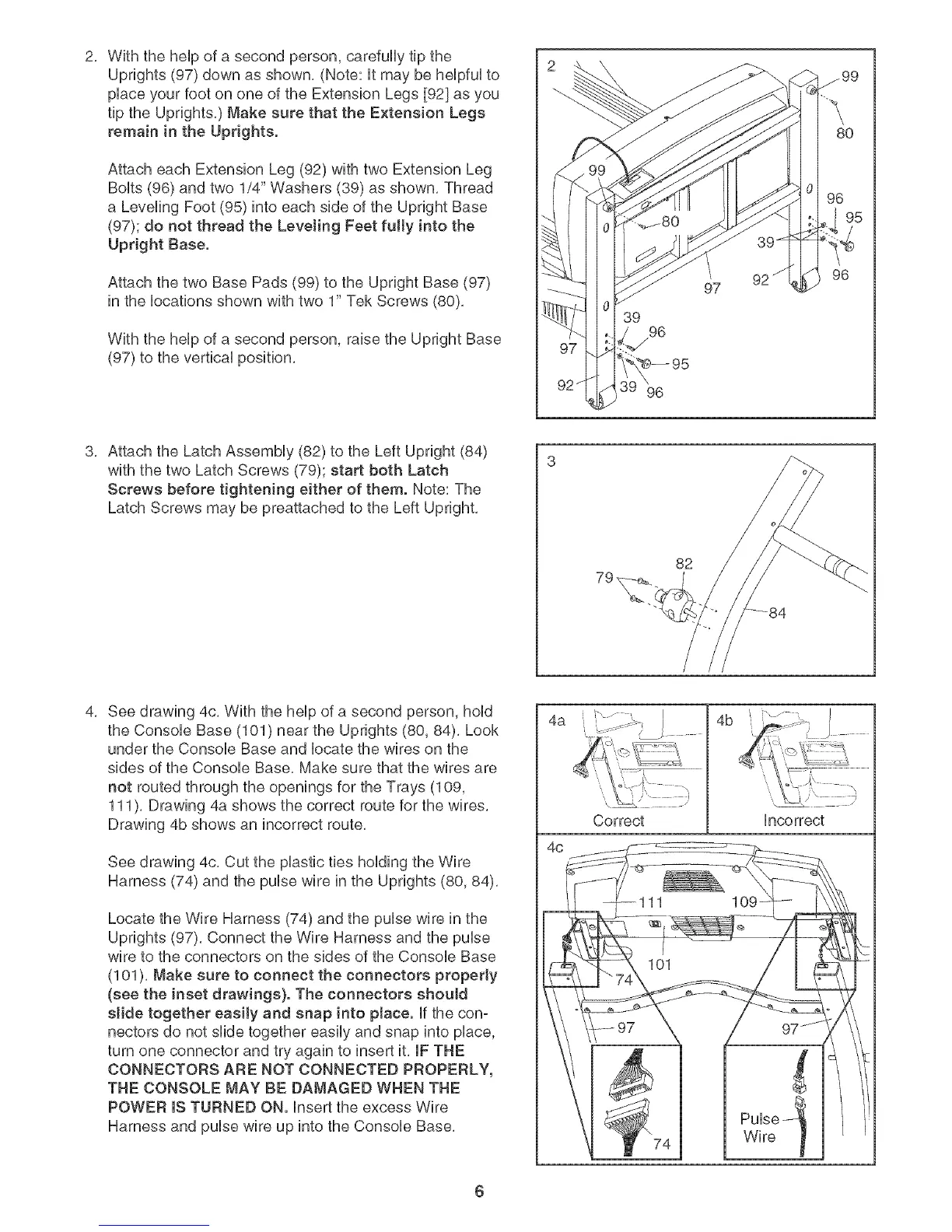
2, WiththeheUpofa secondperson,carefullytipthe
Uprights(97)downasshown,(Note:itmaybeheUpfWto
pUaceyourfootononeoftheExtensionLegs[92]asyou
tiptheUprights,)Makesurethatthe ExtensionLegs
remaininthe Uprights.
AttacheachExtensionLeg(92)withtwoExtensionLeg
BoUts(96)andtwo1/4"Washers(39)asshown,Thread
a LevelingFoot(95)intoeachsideof theUprightBase
(97);donotthreadtheLevelingFeetfully intothe
UprightBase.
AttachthetwoBasePads(99)totheUprightBase(97)
inthebcationsshownwithtwo1"TekScrews(80),
WiththeheUpofa secondperson,raisetheUprightBase
(97)tothevertbaUposition,
39
96
97
80
96
3, AttachtheLatchAssemMy(82)totheLeftUpright(84)
withthetwoLatchScrews(79);startbothLatch
Screwsbeforetighteningeitherof them.Note:The
LatchScrewsmaybepreattachedtotheLeftUpright,
82
4, Seedrawing4c,Withthehelpofasecondperson,hold
theConsoleBase(101)neartheUprights(80,84),Look
undertheConsoleBaseandlocatethewiresonthe
sidesoftheConsoleBase,Makesurethatthewiresare
notroutedthroughtheopeningsfortheTrays(109,
111),Drawing4ashowsthecorrectrouteforthewires,
Drawing4bshowsanincorrectroute,
Seedrawing4c,CuttheplastictiesholdingtheWire
Harness(74)andthepulsewireintheUprights(80,84),
LocatetheWireHarness(74)andthepulsewireinthe
Uprights(97),ConnecttheWireHarnessandthepulse
wiretotheconnectorsonthesidesof theConsoleBase
(101),Makesuretoconnecttheconnectorsproperly
(see the inset drawings}. The connectors shouJd
stide together easily and snap into place, if the con-
nectors do not slide together easily and snap into place,
turn one connector and try again to insert it, IF THE
CONNECTORS ARE NOT CONNECTED PROPERLY,
THE CONSOLE MAY BE DAMAGED WHEN THE
POWER mSTURNED ON. Insert the excess Wire
Harness and pulse wire up into the Console Base,
4a " .....
4c
Correct
4b
Incorrect
Pulse --_
Wire t
6




 To Next Page