Need help?
Do you have a question about the Projecta IP2000 and is the answer not in the manual?
Safety precautions for indoor use, earthing, hazardous voltage, appliance use by children, and wiring.
Battery mounting, high voltage, reverse polarity, sparking, battery handling, and DC connection rules.
Explains pure sine wave vs. modified sine wave and its suitability for sensitive appliances.
Describes the automatic switch between mains and battery power.
Explains power saving mode to reduce consumption and extend battery life.
Details the RCD switch for earth leakage detection and protection from electrocution.
Control and monitor inverter performance remotely.
Automatic fan speed adjustment based on temperature.
Lists protection features like low/high voltage, low battery alarm, over-temp, overload.
Technical details of the inverter, including input, output, efficiency, dimensions, and weight.
Identifies components on the front panel of the inverter.
Identifies components on the rear panel of the inverter.
Details the available settings for Eco mode activation and operation.
Shows maximum combined AC Watts or Amps the inverter can handle.
Recommends battery types and sizes for optimal inverter performance.
Explains resistive, inductive, and capacitive loads and their impact on inverter operation.
Explains how reverse battery connection can damage the inverter.
Details fuse checking and replacement procedures by qualified personnel.
Explains why the cooling fan operates intermittently based on temperature.
Confirms compatibility with sensitive electronics like laptops and computers.
Suggests checking Eco mode settings as a reason for unexpected shutdowns.
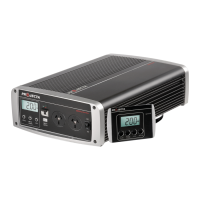
The Projecta Intelli-Wave 2000W Pure Sine Wave Inverter is a sophisticated power conversion device designed to provide clean, stable AC power from a DC battery source. Its primary function is to convert 12VDC or 24VDC battery power into 240VAC 50Hz pure sine wave output, making it suitable for a wide range of electrical appliances, especially sensitive electronics and medical equipment. Unlike modified sine wave inverters, this unit produces an output waveform that closely replicates mains power, ensuring optimal performance and preventing potential damage to delicate devices.
The Intelli-Wave inverter acts as a bridge between a DC power source (like a vehicle or caravan battery) and AC appliances. It features a built-in automatic transfer switch, which is a key functional aspect. This switch allows the inverter to seamlessly switch between mains power and battery power. When external mains power is available, the inverter passes this power directly through to connected accessories. If the mains power is disconnected, the inverter automatically switches to drawing power from the battery, ensuring an uninterrupted power supply. This automatic changeover eliminates the need for manual intervention, such as swapping plugs or adjusting dials, making it highly convenient for mobile applications like caravans, motor homes, and boats.
The inverter also incorporates an ECO Mode, designed to optimize power consumption and extend battery run time. In ECO Mode, when no significant load is being drawn from the inverter, it automatically reduces its own power consumption. This intelligent feature helps conserve battery life, which is crucial for off-grid or remote power setups. The unit is also equipped with an RCD (Residual Current Device) safety switch. This critical safety feature detects earth leakage and automatically disconnects all power sockets, providing protection against electrocution. This compliance with Australian Standards (AS4763 for portable inverters and AS3001 for caravan installations) underscores its robust safety design.
Operating the Intelli-Wave inverter is straightforward. To activate the inverter, the On/Off switch on the unit must be turned to the "ON" position. Upon activation, the inverter performs a brief self-analysis, indicated by a momentary beep, before supplying power to the AC sockets. To turn off the inverter, the On/Off switch is simply moved to the "OFF" position. For optimal performance and to prevent overloading, it is recommended to turn off all connected appliances before turning the inverter on, and if multiple appliances are used, to turn them on one at a time. The RCD switch should be in the down position, showing a red indicator, when operating the inverter. The inverter prioritizes 240V AC mains power over DC battery power when both are available, automatically selecting the mains source.
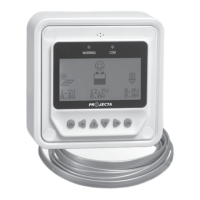
The inverter's performance can be monitored and controlled via a remote control display, which is a significant usage feature. This display allows the inverter to be mounted out of sight, while the user can still access all relevant information. The remote control features an LCD screen, a bi-colour L.E.D, and an audible alarm. The LCD screen defaults to displaying input battery voltage (VOLTS) during normal operation. Users can toggle between different information displays by pressing dedicated buttons: "WATTS & LOAD%" shows the power drawn by appliances in Watts and as a percentage of total capacity, while "ECO" displays the ECO mode status settings. In the event of a fault or error, the alarm will sound, the LCD screen will display a fault code, and the L.E.D will illuminate, providing immediate feedback to the user.
The ECO Mode offers flexible settings to suit various user needs. Users can select "OFF" to disable ECO mode, "1 Hr" for the inverter to enter ECO mode after one hour of no load, "3 Hr" for it to enter after three hours, or "ON" for it to enter after just 30 seconds of no load. These settings are adjusted by pressing the ECO button until the desired status appears on the L.E.D screen. To wake the inverter from ECO/Power save mode, any button on the front panel or remote can be pressed, or a device drawing more than 5-8W can be connected. The inverter automatically checks for connected devices every 5 seconds while in ECO mode.
While the Intelli-Wave inverter is designed for robust operation, certain maintenance considerations are important for its longevity and safe use. The device is intended for indoor, out-of-weather use only, and should be installed in a dry, cool, and well-ventilated area, as close to the batteries as possible, but not within the same compartment as the batteries to prevent exposure to flammable fumes. Adequate ventilation is crucial, with at least 10cm clearance from the end plates to ensure proper airflow for the cooling fan. The inverter's cooling fan is thermostatically controlled and features three speeds, meaning it only operates when needed, contributing to quieter operation and reduced wear.
Connecting the DC cables requires careful attention to cable lengths and sizes to prevent voltage drop, which can trigger low voltage warnings and inverter shutdowns. Projecta offers specific cable kits (IWK6, IWK3, IWK5) for different lengths and current requirements. It is essential to install a circuit breaker or high-current fuse in the positive line, as close to the battery as possible, using Projecta's recommended fuse and holder (IFB-250 for 12V, IFB-150 for 24V). Correct polarity is paramount when connecting DC cables: red to positive (+) and black to negative (-). Reverse polarity can blow internal fuses and damage sensitive electronic components. The inverter is earthed through the negative DC input cable, with provisions for additional earthing from the DC negative terminal if required.
AC wiring, both input and output, must be carried out by a licensed electrician, especially if the unit is installed in a caravan or camper van, to ensure compliance with AS3001. Accessing the internal AC terminals involves removing a rear cover. Suitable cable glands/conduit fittings (16mm or 20mm) and multi-strand cable are specified for these connections. The manual provides clear illustrations for wiring the Earth (Green/Yellow), Neutral (Blue), and Active (Brown) cables to both the INPUT and OUTPUT terminals.
Troubleshooting guidance is provided for common issues. For instance, if the inverter turns itself off, it could be due to overloading, low battery voltage, or insufficient cable size, with the LCD displaying fault codes and the L.E.D indicating the specific issue. If an appliance doesn't run despite drawing less power than the inverter's capacity, it might be due to the appliance being an inductive or capacitive load, which can draw high surge currents during startup. The manual advises on how to handle such situations, including resetting the inverter or considering the appliance's startup current requirements. Internal fuses should only be checked or replaced by a qualified electrical appliance repairer, and the DC/AC supply must be disconnected, and the inverter turned "ON" to discharge capacitors before any repair. The fan's intermittent operation is normal, as it is temperature-controlled. The pure sine wave output ensures compatibility with sensitive electronics, and if the inverter keeps turning off, checking the ECO mode settings is recommended.
 General
| Model | IP2000 |
|---|---|
| Continuous Power | 2000W |
| Surge/Peak Power | 4000W |
| Input Voltage | 12V DC |
| Output Voltage | 230V AC |
| Frequency | 50Hz |
| Waveform | Pure Sine Wave |
| Cooling | Fan Cooled |
| USB Port | 5V/2.1A |
| Protection Features | Overload, Over Voltage, Low Voltage, Short Circuit, Over Temperature |

 To Next Page