7
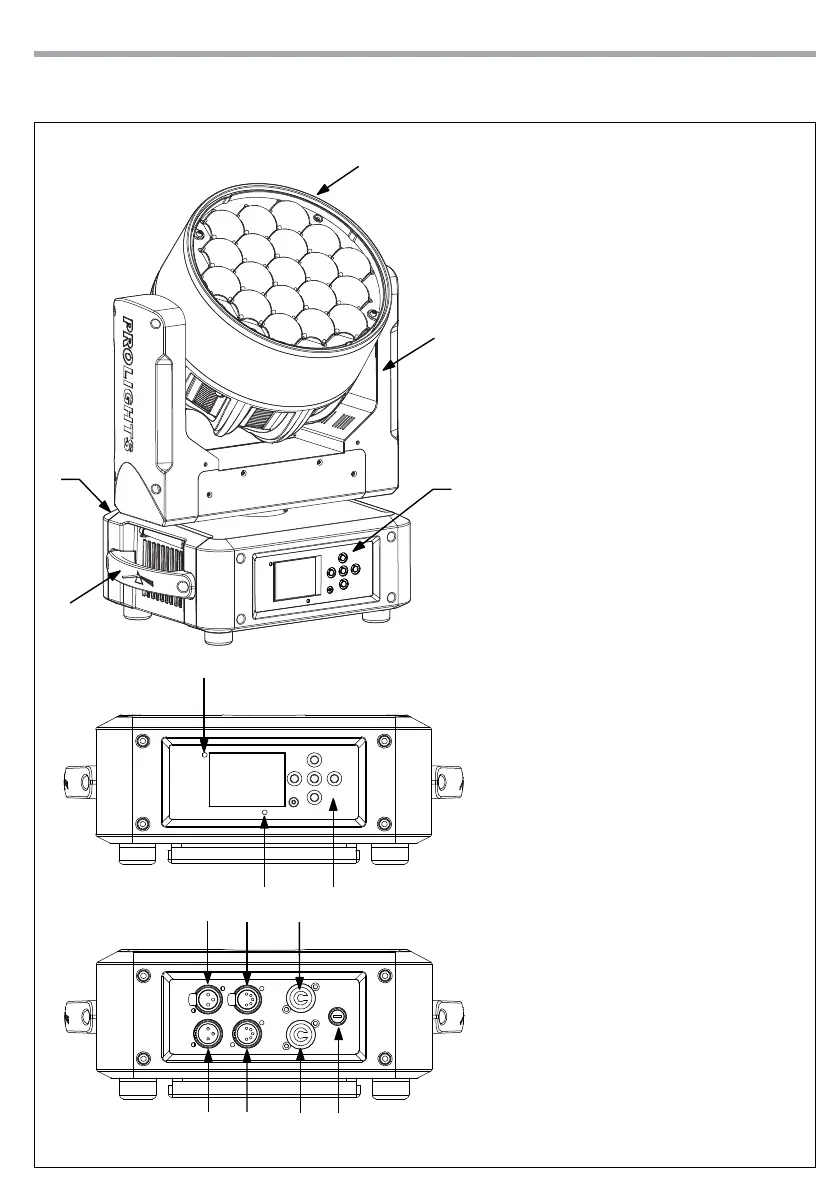
DIAMOND19
1. MOVING HEAD
2. ROTARY ARM
3. HANDLE
4. LED INDICATOR "WDMX"
5. MICROPHONE
6. CONTROL PANEL with LCD display
and 5 button used to access
the control panel functions and
manage them.
7. DMX OUT ( 3-pole XLR):
1 = ground, 2 = DMX -, 3 = DMX +
8. DMX IN (3-pole XLR):
1 = ground, 2 = DMX -, 3 = DMX +
9. DMX OUT (5-pole XLR):
1 = ground, 2 = DMX-, 3 = DMX+,
4 N/C, 5 N/C
10. DMX IN (5-pole XLR):
1 = ground, 2 = DMX-, 3 = DMX+,
4 N/C, 5 N/C
11. POWER IN (PowerCON IN):
for connection to a socket
(100-240V~/50-60Hz) via the
supplied mains cable.
12. POWER OUT (PowerCON OUT):
power output for connection of
multiple units in series.
13. MAIN FUSE HOLDER: replace a
burnt-out fuse by one of the same
type only.
1.3 OPERATING ELEMENTS AND CONNECTIONS
Fig.2
View A
View B
4
A
B
1
2
3
5 6
7 9 11
8 10 1312


 To Next Page