9
DIAMOND19
- 3 - FUNCTIONS AND SETTINGS
3.1 OPERATION
Connect the supplied main cable to a socket (100-240V~/50-60Hz). The unit will run built-in program to
reset all motors to their home position. Shortly after that the DIAMOND19 is ready for operation. To switch
o, disconnect the mains plug from the socket. For a more convenient operation it is recommended to
connect the unit to a socket which can be switched on and o via light switch.
3.2 BASIC
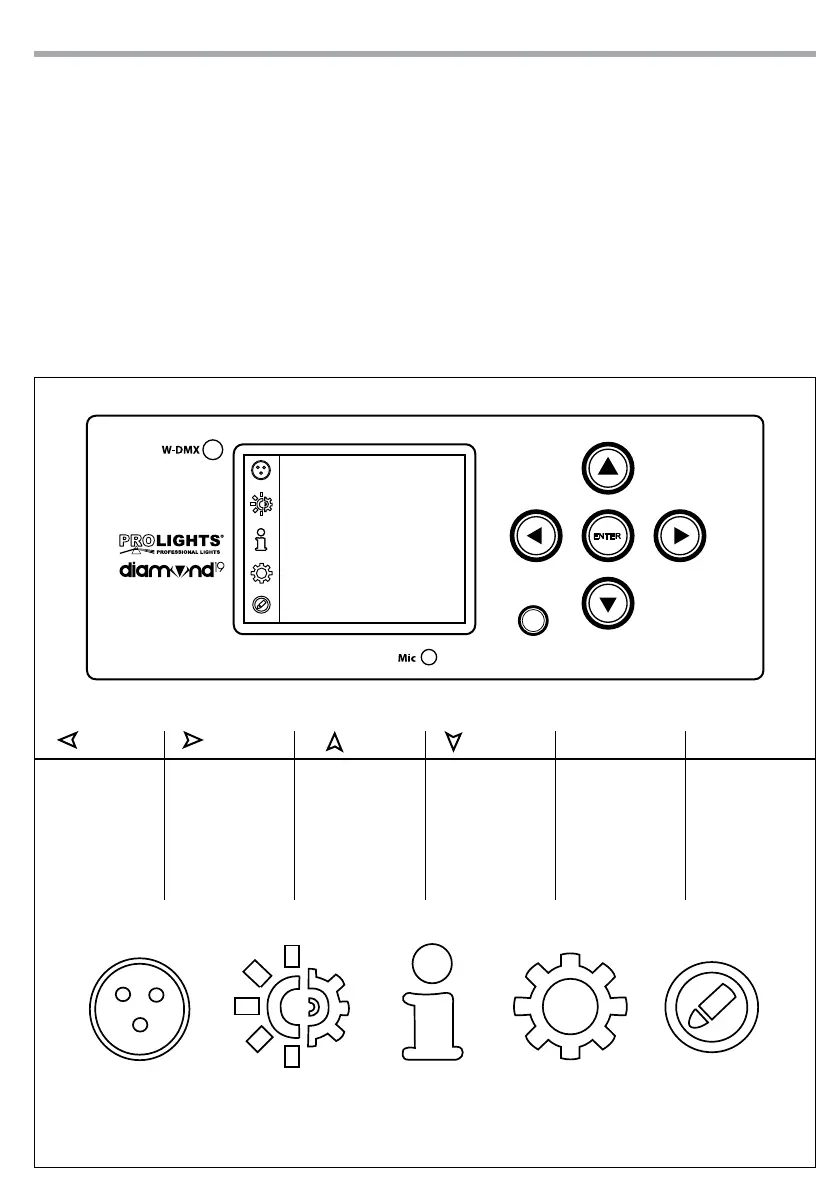
The DIAMOND19 has a LCD display and 5 button used to access the control panel functions and manage
them (g.4).
Fig.4 - Functions of the buttons and display icons
CONNECT
LIGHT
INFORMATION
SET
PROGRAM
LEFT RIGHT UP DOWN ENTER BATTERY
Return to the top
level
Commute from
units, tens, hundred
in the menu
Increases the value
displayed or passes
to the previous item
in a menu
Decreases the value
displayed or passes
to the next item in
the menu
Conrms the
displayed value,
or activates the
displayed function,
or enters the
successive menu
Used to activate the
backup battery. It
allows to switching
display interface
without main power
Battery


 To Next Page