DIAMOND19
16
Number of
DMX channels
Start address
(example)
DMX Address
occupied
Next possible start
address for unit No. 1
Next possible start
address for unit No. 2
Next possible start
address for unit No. 3
19 33 33-51 52 71 90
32 33 33-64 65 97 129
98 33 33-130 131 229 327
18 33 33-50 51 69 87
20 33 33-52 53 73 93
Edit User
The Edit User, in the same menu, allows you to create a prole of personalized functions. You can change
the parameters of the various functions (Control, Pan, Tilt, etc.). Once you’ve created your custom prole,
you can use it by selecting the USER mode as described above.
3.12 DMX ADDRESSING
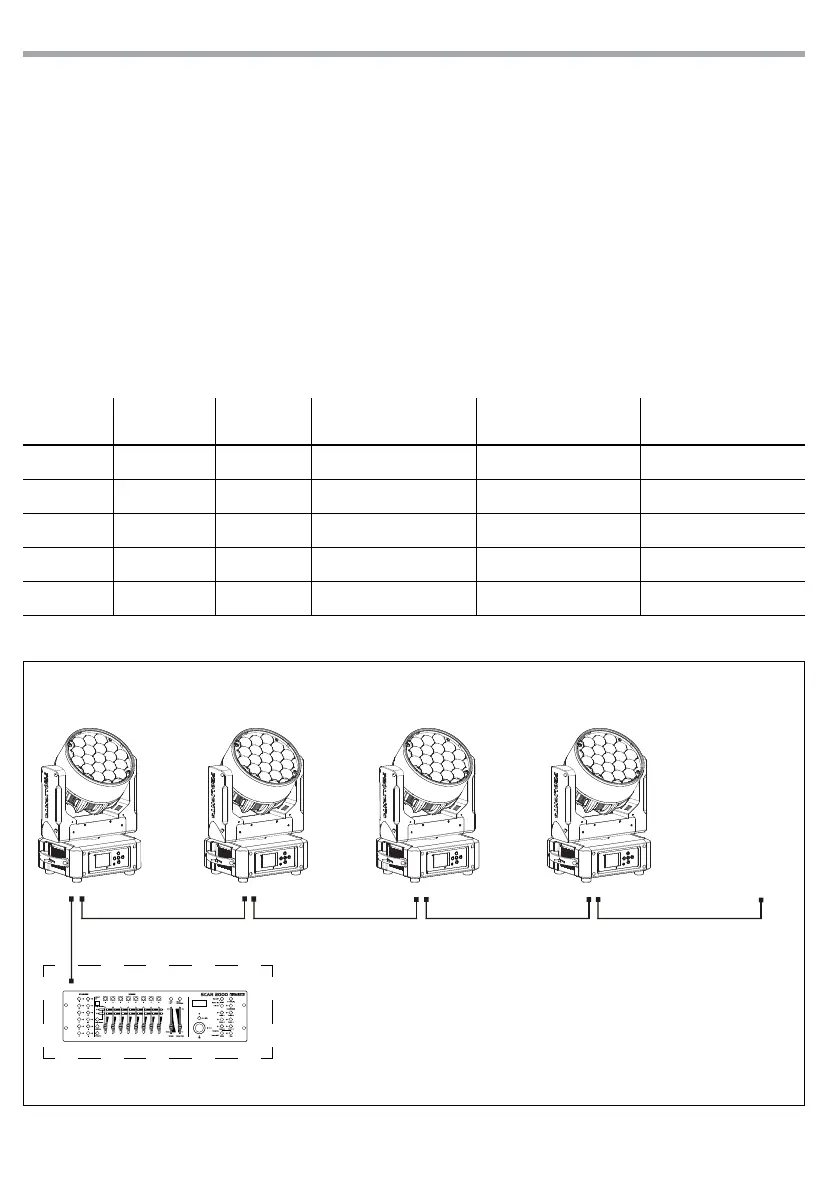
For operation via light control unit with DMX512 protocol, is sucient connect the controller to DIA-
MOND19. To able to operate the DIAMOND19 with a light controller, adjust the DMX start address for the
rst a DMX channel. If e. g. address 33 on the controller is provided for controlling the function of the rst
DMX channel, adjust the start address 33 on the DIAMOND19. The other functions of the light eect panel
are then automatically assigned to the following addresses.
An example with the start address 33 is shown below:
Fig.5 - Example 19 DMX channels conguration
DMX Address: 75DMX Address: 47DMX Address: 33 DMX Address: 61
. . . . . . . . . . . .
DMX512 Controller


 To Next Page