BM-16
This document is protected by copyrights.
Copying, using, or distributing without permission of PROMOTECH is prohibited.
14
3.7. Replacing the roller
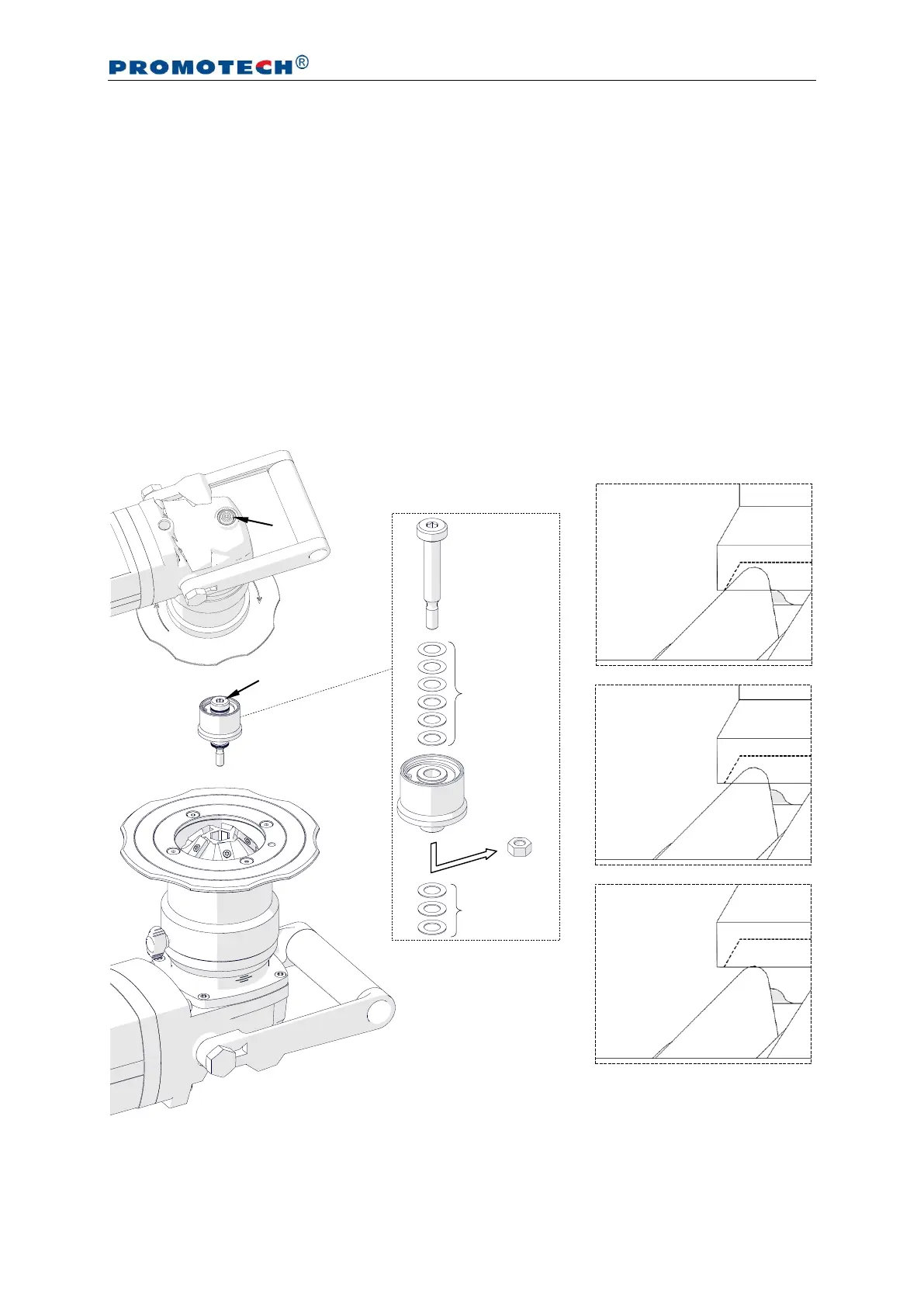
Unplug the machine from the power source, and place the machine upside down.
Next, press the spindle lock button (1, Fig. 9), and then use the 5 mm hex wrench to
unscrew the roller (2).
Remove the nut (3) and assemble the roller with the pivot pin using washers (4),
and then place the roller on the milling head, press and hold the button 1, and tighten
the roller with the 5 mm hex wrench (2). Use such a number of washers to keep a little
gap between the roller and the cutting inserts (5). The number of 0.5-mm and 0.1-mm
washers needed depends on the milling head used. Place all unused washers between
the pivot pin and the roller.
Fig. 9. Replacing the roller
INCORRECT
(collision
between
roller and
cutting insert)
INCORRECT
(too large gap
between roller
and cutting
insert)


 To Next Page