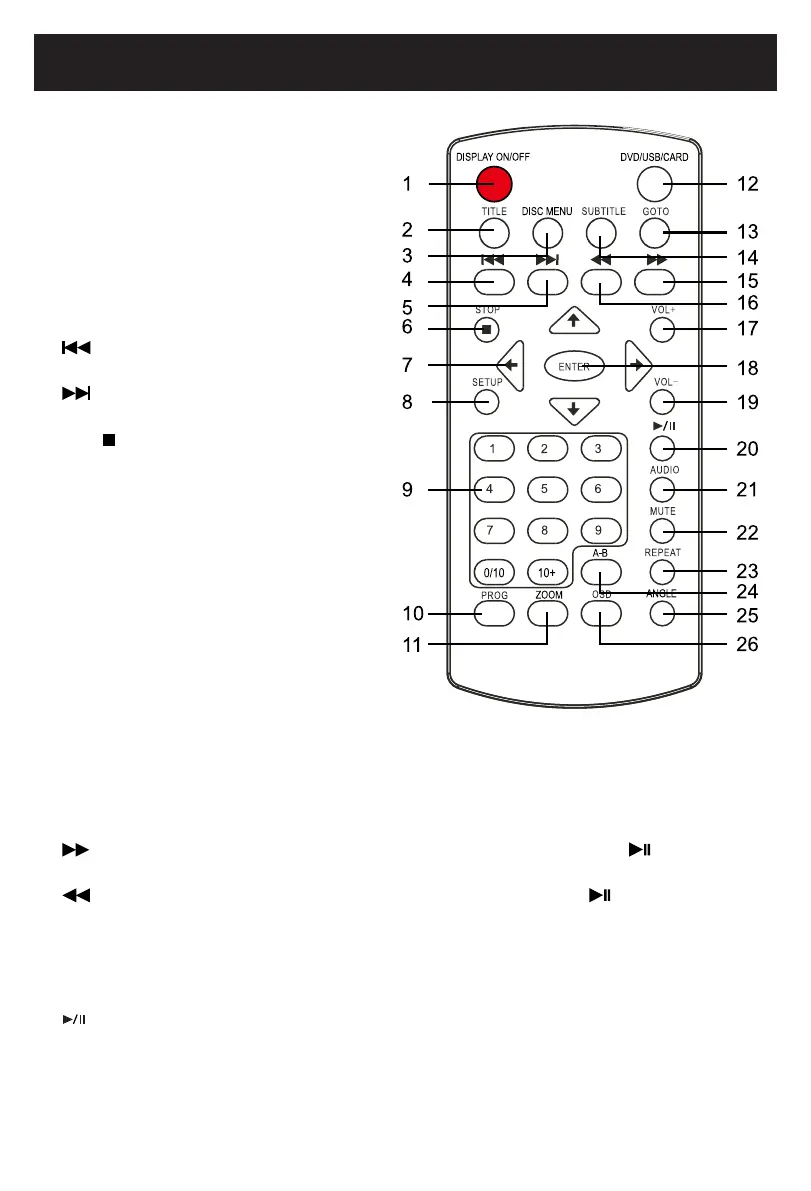
Remote Control
1. DISPLAY ON/OFF: ToturnONorOFFthe
screen.
2. TITLE:Todisplaythetitlemenuof
current disc. Use the Direction and
ENTERbuttonstoselectandplaythe
desired title.
3. DISC MENU:Todisplaythemenuof
current disc. Using the Direction and
ENTERbuttonstoselectandplaythe
desired chapter or track.
4. Previous: Press repeatedly to skip
backward.
5.
Next: Press repeatedly to skip
forward.
6. Stop
: Press to stop.
7. Direction buttons: Press to highlight
the options within the setting menu.
8. SETUP: Presstoenterorexitsetupmenu.
9. Numberic buttons: Press numeric
buttons to enter numbers.
10. PROG (Program) button: Press to
display program setting menu. Use
theNumeric/DirectionandENTER
buttons to set the program as on screen
instructions.
11. ZOOM:Pressrepeatedlytozoomin/out
the picture.
12. DVD/USB/CARD: When USB device and/
or SD Card was inserted, press repeatedly to select the playback source as desired.
13. GOTO: PresstoenterGOTOmenu.UsetheNumeric/DirectionandENTERbuttonstoselectthe
desired track to play.
14. SUBTITLE: Press repeatedly to select the subtitle languages available in the disc.
15.
(Fast Forward): Press repeatedly to search for the desired section. Press button to
resume normal playback.
16.
(Reverse): Press repeatedly to search for the desired section. Press button to resume
normal playback.
17. VOL+ (Volume): Press to increase the volume level.
18. ENTER: Presstoconrmtheselection(settings).
19. VOL- (Volume): Press to decrease the volume level.
20. (Play/Pause): Press to play or pause playback.
21. AUDIO: Press repeatedly to select the audio channels.
22. MUTE: Press to turn off the sound. Press again to resume the sound.
9
2015.0
9.25
08:29:
47
+08'00'



 To Next Page