P.8 User Guide
ColdWeatherMode
If the vehicle has a manual transmission, Ready mode (page-4) should be set before entering
Cold Weather mode. When Cold Weather Mode is active, the engine starts every 2 hours and runs
for 3 minutes (or for 8 or 20 minutes with diesel engines). Cold Weather Mode automatically ends
after 24 hours (or 12 starts).
To enter Cold Weather Mode:
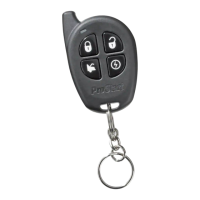
• Press and hold the button for at least 3 seconds
• The parking lights will flash for 2 seconds, pause, then flash three (3) times.
To exit Cold Weather Mode, do any one of the following actions:
• Open the hood.
• Start the engine by remote.
• Turn the ignition key to the IGNITION ON (RUN) position.
• Press and hold the button until the parking lights come ON for 2 seconds, pause,
then flash once.
To verify whether the system is in Cold Weather Mode (automatic transmissions only):
Press the brake pedal:
If the vehicle is in cold weather mode, the parking lights will remain ON while the brake pedal is
pressed.
Disable/EnableLEDflashing
To disable the LED: Press and simultaneously until the parking lights flash
three times.
To Enable the LED: Press and simultaneously until the parking lights flash
once.
Constantoutput
• Pressing and holding the button for more than 3 seconds will lock all doors and will
send a constant pulse as long as the button is held down (maximum of 15 seconds).
This constant pulse can be configured to activate certain functionalities such as rolling up
the windows – Please refer to your installer to see if your vehicle is compatible with
this option.
• Pressing and holding the button for more than 3 seconds will unlock all doors and will
send a constant pulse as long as the button is held down (maximum of 15 seconds).
This constant pulse can be configured to activate certain functionalities such as rolling
down the windows – Please refer to your installer to see if your vehicle is compatible
with this option.



 To Next Page