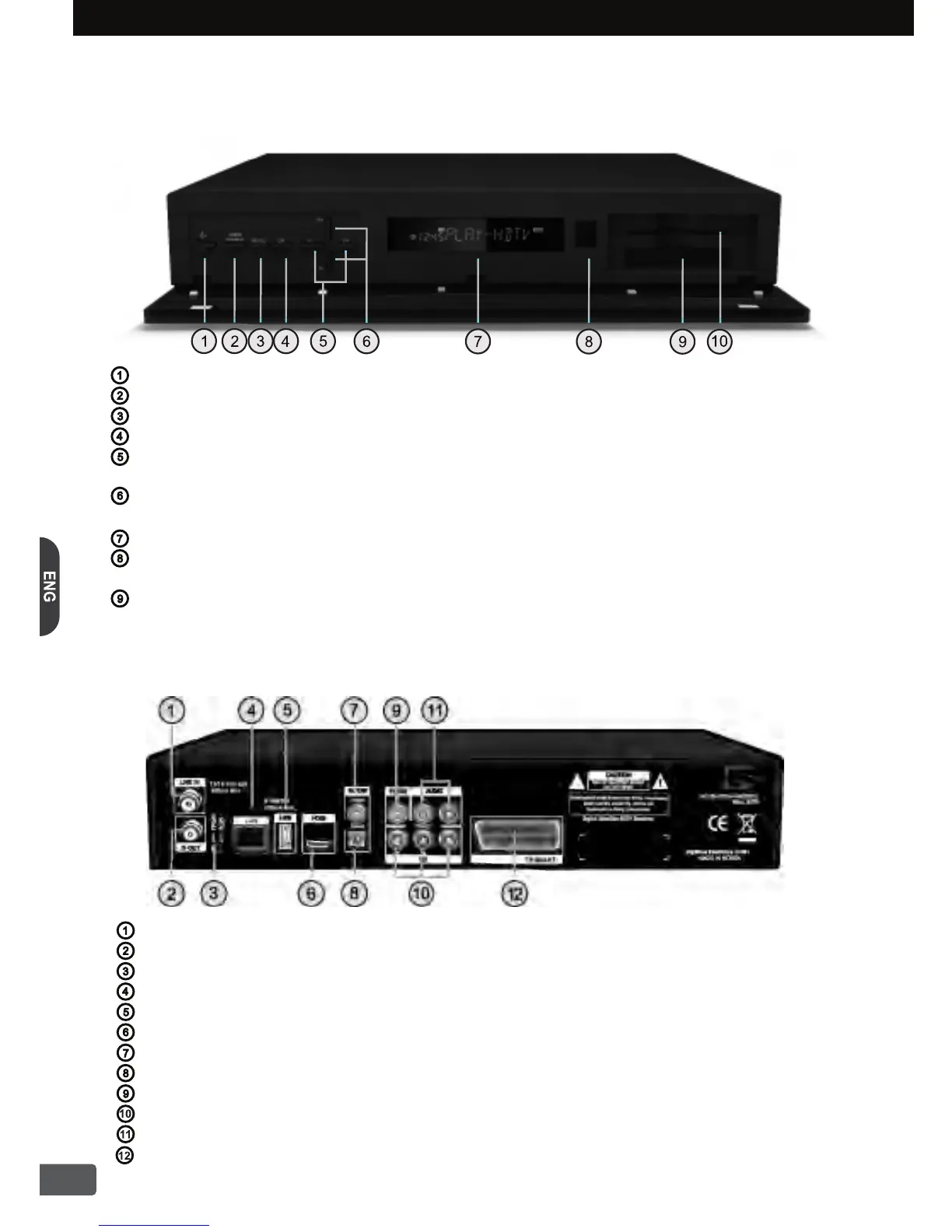
LNB IN :Connect the satellite antenna cable from the LNB.
IF OUT :Connect to another digital satellite receiver.
Output Select Switch :Select Output to HD YPbPr or SCART RGB
LAN :Connect Internet Cable.
USB :Connect USB Device such as USB Memory for software
upgrade or channel data exchange.
HDMI :Connect to the TV using HDMI Cable.
S/PDIF Coaxial :Output the S/PDIF Coaxial digital audio signal.
S/PDIF Optical :Output the S/PDIF Optical digital audio signal.
VIDEO :Provide SD composite video output to the TV or VCR equipments.
Y/Pb/Pr :Provide HD component video output to the TV or other equipments.
AUDIO L/R :Provide stereo audio output to the TV or VCR equipments.
TV SCART :SCART Output to the TV or other equipments.
1-2. Rear Panel
STANDBY Button :
Switch the HD-Receiver between standby mode and operation mode.
VIDEO FORMAT Button :Change HD Video Format among 1080i, 720p or 576p.
MENU Button :Show the Main Menu on the screen.
OK Button :
Use to make selection in the Menu and show the Channel List on the screen.
LEFT / RIGHT (V- / V+) :
These buttons increase/decrease the volume levels.
They are also
used
to move left/right in menus and interactive screens.
UP / DOWN (P+ / P-) :
These buttons switch to previous or next service. They are also used
to move up/down in menus and interactive screens.
Front Display :Show the channel information, current time and the HD-Receiver status.
Remote Sensor :
Infrared Remote Control sensor. To ensure reliable remote control operation,
do not place any objects in front of the sensor.
SMART CARD Slot : One SMART CARD Slot
1. Overview of the equipment
1
This section summarize HD-Receiver Buttons, Remote Control and the Terminals.
1-1. Front Panel


 To Next Page