EasyManua.ls Logo

Proton SLR mini 3060 - Settings

Default Icon
127 pages
Print Icon
To Next Page IconTo Next Page
To Previous Page IconTo Previous Page
Loading...
Page 48 of 126
Proton Products SL mini and SLR mini Series Speed and Length Gauges Instruction Manual - issue 1s
Field
Description
Print…
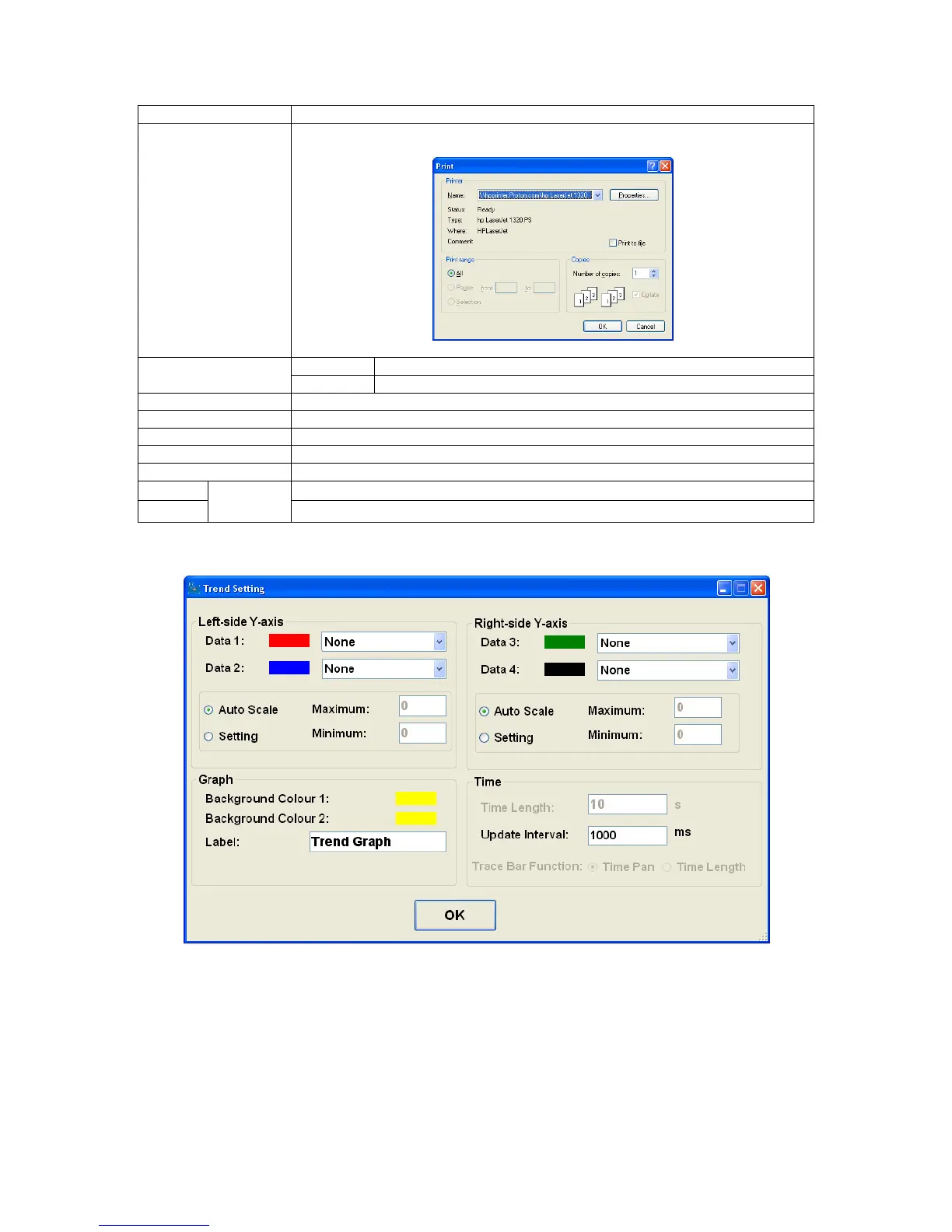
Open the “Print” dialog box for printing the graph:
Show Point Values
Ticked
Show the value of the point on the graph under the cursor.
Un-ticked
Do not show the value of the point on the graph under the cursor.
Un-Zoom
Return to the un-zoomed view of the graph.
Undo All Zoom/Pan
Return to the un-zoomed, un-panned view of the graph.
Set Scale to Default
Return to default scale settings.
Clear all
Clear the current graph and begin plotting from the left side of the time axis.
Settings
Open the graph settings dialog box (see below).
Stop
refresh
Halt graph update.
Start
Resume graph update.
Settings
Click the “OK” button to return to the main page.

Table of Contents

Related product manuals