Hardware Overview and Installation
ORiNOCO
®
802.11n & 802.11ac Access Points - Hardware Installation Guide 24
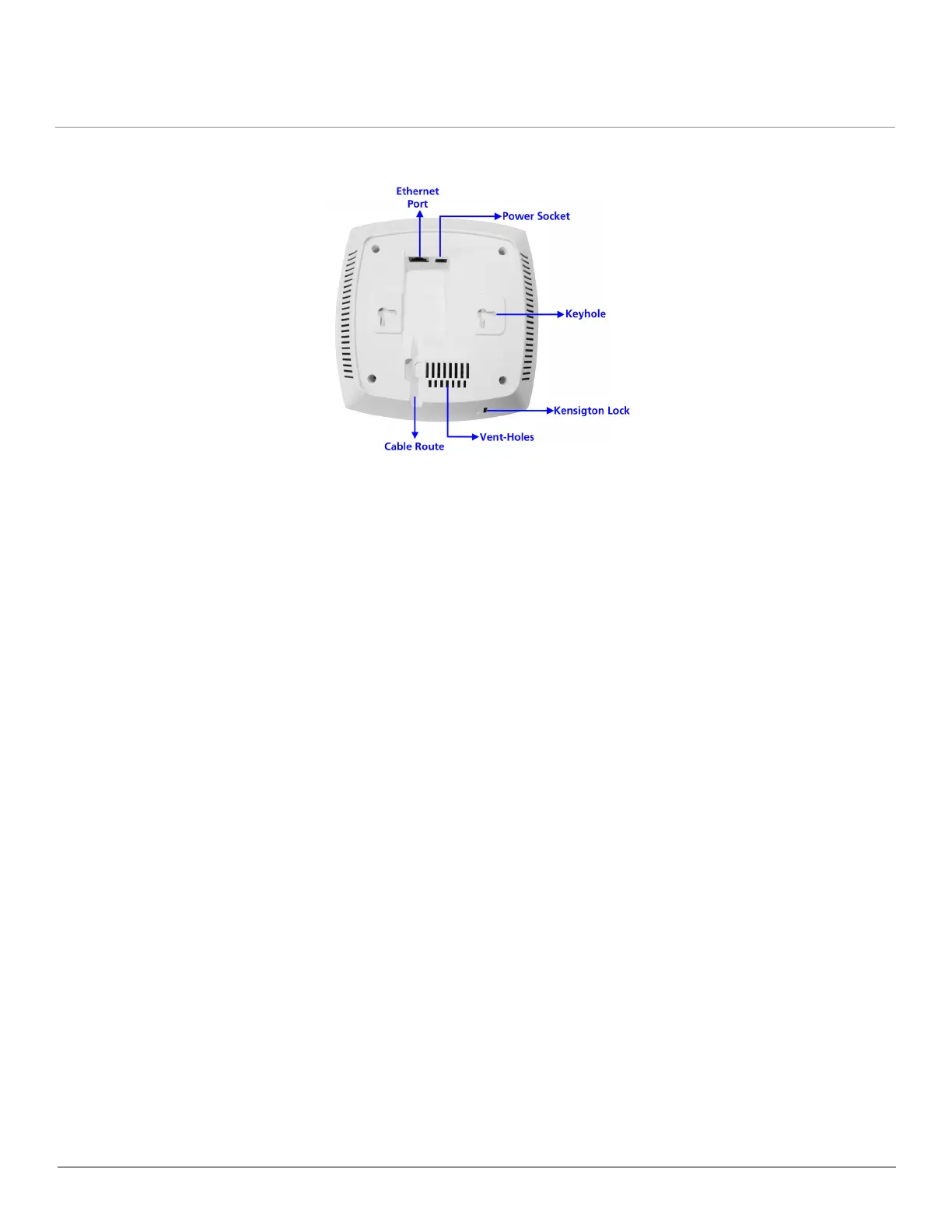
2.4.2 Rear View of the Device
Figure 2-11 Rear View of the Device
The rear panel of the device contains the following components:
2.4.2.1 Ethernet Port
The Ethernet port of the device allows the user to connect to the LAN by using CAT5e / CAT6 ethernet cable.
2.4.2.2 Power Socket
This socket connects to the 12 VDC power adapter.
2.4.2.3 Keyhole
A provision to fix the device onto the mounting plate.
2.4.2.4 Kensington Lock
A security slot to lock the device.
2.4.2.5 Cable Route
A slot for the CAT5e / CAT6 ethernet cable and the power cable to rest securely.
2.4.2.6 Vent-Holes
Ventilation holes on the device allow heat dissipation.
2.4.3 System Requirements
Following are the minimum system requirements to use the device:
1. Any 802.11 compliant wireless adapter.
2. A computer that is connected to the same IP network as the AP and has one of the following installed:
— Web Browser
—Telnet
— MIB Browser
— Ethernet NIC Card
3. Ethernet switch, cross-over or straight Ethernet cable.



 To Next Page
 Loading...





