17
Connecting to a Video Source
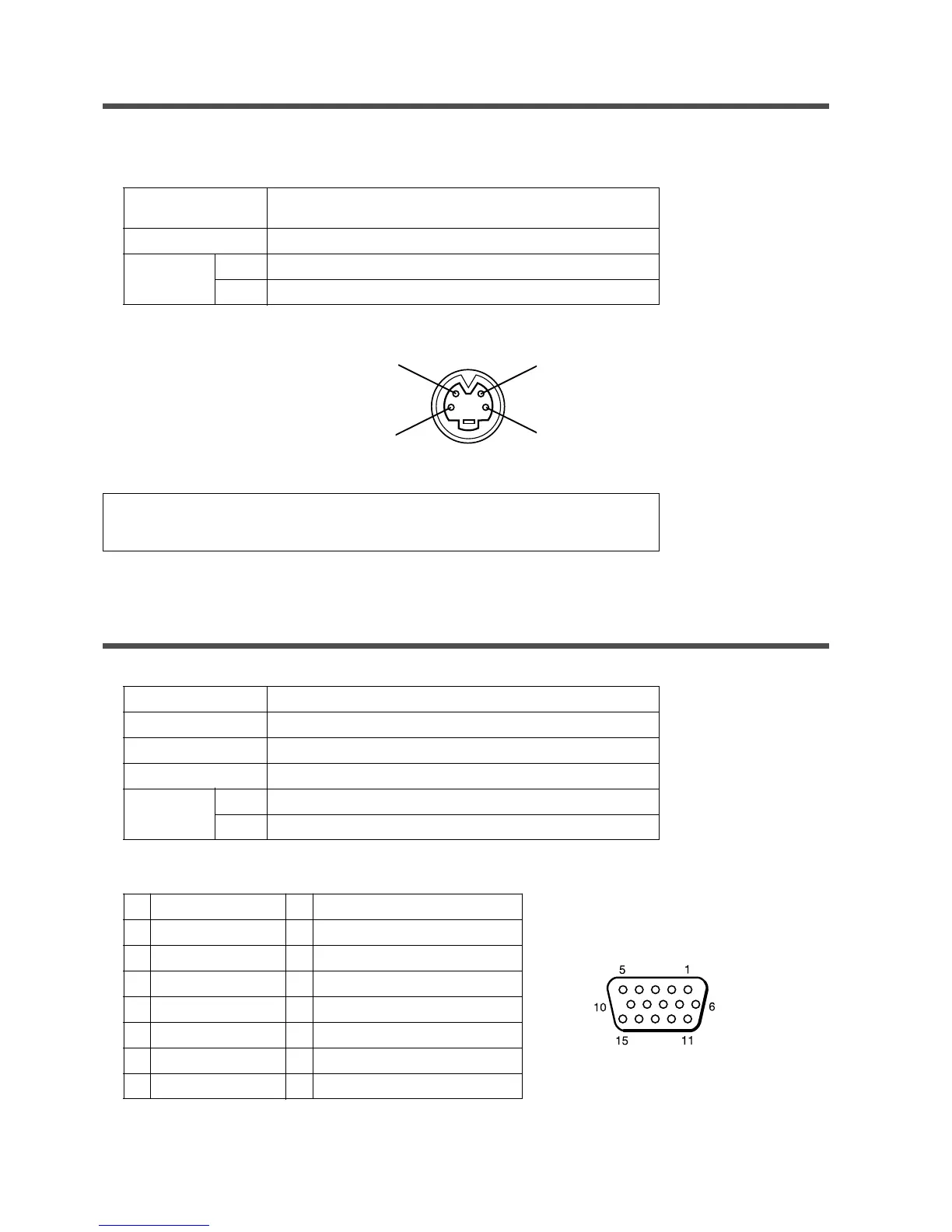
1.Input signal specifications
S-VIDEO signal
VIDEO signal
AUDIO signal
Input
Output
2.Signal input terminal pin-out
Connecting to an RGB Signal
1.Input / output signal specifications
Video signal
Horizontal sync signal
Vertical sync signal
Composite sync signal
Audio signal
Input
Output
Analog 0.7Vp-p 75 Ω termination (Positive polarity)
TTL level (Positive/negative polarity)
TTL level (Positive/negative polarity)
TTL level
200mVrms, 20k Ω below (MAX 3.0Vp-p)
0 ∼ 200mVrms, 1k Ω
2.Signal input / output terminal pin-out
1
2
3
4
5
6
7
8
Video signal (Red)
Video signal (Green)
Video signal (Blue)
N.C
N.C
Ground (for R)
Ground (for G)
Ground (for B)
Luminance signal 1.0Vp-p, 75 Ω termination
Chrominance signal 0.286Vp-p (burst signal), 75 Ω termination
1.0Vp-p, 75 Ω termination
200mVrms, 20 kΩ below (MAX 3.0Vp-p)
0~200mVrms, 1k Ω
9
10
11
12
13
14
15
N.C
Ground
Ground
N.C
Horizontal/Composite sync signal
Vertical sync signal
N.C
NOTE: Video input signal terminals have priority in the following order:
1. S-VIDEO input terminal 2. RCA jack input terminal
Chrominance signal
Ground
S VIDEO input (Mini DIN4 pin)
Luminance signal
Ground
D-sub 15 pin terminal (Female)
Available for video models only.


 To Next Page