Go to Contents Precise Time and Frequency, Inc., 50L Audubon Road, Wakefield, MA 01880, USA ptf 3207A rev G
Tel: +1-781-245-9090 e-mail: info@ptfinc.com www.ptfinc.com pg. 38
Step 1 - Down loading the new software
New software updates are located on the ptf web site at www.ptfinc.com/downloads/upgrades/
For convenience, a link is provided on the instrument web browser interface that will take you to the
correct location for reviewing available upgrades and downloading them.
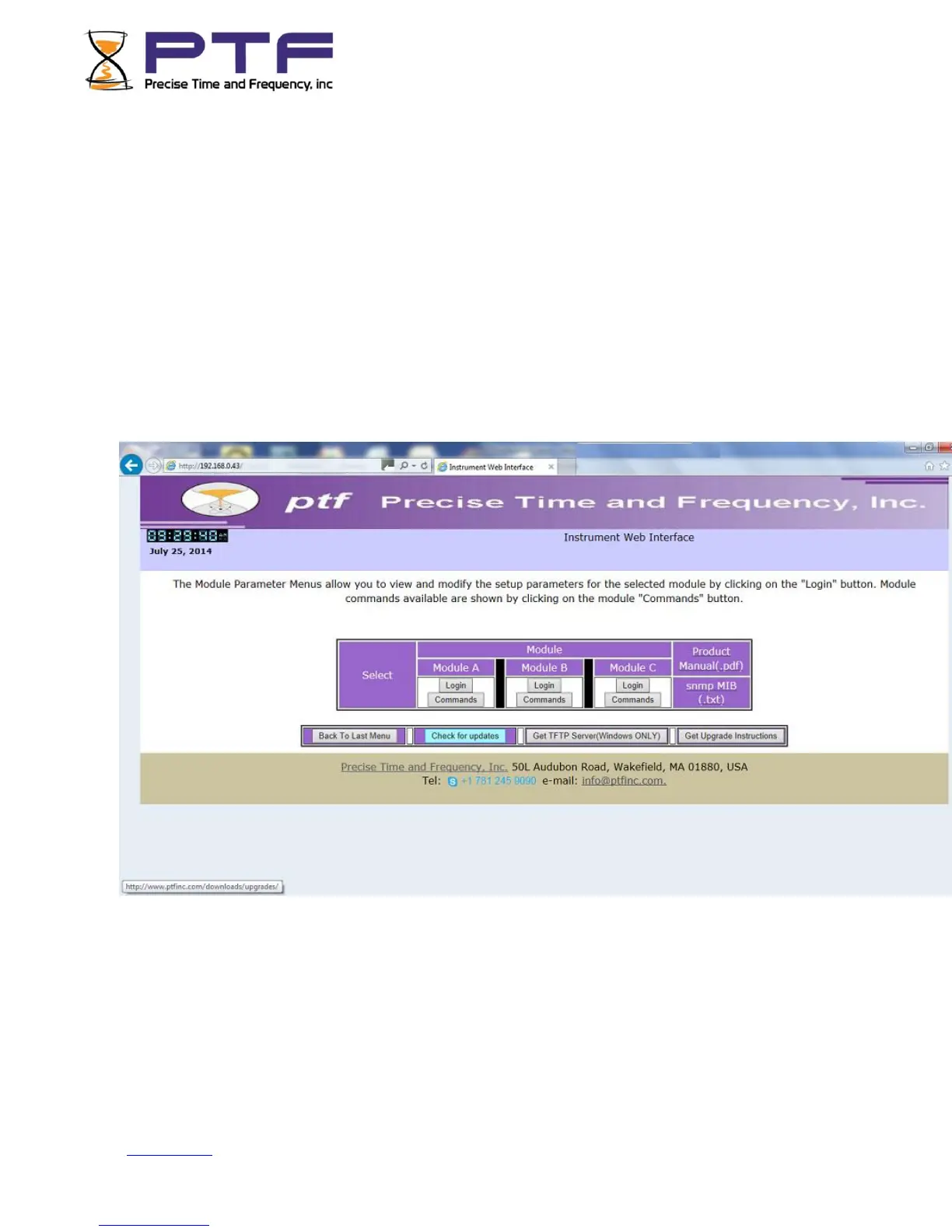
To access the instrument web browser, simply connect a computer to the same network as the
instrument to be upgraded is located, open a browser (e.g. Internet Explorer), and type the instrument
IP address into the browser address bar, e.g. http://192.168.0.43/. The instrument home page will be
served up to the browser as shown below;
Click on the "Check for updates" button, and you will be re-directed to the appropriate folder on the
ptf web site.


 To Next Page