17
RTSP Streaming, RTMP Streaming
• RTSP Streaming
Your camera is able to send two (2) RTSP streams for viewing video through your
LAN. You can view these streams typically through live streaming software and
typing in the following strings:
Ŝ Stream 1 (HD): rtsp://(Camera IP):554/1
Ŝ Stream 2 (SD): rtsp://(Camera IP):554/2
• RTMP Streaming
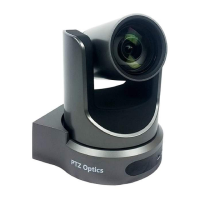
Your camera can send two (2) RTMP(S) streams. To send the camera’s video feed
through an RTMP stream, you will need a Stream URL & Stream Key, which you
can receive from a CDN (Content Delivery Network) or from the social network to
which you want to stream.
Once the Stream URL & Stream Key are acquired, login to the camera’s Web
UI and head to the Streaming Settings page. Enter the information into the
corresponding elds, then toggle the Enable Stream dropdown to On for the
desired stream, and nally, click the Apply button at the
bottom of the page.
Note: Stream 1 has a maximum resolution of 1920x1080 @ 60 FPS. Stream 2 has a
maximum resolution of 1280x720 @ 60 FPS
SRT Streaming
Ŝ Your camera can output an SRT stream. It can be set up as a Caller or Listener.
You can congure the SRT settings from the Streaming Settings page of the
camera’s Web UI.


 To Next Page