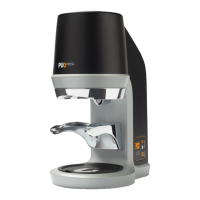
18
15. On/off switch
16. Power cable
18. Allen key (4 mm)
4 INSTALLATION
You have received your PUQpress in
operating condition. Now you only need to
with your coffee grinder and switch on the
PUQpress. Refer to the chapter ‘Safety
instructions’ for more information.
4.1 Preparation
4.1.1 Checking the contents
Check that all parts are present and that no
damage is visible on the parts. If parts are
missing or damaged, contact your dealer or
your authorised customer service centre.
4.1.2 Tools and materials
Required tools and materials
•
Provided tools and materials
•
4.2 Adjustingtheport-a-lterclamp
The PUQpress is designed so that all
even and level tamping.
6
CAUTION
Always adjust the lower clamp before use.
Not doing so results in exposure of
dangerous moving parts.
NOTICE
Make sure to adjust the lower clamp before
use. Not doing so can result in uneven and
unlevelled tamping.
1. Slightly loosen the bolts of the lower
2. Pull down the lower clamp.
upper and lower clamp.
4. Rotate the adjustment wheel clockwise
to move the lower clamp up against the
5. Slightly fasten the bolts of the lower
NOTICE
Make sure not to fasten the bolts entirely.
7. Fasten the bolts of the lower clamp with
upper and lower clamp and check if the
start again at step 1..


 To Next Page
 Loading...