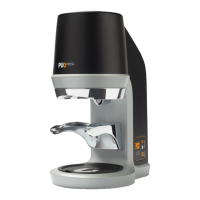
20
5.2 Using the PUQpress
upper and lower clamp.
3. The PUQpress automatically starts
tamping the coffee. The contactless
4. Wait until the PUQpress has tampered
the coffee.
of approximately 1.3 seconds.
5.3 Adjusting the tamping force
Adjust the tamping force by using the display
and the buttons.
1. Press the up button to increase the
force.
2. Press the down button to decrease the
force.
NOTICE
The force is displayed in kilograms (kg) or
pounds (lbs).
5.4 Selecting the tamping mode
1. Press and hold the set button for 5
seconds.
2. Use the up and down button to adjust
the setting.
3. Choose between the following settings:
M2/M3/M5/M6
Code Setting Explanation
SPEEDY Normal tamping speed
PRECISE Slow retraction of the
tamper base
SOFT Slow retraction of the
tamper base, lower
kg)
Triple tamp
SINGLE Single tamp
M4
Code Setting Explanation
SPEEDY Normal tamping speed
PRECISE Slow retraction of the
tamper base
SINGLE Single tamp
4. Press the set button
setting.
5.5 Checking the tamping cycle count
1. When the PUQpress is not in use, press
and hold the up and down button for 3
seconds.
seconds. Multiply this number by 5,000
to get the tamping cycle count.
5.6 Checking the cleaning cycle count
1. Press the set button.
2. Press and hold the up and down button
for 3 seconds when the PUQpress is in
clean modus.


 To Next Page
 Loading...