5
Getting started
Your Evoke
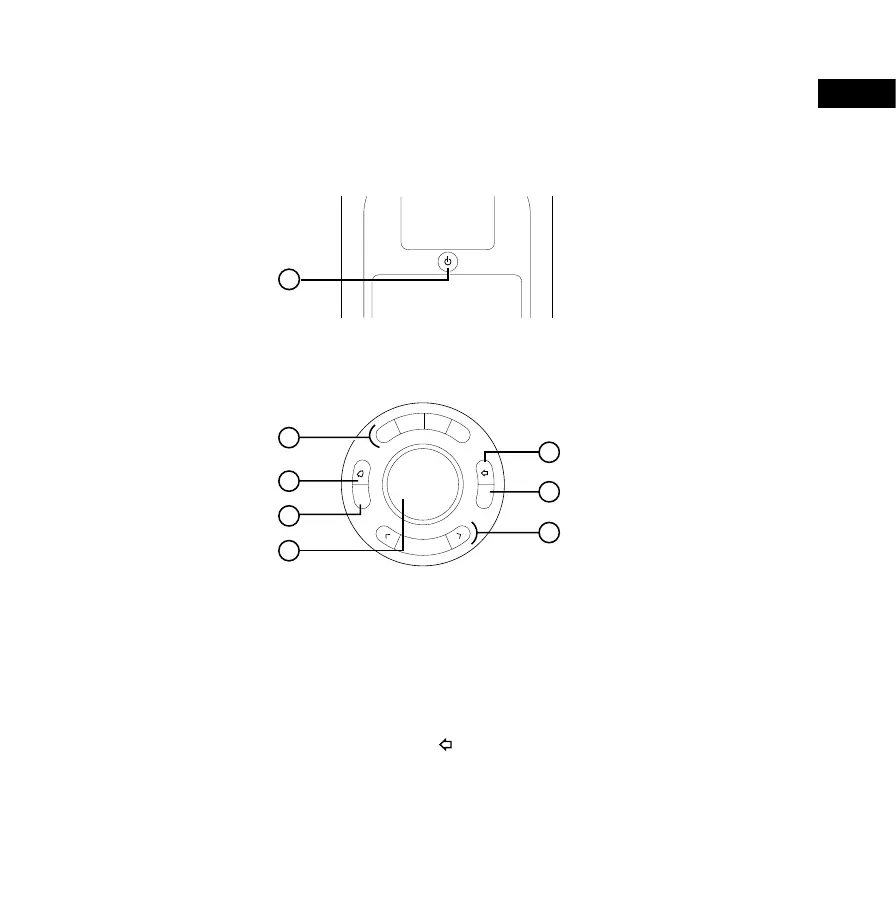
Front controls
1 Presets Press to store and access your favourite radio stations
2 Alarm Press to set an alarm, a kitchen timer or a sleep timer
3 Source Press to change between digital radio, FM radio, Bluetooth, and auxiliary input
4 Volume/Scroll Turn to change the volume, press to mute the volume
Tip: When you are in a menu, you can turn and press the Volume dial to
choose settings and options. To then use the dial to change the volume again,
wait 10 seconds or press
.
5 Select Press to browse radio stations, or choose settings and options
6 Menu Press to change settings and options
7 Back Press when in the menu to go back to the previous screen
1 Standby Switch your Evoke H3 on and off, or put it in standby
Top controls
Source
Menu
Select
1
2
3
4+
1
2
3
4
6
7
5
EN



 To Next Page