EasyManua.ls Logo

Pyle Pro P2002ABTI - Rear Panel Function; Rear Panel Connectivity and Power

Pyle Pro P2002ABTI
11 pages
Print Icon
To Next Page IconTo Next Page
To Previous Page IconTo Previous Page
Loading...
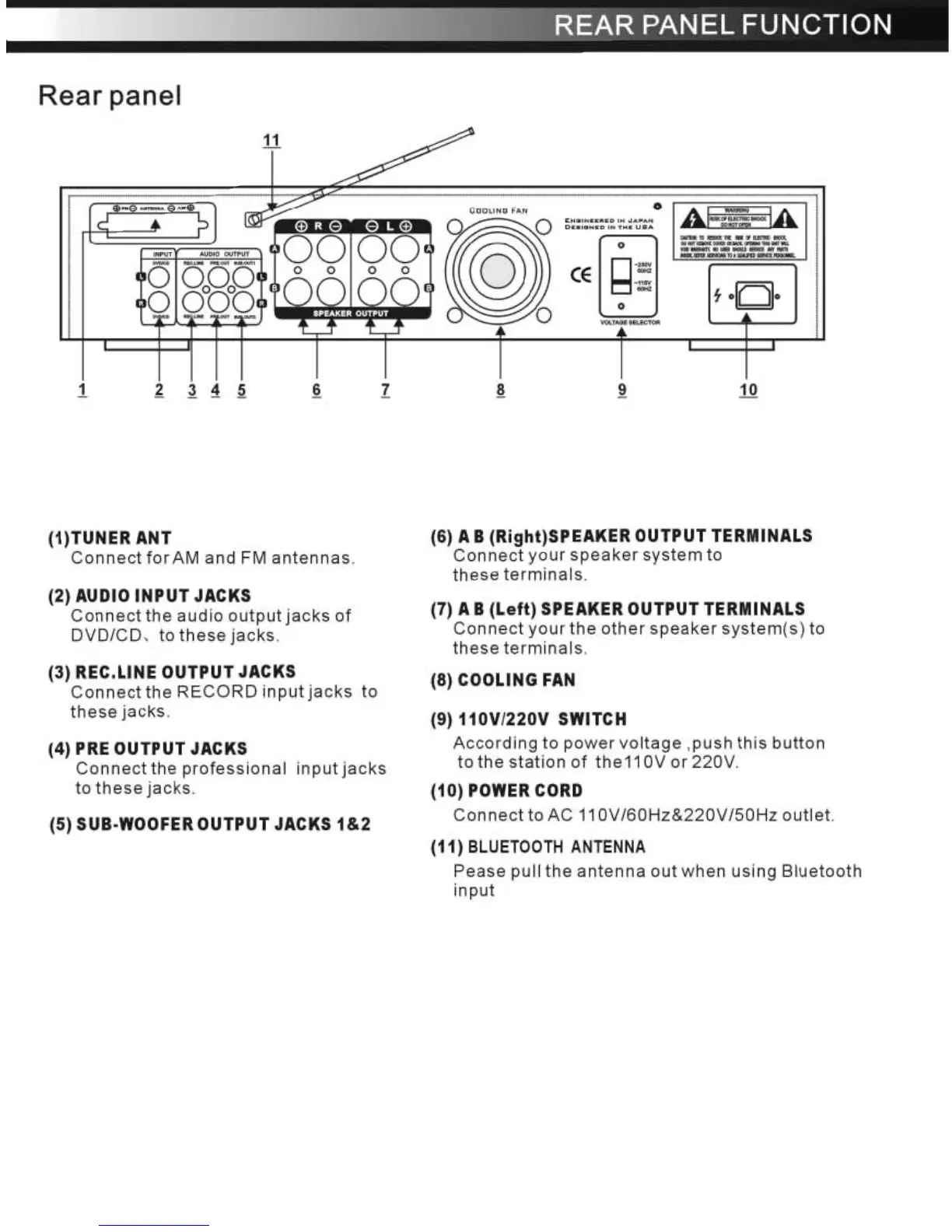
Rear
panel
(1)TUNER
ANT
Connect
for
AM and FM
antennas.
(2)
AUDIO
INPUT
JACKS
Connect
the
audio
output
jacks
of
DVD/CD
, to
these
jacks.
(3) REC.LlNE
OUTPUT
JACKS
Connect
the
RECORD
input
jacks
to
these
jacks.
(4) PRE
OUTPUT
JACKS
Connect
the
professional
input
jacks
to
these
jacks.
(5) SUB·WOOFER
OUTPUT
JACKS
1&2
REAR
PANEL
FUNCTION
(6) A B
(Right)SPEAKER
OUTPUT
TERMINALS
Connect
your
speaker
system
to
these
terminals.
(7) A B
(Left)
SPEAKER
OUTPUT
TERMINALS
Connect
your
the
other
speaker
system(s)
to
these
terminals.
(8) COOLING
FAN
(9)
110V/220V
SWITCH
According
to
power
voltage
,push
this
button
tothestationof
the110Vor220V.
(10)
POWER CORD
Connect
to
AC
11
OV/60Hz&220V/50Hz
outlet.
(11)
BLUETOOTH
ANTENNA
Pease pull
the
antenna
out
when
using
Bluetooth
input

Related product manuals