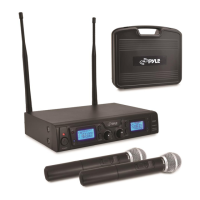
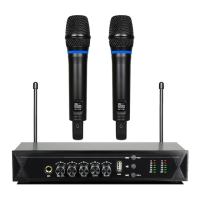
The Pyle PDWM3100 is a Home & Office UHF Wireless Microphone System designed for various audio applications, including home karaoke, classrooms, offices, and business settings. It includes two USB rechargeable handheld microphones and a receiver, offering fixed frequency operation.
Function Description:
The system functions as a 2x100 channel UHF wireless microphone system. The receiver processes digital signals and features high-fidelity cartridge modules. It utilizes infrared carrier-frequency synchronization and a unique ID address for reliable communication. The system is designed with a super anti-jamming circuit and super-low background noise for clear audio. It includes a frequency auto-search function to find non-interference frequencies. The microphones can be used with any compatible receiver and offer high-low two-type power transmission. The system is suitable for conferences, high-class KTV, and stage performances, providing a perfect switch noise deduction circuit. It offers simple plug-and-play operation and is ideal for professional audio stage and studio performances. The system can be directly connected to amplifiers, stereos, audio processors, and DJ mixers.
Important Technical Specifications:
Transmitter Specs:
- Transmitter Power: 3-8mW
- Modulation Method: FM
- Sampling Ratio: 48KHz
- Delay Time of Audio Transmission: <3ms
- Battery Voltage: AA1.5V×2
- Frequency Response: 30 ~ 20 KHz
Receiver Specs:
- Power Supply: AC100~240V/ 50/60Hz, DC12V
- Power Consumption: 200mW
- S/N Ratio: >96 dB
- Frequency Response: 30 ~ 20 KHz
- RX Sensitivity: < -94dBm
- Balance Type: 0~±500mV
- Mix Type: 0~±300mV
Technical Specs (Overall System):
- Frequency Range: UHF 510-560MHz
- Channel: 2 x 100
- Frequency Stabilization: <±30ppm
- Dynamic Range: >90dB
- Total Harmonic Distortion: <0.5%
- Frequency Response: 40Hz~20KHz ±3dB
- Cover Range: 164-262 ft.
- Battery Type: NI-MH Battery, 1200mAh (Rechargeable)
- Battery Life: more than 7 Hours
- Charging Time: 10 Hours
- Product Dimensions: 8.67" x 5.31" x 10.83" -inches
Usage Features:
Hand-Held Transmitter:
- Microphone head: The top part of the microphone.
- LCD display window: Shows operational information.
- Power Switch: Turns the microphone on/off.
- Infrared receiving window: Used for synchronization with the receiver.
- Battery house: Compartment for batteries.
- Transmitter Display Content: Displays transmit frequency/the number of channels and battery indicator.
Receiver Function Controls and Functions:
- Power Button: Turns the unit ON/OFF.
- MIC 1 Selector Buttons (UP/SET/DOWN): Controls the LCD screen and functions for Microphone 1.
- MIC 2 Selector Buttons (UP/SET/DOWN): Controls the LCD screen and functions for Microphone 2.
- LCD Screen: Displays system status, including RF Level (radio signal strength), AF Level (incoming audio signal strength), MUTE indicator (if microphone is powered off), and Frequency & Channel.
- IR Port: Infrared port for wireless Infrared Auto Sync System. Pointing the handheld microphone's infrared port at the receiver's infrared port allows communication.
- Recharge port: Used to recharge the microphones.
- Antenna-B & Antenna-A: Connect antennas to the BNC sockets.
- Power Supply: For DC12~18V 500mA power adapter.
- MIC 2 Balanced Output: Balanced XLR audio output.
- Mixed Output: Unbalanced 1/4" audio output for MIC 1 & MIC 2.
- MIC 1 Balanced Output: Balanced XLR audio output.
- VOL-A, VOL-B: Controls the microphone-A or channel-B volume.
Frequency/Channel Selection:
- Automatic Selection: Press and hold "DOWN ▼" until "SCA.0CS" displays to automatically select the best frequency.
- Manual Selection: Press and hold "UP ▲" on the receiver until the channel blinks. While blinking, use "UP ▲" or "DOWN ▼" to select the desired channel, then press "SET" to confirm.
Matching Receiver's Frequency with Microphone:
- Step 1: Turn ON the microphone, point its infrared port (IR) directly at the receiver's IR PORT. Ensure the other handheld microphone is powered off.
- Step 2: Press and hold "SET" until "18 - - - -" displays. Once syncing is completed, the RF level bar appears, and the "MUTE" icon disappears.
Lock/Unlock Display:
- Press and hold "UP ▲" and "DOWN ▼" simultaneously to lock/unlock the display settings.
Maintenance Features:
Troubleshooting:
- Transmitter LCD display off: Turn on transmitter power, confirm battery polarity, insert a new battery.
- Receiver LCD display off: Confirm AC power adapter connection to outlet and receiver, check outlet and power supply voltage.
- Receiver shows RF signal, but no sound/weak voice: Adjust receiver's volume control higher, check cable connection between receiver and amplifier/mixer.
- Receiver shows no RF signal, or transmitter/receiver power indicators light but no sound/weak voice: Elongate receiver antenna vertically, move receiver away from metal objects, check for obstacles between transmitter and receiver, move transmitter closer to receiver, confirm receiver and transmitter use the same frequency.
- Distortion or excess burst noise (receiver shows RF signal): Remove nearby interference sources (CD player, computers, digital devices, earplugs monitoring system), change receiver and transmitter to a different frequency, replace transmitter battery, increase frequency interval if using multiple systems.
- Transmitter can't be opened/closes automatically: Replace the transmitter battery.
The system includes a receiver, two handheld microphones, a power adapter (DC 12V, 1A), a connecting line (39.37"-inches), four rechargeable NI-MH batteries, two silicone antiskid rings, and two antennas.

 Need help?
 General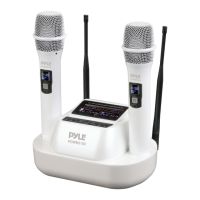

 To Next Page