www.PyleUSA.com
8
BODY PACK TRANSMITTER SETTING
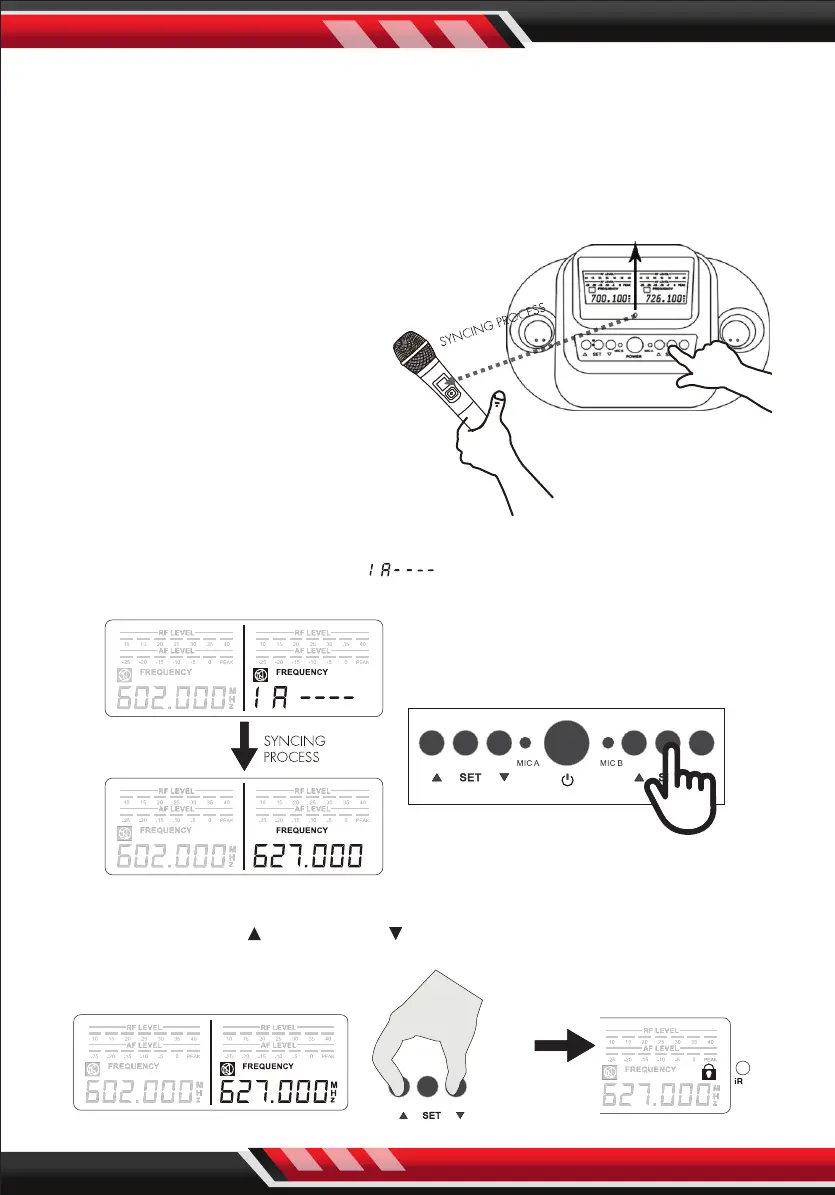
3. HOW TO MATCH RECEIVER'S FREQUENCY WITH MICROPHONE
STEP 1: Turn ON the microphone, point the microphone infrared port (IR)
directly at the receiver's IR PORT.
STEP 2: Press and hold “SET” until “ ” displays. Once syncing is completed
the RF level bar appears and the "MUTE" icon disappears.
4. HOW TO LOCK/UNLOCK THE DISPLAY
Press and hold “UP ” and “DOWN “ at the same time to lock/unlock the
setting.
IR
Maximum Frequency
Matching Distance: 10 feet
NOTE: Please make sure that the
other handheld microphone is
powered o when adjusting the
frequency on one microphone.
Each unit is fully tested and qualied
by the manufacturer. However, due
to the nature of wireless connection,
interference may occur because of
local environments and/or radio
signals emitted by other wireless
devices within the household.


 To Next Page