Atmospheric Oil Mist Detection System
MULTIPLEX
AM8/JANUARY 2015
EMAIL qmi@oilmist.com WEBSITE www.oilmist.com 4 East Barnet Road, London, England, EN4 8RW TEL +44 (0)20 7328 3121
Maintenance Part5-3
LENS CLEANING PROCEDURE
The “F2” Fault indicator indicates need for lens cleaning on the relevant channel on the
MULTIPLEX CMU (Q01H).
It is advisable to have a clean and working spare Q10 Sensor.
To clean, the lens in the event of oil or condensation build up, use the following
guidelines:
1. Isolate the relevant channel on the CMU:
Turn Security Key (Q0103) to Setting Mode
Using Magnetic Pen (Q0109):
Touch Isolate Button
Touch Channel Button
Turn Key back to Working Mode
2. Unplug cable from Sensor.
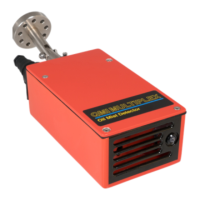
3. Holding the Sensor, undo the 4 screws fixing the Sensor body to the
Articulated Joint. Use the Allen Key tool from the Maintenance Kit.
4. Replace with a spare Sensor, if available. Proceed to item (8).
5. In a clean area, remove cover plate by undoing the 4 Button Head Screws.
The tool is in the Maintenance Kit.
6. 3 lenses will be visible inside the chamber. Using a clean cloth and the cleaning
solution "Clean All" to wipe the lenses clean. For badly contaminated lenses,
repeat until clean. Polish the lenses with a clean and dry cloth.
DO NOT SATURATE THE LENSES WITH FLUID.
7. Ensure the chamber is dry. Replace the cover plate.
8. Replace Sensor on Articulated Joint. Make sure Sensor is in original position.
9. Reset the Sensor on CMU:
Turn key to setting mode.
Using magnetic Pen:
Touch Isolate Button,
Touch Reset Button,
Touch Channel Button,
Turn Key to Operate Mode
SEE IMPORTANT NOTES OVERLEAF


 To Next Page
