Need help?
Do you have a question about the QNAP TL-R1200S-RP and is the answer not in the manual?
Steps for installing a 3.5-inch HDD into the enclosure tray.
Steps for installing a 2.5-inch HDD or SSD into the enclosure tray.
Instructions for removing the enclosure case cover.
Procedure for installing QXP expansion adapters into the enclosure.
Download and install drivers and QNAP JBOD Manager for Windows/Linux.
Information on QTS Storage and Snapshots for QNAP NAS integration.
Diagrams illustrating how to connect the JBOD enclosure to a PC.
Diagrams illustrating how to connect the JBOD enclosure to a QNAP NAS.
Controls for fan speed and audio alerts on the TL-R1200S-RP model.
Identification of SFP ports on the rear panel of the TL-R1200S-RP.
Controls for audio alerts and fan speed on the TL-R400S model.
Identification of rear panel ports on the TL-R400S model.
Data on SSD/HDD will be erased during initialization.
Tighten screws to prevent the tray from getting stuck in the chassis.
Information about accessing the QNAP download center for guides and utilities.
Details on FCC, CE, WEEE, and RoHS compliance for the product.
 General
| Hot-swap | Yes |
|---|---|
| Storage drive size | 2.5/3.5 \ |
| Total installed storage capacity | 0 TB |
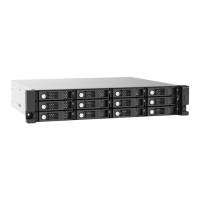
| Number of storage drives supported | 12 |
| Supported storage drive interfaces | Serial ATA III |
| Fan diameter | 70 mm |
| Product type | HDD/SSD enclosure |
| Product color | Black, Grey |
| Rack capacity | 2U |
| LED indicators | Fan fail, HDD, Link |
| Number of fans | 2 fan(s) |
| Noise level | 33.7 dB |
| Data transfer rate | 6 Gbit/s |
| Power source type | AC |
| AC adapter frequency | 50/60 Hz |
| AC adapter input voltage | 100 - 240 V |
| Cables included | AC, MiniSAS |
| USB connectivity | No |
| Storage temperature (T-T) | -20 - 70 °C |
| Operating temperature (T-T) | 0 - 40 °C |
| Operating relative humidity (H-H) | 5 - 95 % |
| Harmonized System (HS) code | 84733080 |
 Weight and Dimensions
| Depth | 534 mm |
|---|---|
| Width | 482 mm |
| Height | 89 mm |
| Weight | 6170 g |


 To Next Page