Need help?
Do you have a question about the QNAP TL-R1200C-RP and is the answer not in the manual?
Provides an overview of the QNAP TL-R1200C-RP JBOD enclosure, installation, operations, and troubleshooting.
Specifies the intended readers of the guide, assuming basic storage and backup knowledge.
Explains symbols and their meanings used throughout the guide for clarity and safety.
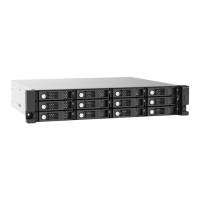
Introduces QNAP JBOD enclosures, their purpose, and the specific features of the TL-R1200C-RP.
Details the technical specifications of the TL-R1200C-RP, including components, compatibility, and ports.
Provides essential safety guidelines for handling and operating the JBOD enclosure to prevent injury or damage.
Outlines safety precautions for power connections and electrical safety.
Details safety measures for the system battery, including replacement and disposal.
Warns users to keep clear of moving fan blades and other components to avoid injury.
Introduces the process of installing drives into the JBOD enclosure, noting compatibility.
Detailed instructions for physically installing 3.5-inch hard disk drives into the enclosure's trays.
Explains the meaning of various LED indicators on the JBOD enclosure for system status.
Describes the audio alert signals, their frequency, and what they indicate about the system status.
Steps to force the JBOD enclosure to be recognized by the NAS or computer when it's not detected.
Procedure for replacing a failed drive without interrupting system operation.
Defines QTS as the QNAP NAS operating system.
Defines QNAP JBOD Manager as a utility for managing JBOD enclosures.
Defines Storage & Snapshots as a QTS utility for managing JBODs connected to a NAS.
Outlines the limited warranty service provided by QNAP for its hardware products.
Provides legal disclaimers regarding the document's information and QNAP product usage.
Introduces the GNU General Public License, its purpose, and terms.
 General
| Storage drive size | 2.5/3.5 \ |
|---|---|
| Total installed storage capacity | 0 TB |
| Number of storage drives supported | 12 |
| Supported storage drive interfaces | Serial ATA III |
| USB version | 3.2 Gen 2 (3.1 Gen 2) |
| USB connectivity | Yes |
| USB connector type | USB Type-C |
| USB ports quantity | 1 |
| USB connector gender | Female |
| Fan diameter | 70 mm |
| Product type | HDD/SSD enclosure |
| Product color | Black, Grey |
| Rack capacity | 2U |
| LED indicators | Fan fail, HDD, Link, Status |
| Number of fans | 2 fan(s) |
| Storage temperature (T-T) | -20 - 70 °C |
| Operating temperature (T-T) | 0 - 40 °C |
| Operating relative humidity (H-H) | 5 - 95 % |
| Power source type | AC |
| AC adapter frequency | 50/60 Hz |
| AC adapter input voltage | 100 - 240 V |
| Noise level | 33.4 dB |
| Data transfer rate | 6 Gbit/s |
| Cables included | AC, USB Type-C to USB Type-A |
| Harmonized System (HS) code | 84733080 |
 Weight and Dimensions
| Depth | 562.5 mm |
|---|---|
| Width | 482 mm |
| Height | 88.6 mm |
| Weight | 11030 g |
| Package weight | 14290 g |


 To Next Page