37
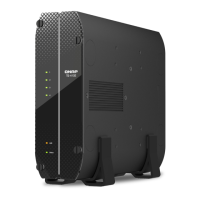
Note: For TS-x53U & TS-451U models, always ensure that a memory module is
installed in the primary slot (red box in the below figure,) or the system will fail to
start. When installing two memory modules, please ensure that they are the same size and
ideally use the same type of RAM for both memory slots. The maximum supported memory
is 8GB combined.
5. Close the NAS cover and fasten the screws. Connect the power adaptor and cables back
to the NAS.



 To Next Page