EasyManua.ls Logo

Qtx QX05PA - User Manual

Qtx QX05PA
4 pages
Print Icon
To Next Page IconTo Next Page
Loading...
100.605UK User Manual
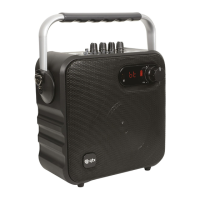
Portable Party Bluetooth® Speaker
QX05PA
Item ref: 100.605UK White, 100.606UK Blue, 100.607UK Black
User Manual
Look no further for a portable powerful Bluetooth speaker, which is ideal for house gatherings and parties,
kids rooms and even festivals. Play your music direct from your smartphone or tablet using the Bluetooth
function and you can even sing along using the handheld wireless microphone. Not only does it have
Bluetooth connectivity, but you can also listen to audio from the built-in FM radio, the USB/TF (micro SD)
media inputs or the Aux line input (3.5mm jack) to stream your music. Power this great speaker by either
mains or the integral rechargeable battery, which lasts up to 10 hours on one charge. You can take this great
little speaker anywhere using the integrated carry handle or additional shoulder strap providing the ultimate in
portability.
Features
Bluetooth wireless operation allowing connection to your portable devices.
5.25" Full range speaker provides great sound quality and 30W RMS output.
Wireless VHF microphone included.
Built-in rechargeable battery that lasts up to 10 hours on a single charge.
FM radio.
USB/TF (micro SD) media inputs.
Aux line input (3.5mm jack).
Wired microphone socket (6.35mm jack).
Comes supplied with remote control and shoulder strap.
Technical Specifications

Power handling (RMS)
30 Watts
Speaker driver
5.25” full range
Bluetooth version
3.0
Microphone
Wireless VHF 175.0MHz handheld
SNR
71dB
Frequency response
20Hz - 20kHz
Input sensitivity
550±30mV
Power supply
AC100V-AC240V, 60Hz/50Hz
Dimensions
225 x 220 x 115mm (unit body)
Weight
2.9kg
In The Box
Portable party speaker unit
VHF wireless microphone
Remote control
UK power supply
Audio connection cable
Shoulder strap
User guide

Questions and Answers

  • J
    Judy DennisAug 1, 2025
    What to do if I cannot connect Qtx QX05PA to a Bluetooth device?
    • W
      waynejohnsonAug 2, 2025
      If your Qtx Speakers cannot connect to a Bluetooth device, verify that the transmitting device is set to pairing mode and that both devices are within 10 meters of each other without any obstructions.
  • D
    Douglas RamirezAug 7, 2025
    How to troubleshoot a microphone that is not working on Qtx QX05PA Speakers?
    • T
      Todd MejiaAug 7, 2025
      If the microphone is not working with your Qtx Speakers, ensure the wireless microphone is switched on, the batteries are charged, and the microphone volume control is turned up.
  • A
    Alexis JohnsonAug 12, 2025
    What to do if my Qtx Speakers won’t turn on?
    • J
      Jacqueline YoungAug 12, 2025
      If your Qtx Speakers won’t turn on, ensure the battery is adequately charged or that the power supply is properly connected and switched on.
  • T
    Teresa SaundersAug 16, 2025
    How to fix no sound from Qtx QX05PA Speakers?
    • J
      Jared EdwardsAug 17, 2025
      If there is no sound coming from your Qtx Speakers, make sure the master volume is turned up, the sound on your transmitting device is also turned up, and the connection to the speaker is secure.
  • T
    Timothy CampbellAug 21, 2025
    Why is there sound distortion from Qtx Speakers?
    • S
      stefanieroweAug 21, 2025
      To address sound distortion in your Qtx Speakers, try turning down the volume on your transmitting device.
  • V
    Vickie Chang PhDAug 27, 2025
    What to do if audio file from USB or TF card won’t play on Qtx QX05PA Speakers?
    • P
      Phillip MurphyAug 27, 2025
      If your Qtx Speakers are not playing audio files from a USB or TF card, verify that the audio file format is compatible with the speaker, the USB or TF device is correctly inserted, and the master volume is turned up. If problems persist, try removing the media and resetting the speaker.

Summary

Controls and Functions

Charging and Powering the Speaker

Instructions for charging the speaker and understanding battery status indicators.

Connecting a Bluetooth Device

Details on how to pair and connect your devices via Bluetooth.

USB or TF (micro SD) Plug and Playback

Guide for playing audio files from USB or TF media cards.

Using the FM Radio

Instructions on how to select and scan FM radio channels.

Microphone Usage

Using the VHF Microphone

Guide for operating the wireless VHF microphone, including battery insertion and pairing.

Using a Wired Microphone

Instructions for connecting and using a wired microphone via the 6.35mm input.

Audio Line Input

Details on connecting external audio devices using a 3.5mm audio cable.

Recording Function

How to record microphone sessions onto USB or TF storage and play them back.

Compatibility

Information on the devices and media formats supported by the speaker.

Troubleshooting

No Sound or Sound Distortion

Solutions for common audio issues like no sound or distorted audio output.

Microphone Not Working

Steps to resolve problems with the microphone not functioning correctly.

Audio File Playback Issues

Troubleshooting for audio files from USB or TF cards not playing.

Speaker Power and Bluetooth Connection

Solutions for the speaker not turning on or failing to connect via Bluetooth.

Safety and Disposal

Safety Disclaimer

Important warnings regarding product servicing, usage environment, and potential hazards.

Disposal Guidelines

Instructions for the proper disposal of electronic equipment according to local regulations.

Qtx QX05PA Specifications

General IconGeneral
BrandQtx
ModelQX05PA
CategorySpeakers
LanguageEnglish

Related product manuals