Functions: Primary Controls
18. Loop Mode
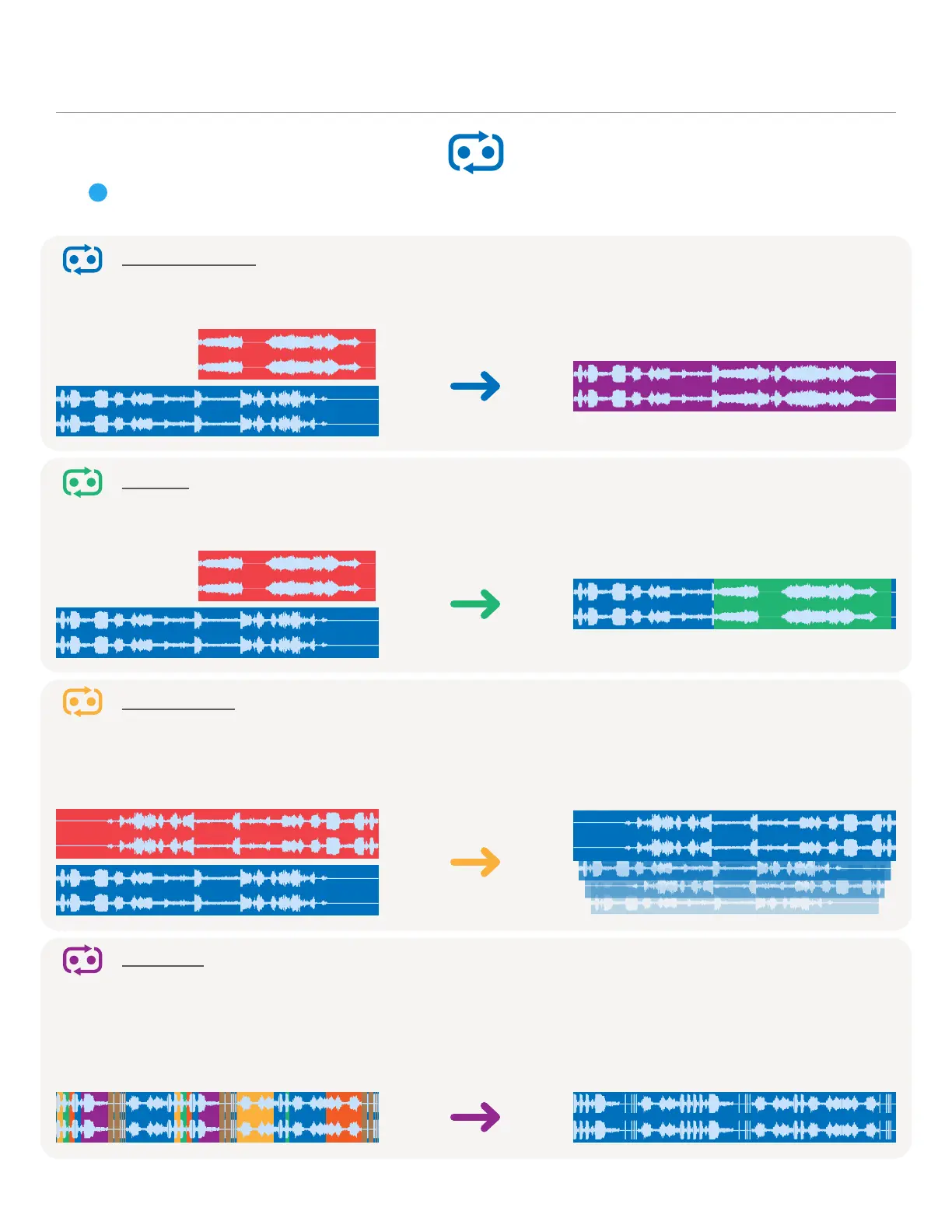
The Loop Mode button selects the macro recording behavior for Stardust. The active mode
determines how audio will be recorded into an existing buffer.
15
Sound on Sound
The default loop mode on Stardust is Sound on Sound, in which newly recorded audio is added to
the existing loop in its current position.
New Recording Result
Replace
When set to the Replace loop mode, a new recording will delete and replace the old audio at its
current position.
New Recording Result
Frippertronics
Inspired by the tape recording technique pioneered by Robert Fripp, the Frippertronics loop
mode decreases the old loop amplitude each time Stardust adds a new recording. The older the
audio is in the loop, the further it decays into the ether.
New Recording Result
Resample
Recordings in this mode become new recordings of their own lengths, and include any playback
modifications applied to the current loop (speed, direction, slices, skips, etc.). The Undo tree is
baked into the resample as well, and undo-locking is ignored. You can still revert to your pre-
Resample loop by pressing the Undo button.
Current, Mangled Loop Result


 To Next Page