ABOUT THE SYSTEM SYSTEM OVERVIEW
1-9
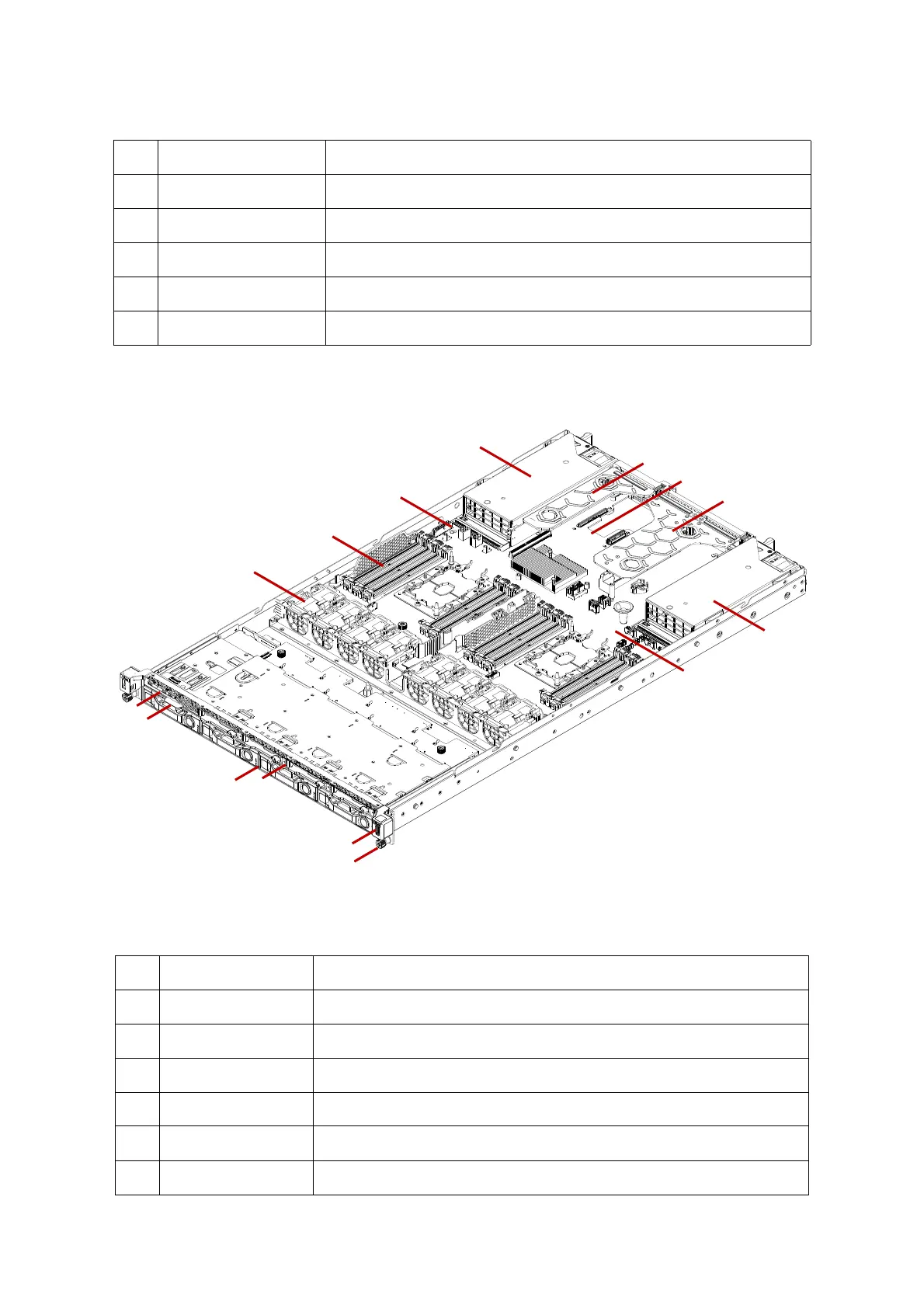
The hybrid 3.5” + 2.5” storage drive configuration system overview is displayed in the fol-
lowing image:
Figure 1-2. Hybrid 3.5” + 2.5” Storage Drive System Component Overview
10 Riser assembly (CPU0) Support PCIe add-on card installation with riser feature.
11 PSU assembly Redundant power supply unit assembly
12 SuperCAP carrier Housing SuperCAP using in SAS mezzanine card or SAS add-on card
13 DIMM slots (12) DDR4 DIMM slots per CPU
14 Fan module (8) System fan modules
Table 5: Component Overview
NO.ITEM DESCRIPTION
1 Front control panel See Enabling the Intel® VMD technology on page 1-16
2 Asset tag Record serial number or other important information
3 3.5” HDD tray Housing up to four 3.5” SATA/SAS drive
4 2.5” HDD tray Housing up to four 2.5” SATA/NVMe drive (optional)
5 USB port Connect to USB device
6 Thumb screw Secure the system to rack frame
Table 4: Component Overview (Continued)
NO.ITEM DESCRIPTION



 To Next Page