Connecting tank to tap
• The Quooker tank is supplied with a UK 3 pin plug and requires a standard 13 amp earthed
socket.
• The light ring on the boiling-water tap will light up to indicate when the water is being heated
inside the tank.
• If the mains lead is damaged, it must be replaced by the manufacturer, their agent or a
qualied technician.
• The ‘Q’ on the lid is the on/o switch.
1
3
2
4
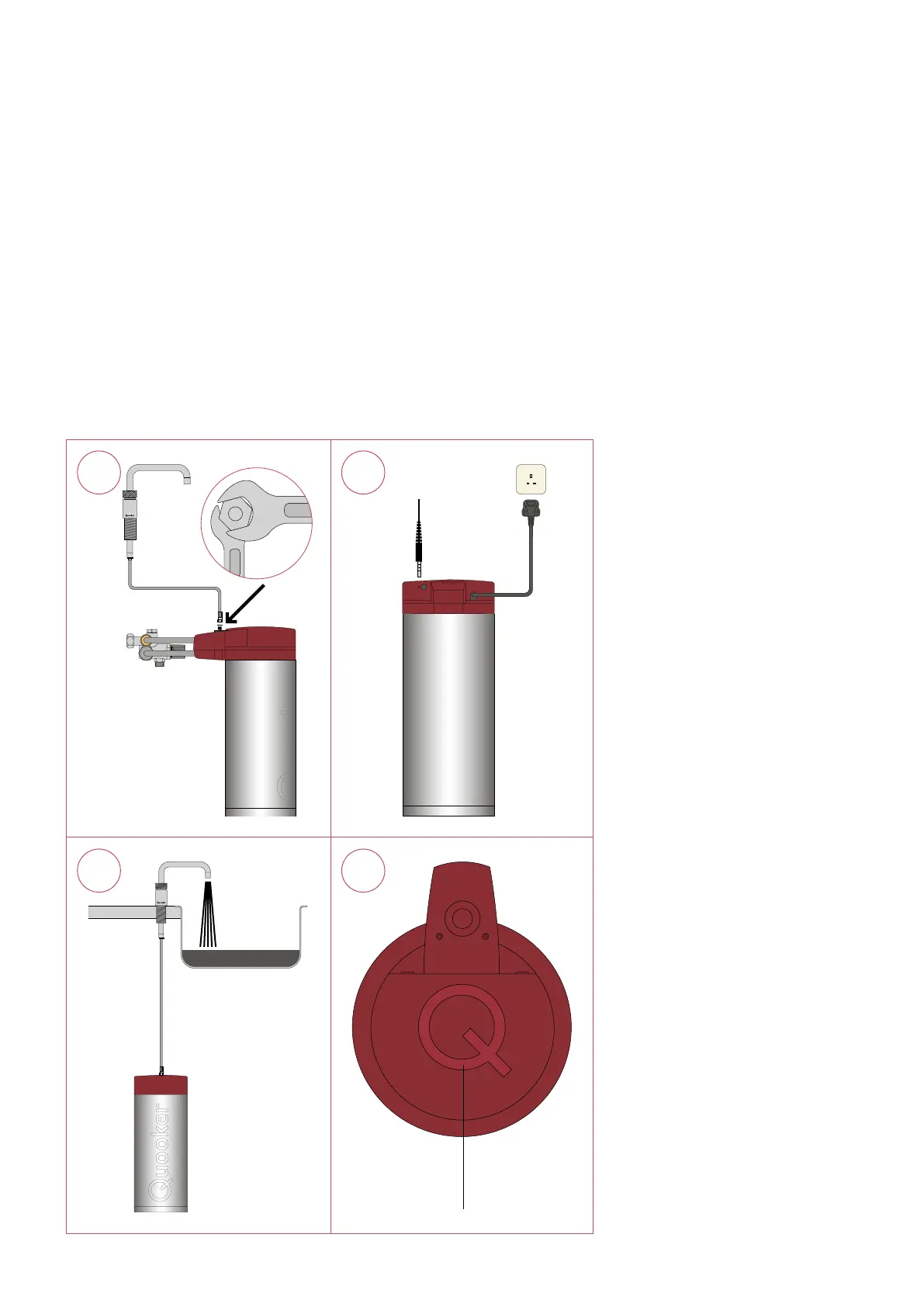
1. Connect the tank and tap
Connect the boiling water hose to the tank
using spanner sizes 12 and 14.
2. Electrical connection
Connect the boiling-water tap by plugging
the LED cable into the port provided at
the back of the tank cover. Connect the
tank to the power socket. Note: Do not
switch on the tank yet.
3. Fill the tank
Open the boiling-water tap (push-push-
turn) and the isolation valve. Check for
leaks. Flush the tank through until the
water runs clear. Black water will ow out
initially. This is activated carbon from the
lter and completely harmless.
4. Switch on
Switch on the Quooker system with the
on/o switch.
D



 To Next Page