True to the Music
Radial Engineering Ltd.
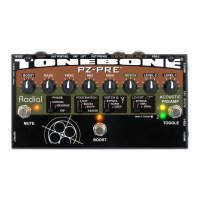
PZ-Pre
™
User Guide
2
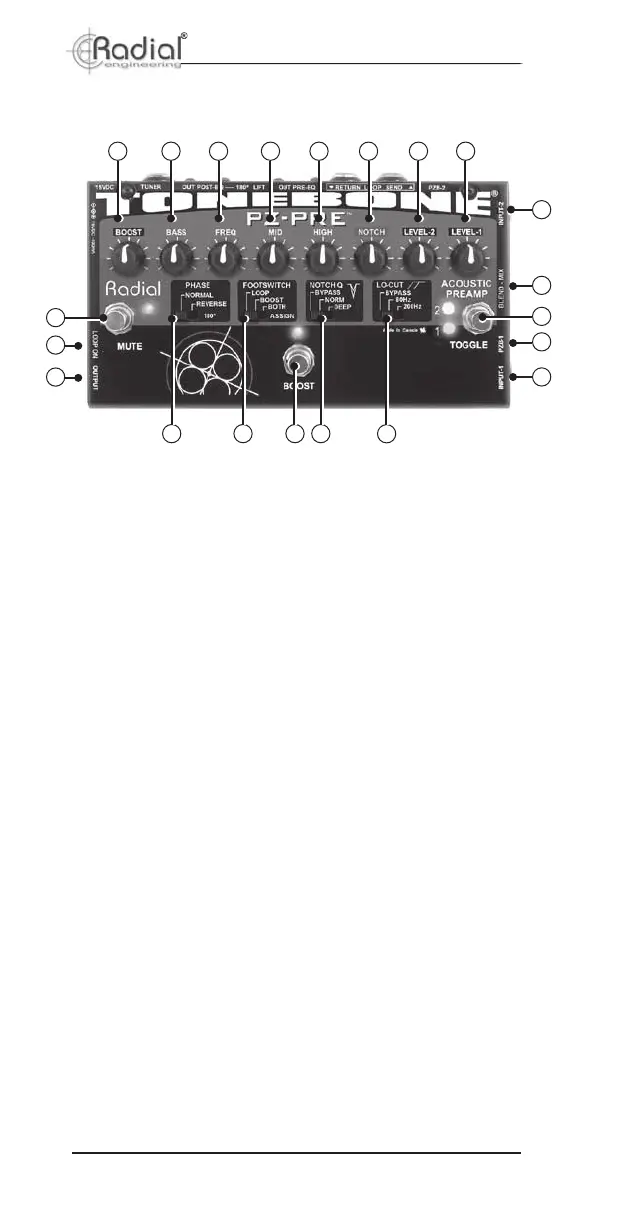
1. INPUT-1: ¼" connection for rst instrument.
2. PZB-1: Recessed switch activates piezo buffer for input-1.
3. TOGGLE: Footswitch selects between input-1 and input-2.
4. BLEND-MIX: Recessed switch selects between toggle mode
and mix/blend mode.
5. INPUT-2: ¼" connection for second instrument.
6. LEVEL-1: Gain control for input-1.
7. LEVEL-2: Gain control for input 2.
8. NOTCH: Used to sweep the frequency of the notch lter.
9. HIGH: High frequency shelving EQ, boosts or cuts treble.
10. MID: Amplitude control for semi-parametric mid EQ.
11. FREQ: Frequency control for semi-parametric mid EQ.
12. LOW: Low frequency shelving EQ, boosts or cuts bass.
13. BOOST: Variable level control for the power booster.
14. MUTE: Footswitch mutes all outputs except tuner out.
15. LOOP ON: Forces the effects loop to remain on.
16. OUTPUT: ¼” out for instrument amplier.
17. PHASE: Inverts the signal polarity at the ¼" instrument output.
18. FOOTSWITCH ASSIGN: Sets function of boost footswitch
between power boost, effects loop or both.
19. BOOST: Footswitch activates power booster and/or effects
loop depending on setting of footswitch assign switch.
20. NOTCH Q: Sets the depth of the notch lter. Select between
normal, deep and bypass.
21. LO-CUT: High-pass lter removes low frequencies to eliminate
resonant feedback. Select between bypass and two low-cut settings.
FEATURES AND FUNCTIONS - TOP PANEL
21
2019
111213
14
17
15
16
18
1
2
3
4
5
678
9
10


 To Next Page