
 To Next Page
S
Sharon ChambersJul 31, 2025
What to do if I have tried all the codes under my device’s brand and my Radio Shack universal Remote Control still does not work?
- CCarlos WaltersJul 31, 2025
Use Manual Search or Auto Search to find the proper codes.

What to do if I have tried all the codes under my device’s brand and my Radio Shack universal Remote Control still does not work?
Use Manual Search or Auto Search to find the proper codes.
What to do if the Radio Shack Remote Control device key doesn’t turn off after I enter the 3-digit code during Brand Code Setup?
If the device key light turns off after entering the last digit of the code, the code number is valid. If the device key blinks and stays lit after entering the last digit of the code, the code number is invalid, so try the next code for your device.
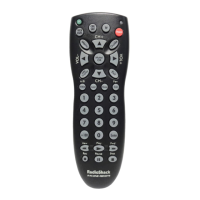
What to do if the Radio Shack 15-303 device recognized a code, but not all of the features work?
If the device recognized a code but the features don't work as expected, start the search again for a more compatible code. Ignore unwanted codes by waiting for the device to power off/on the second, third, or fourth time before confirming the code. Try all the 3-digit device codes one by one under the same brand until most keys work. Write down all the code numbers that work with your device and choose the best code as your setup code.
What to do if I can’t get the Radio Shack Remote Control to pair with my device?
Make sure you know how your TVs and other devices power off so you can press the appropriate key at the correct time. Otherwise, the remote will not pair with the device and you will have to try again. Try all the 3 digital-device codes one by one under the same brand until all or most keys work properly. Write down all the code numbers that work with your device, then try each until you find the best code.
Why when I press SET and the appropriate key at the same time, the Radio Shack 15-303 still doesn’t work?
Press and hold SET, then press the appropriate key. The remote will not enter the desired mode if buttons are pressed in the wrong order.
Operates up to four devices and controls TV volume regardless of mode.
Instructions for installing AAA batteries and notes on proper battery usage and disposal.
Directly enter the device code from the Code List. Try each code until one works.
Remote automatically sends device codes. May take up to 60 minutes to search all codes.
Codes are sent one by one by pressing the power button until the device turns off.
Retrieve and write down device codes for future reference or setup.
Lock device codes and volume/mute functions to prevent accidental changes.
Program a device key to work with a different type of device than labeled.
Restore the remote to factory settings by pressing SET and 0.
Provides solutions for common problems encountered with the remote control.
Information regarding compliance with FCC rules and potential interference.
 General
| Brand | Radio Shack |
|---|---|
| Model | 15-303 |
| Category | Remote Control |
| Language | English |