EasyManua.ls Logo

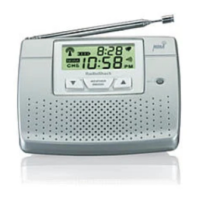
Radio Shack Weatheradio - User Manual

Radio Shack Weatheradio
36 pages
Print Icon
To Next Page IconTo Next Page
Loading...
Cat. No. 12-251
OWNER’S MANUAL
Please read before using this equipment.
Weatheradio
®
with Alert
12-251.fm Page 1 Tuesday, March 14, 2000 12:40 PM

Questions and Answers

  • S
    Sheena MedinaAug 16, 2025
    What to do if my Radio Shack Weather Radio has no power?
    • R
      Riley HoweAug 16, 2025
      If your Radio Shack Weather Radio isn't powering on, ensure it's properly connected to an AC power source. If the AC power is out, check that a backup battery is correctly installed.
  • S
    Susan MathisAug 19, 2025
    How to fix no sound on Radio Shack Weatheradio?
    • A
      allen78Aug 19, 2025
      If there is no sound coming from your Radio Shack Weather Radio, try adjusting the VOLUME or TONE settings.
  • Z
    Zachary RussoAug 22, 2025
    What to do if no weather broadcast when I press WEATHER on my Radio Shack Weatheradio Weather Radio?
    • G
      Gail MontgomeryAug 22, 2025
      If you're not getting a weather broadcast when you press the WEATHER button on your Radio Shack Weather Radio: - Ensure the telescoping antenna is fully extended. - Verify that the Weather Radio is set to the correct NOAA channel broadcasting in your area.
  • Q
    qwhiteAug 25, 2025
    Why is my Radio Shack Weather Radio not responding to NWS weather alert broadcasts?
    • N
      Noah HortonAug 26, 2025
      If your Radio Shack Weather Radio isn't responding to NWS weather alerts, ensure you have programmed the correct FIPS codes into the radio's memory. Also, verify that the PROGRAM/OPERATE switch is set to OPERATE.
  • M
    Mark GentryAug 28, 2025
    How to clear the C-OP (check operation) message on my Radio Shack Weatheradio Weather Radio?
    • T
      Timothy PattersonAug 28, 2025
      The 'C-OP' message appears on your Radio Shack Weather Radio when it hasn't received a SAME alert signal (including test signals) for about 192 hours. To resolve this: - Ensure the FIPS codes stored in the memory are correct. - Make sure the telescoping antenna is fully extended.
  • M
    Mrs. Megan RobinsonAug 31, 2025
    What to do if my Radio Shack Weather Radio responds to alerts outside programmed FIPS codes?
    • A
      adriennerobertsAug 31, 2025
      If your Radio Shack Weather Radio is responding to weather alerts for areas not covered by the stored FIPS codes, ensure that the all-signals code (99) is not stored in the memory.
  • A
    Alexander ScottSep 3, 2025
    What to do if Radio Shack Weatheradio Weather Radio is not responding to weather alert broadcasts?
    • J
      John MartinezSep 3, 2025
      If your Radio Shack Weather Radio isn't responding correctly to NWS alerts, verify that you've programmed the correct FIPS code(s). Also, ensure the radio is set to receive new alert types.
  • C
    Charles SotoSep 6, 2025
    Why no weather broadcast when I press WEATHER on Radio Shack Weatheradio?
    • D
      Denise SinghSep 6, 2025
      If you're not getting any weather broadcasts when you press the WEATHER button on your Radio Shack Weather Radio, first, fully extend the telescoping antenna. Second, ensure that the Weather Radio is tuned to the NOAA channel broadcasting in your area.
  • K
    Kevin WhiteSep 9, 2025
    How to make Radio Shack Weatheradio respond to multiple FIPS codes?
    • D
      dloveSep 9, 2025
      If your Radio Shack Weather Radio only responds to weather alert broadcasts for one code, even though multiple FIPS codes are stored, ensure that the Weather Radio is set to its multiple mode.
  • J
    Jill HicksSep 12, 2025
    How to troubleshoot no power on Radio Shack Weather Radio?
    • K
      Kristine WestSep 12, 2025
      If your Radio Shack Weather Radio has no power, ensure that the batteries are fresh and installed properly.

Summary

Product Features

Understanding Weatheradio Operation

How to Get Your FIPS Code

Instructions on how to find the correct FIPS code for your location.

Getting Started: Preparation

Powering and Battery Setup

Connecting AC power and installing a backup battery.

Programming Your Weatheradio

Initial setup for receiving broadcasts and alerts.

Managing FIPS Codes

Entering or modifying specific geographical codes for alerts.

Testing Device Functionality

Procedures to verify the device is functioning correctly.

Using Your Weatheradio

Weather Alert Functionality

Understanding how the device alerts users to weather emergencies.

Troubleshooting Guide

Troubleshooting: No Power

Solutions for when the device does not turn on or receive power.

Troubleshooting: No Sound

Steps to resolve issues related to the absence of audio output.

Troubleshooting: Incorrect Alerts

Diagnosing alerts for unintended geographical areas.

Troubleshooting: Radio Unresponsive

Addressing issues where the radio fails to react to broadcasts.

Troubleshooting: No Broadcast

Troubleshooting the lack of NOAA broadcast reception.

Weatheradio Specifications

Radio Shack Weatheradio Specifications

General IconGeneral
BrandRadio Shack
CategoryWeather Radio
DisplayLCD
Channels7
Frequency Range162.400 MHz - 162.550 MHz
Power SourceAC adapter, Batteries
Alert TypeSAME
BandsWX
Backup PowerBattery

Related product manuals