18 19
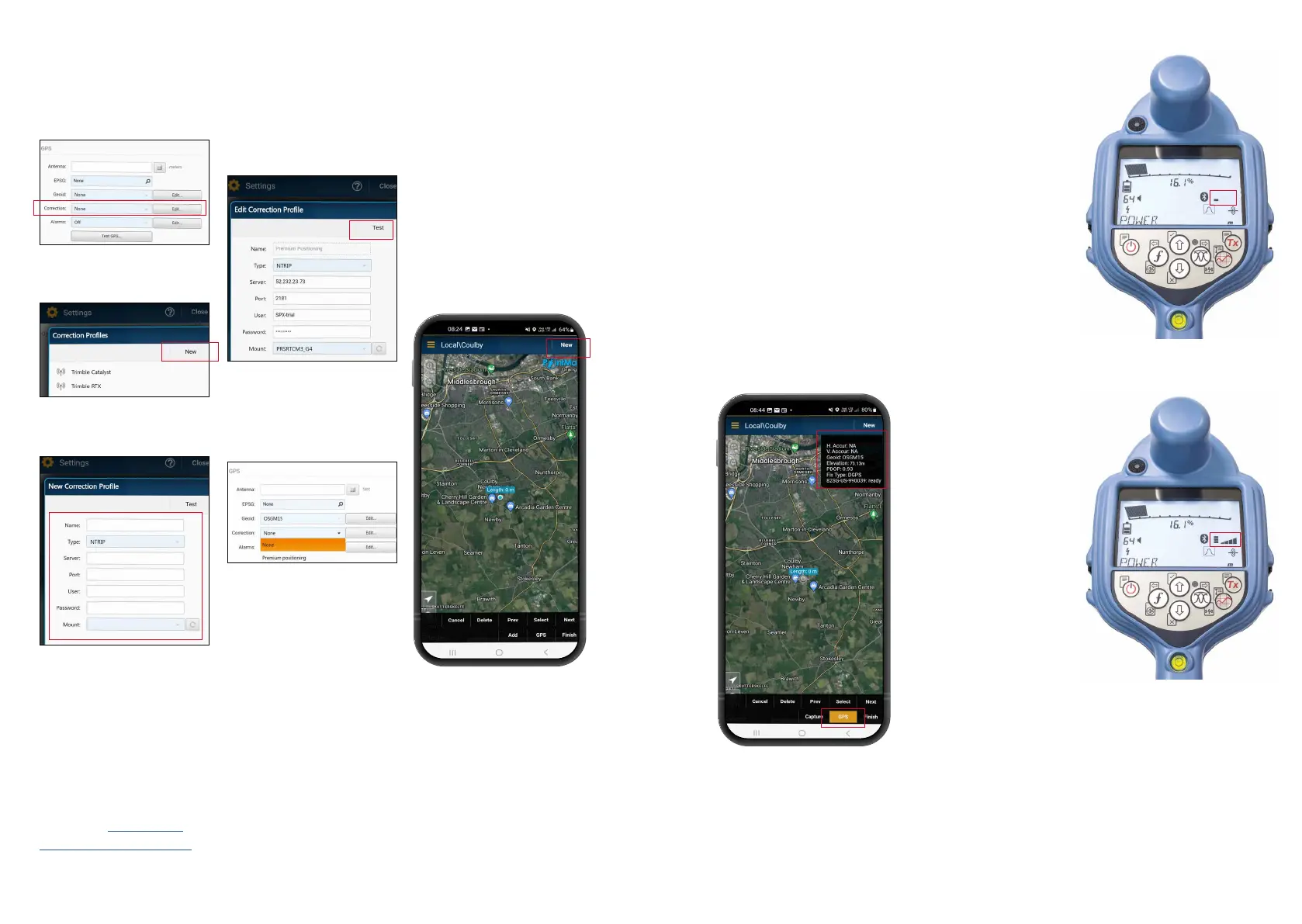
NTRIP client setup:
1. Click ‘Edit’ in
the
‘Correction’ section of
the GPS menu.
3. Enter your NTRIP client
credentials.
4. Click ‘Test’ to ensure
that you have entered
the details correctly –
you should see an ‘OK’
to conrm that it has
worked.
5. Click on the 'Correction'
drop down and select
the prole you just
created
Start a survey
and obtaining
RTK oat/x
1. Ensure the GNSS device
in the locator has access
to GNSS satellites
(see gure 1b).
2. Select ‘NEW’ from the
top right-hand corner of
the app.
Figure 1a.
Locator searching for satellites
Figure 1b.
Locator identied satellites
3. Select a utility type.
4. You will now see a box
of information in the top
right-hand corner of the
screen. If after 10-15
seconds ‘Di source’
does not appear then you
may need to toggle the
‘GPS’ button near the
bottom of the screen.
5. The ‘Fix type’ eld will
display values such as
GPS, DGPS, RTK oat
and RTK. The LED on the
locator noties you of
RTK oat (ashing) and
RTK x (solid).
6. The time to rst x will
be longer as the GNSS
device is performing a
cold start. Find an area
that has good visibility
of the sky and stand still.
This may take up to 15
minutes for the rst x,
but will be much quicker
for subsequent uses.
7. Once RTK oat/x has
been achieved you can
start the survey. If the
SM log interface is set
up correctly, you’ll see it
described as ‘ready’ in
the information box.
8. Take Survey Measurement
readings by pressing the
Survey Measurement
button at set intervals
or when required. The
point should appear in
the PointMan app a few
seconds later.
9. The RD8200SG is tted
with a level /bubble
for ultimate precision.
When taking a survey
measurement reading, the
RD8200SG automatically
compensates for the
dierence between the
GNSS antenna position
and the foot of the
locator. Keep the bubble
central for ultimate
positional accuracy.
Use of the bubble is
entirely optional.
2. Cllick ‘NEW’ on the
correction proles pop-up.
Details will be provided by
your correction service
provider. They should include:
• Server or Caster IP
• Port
• User
• Password
• Mount point
Please see RD8200SG
technical support page
for more information about
correction service providers.






 To Next Page