12 13
Transmitter battery packs
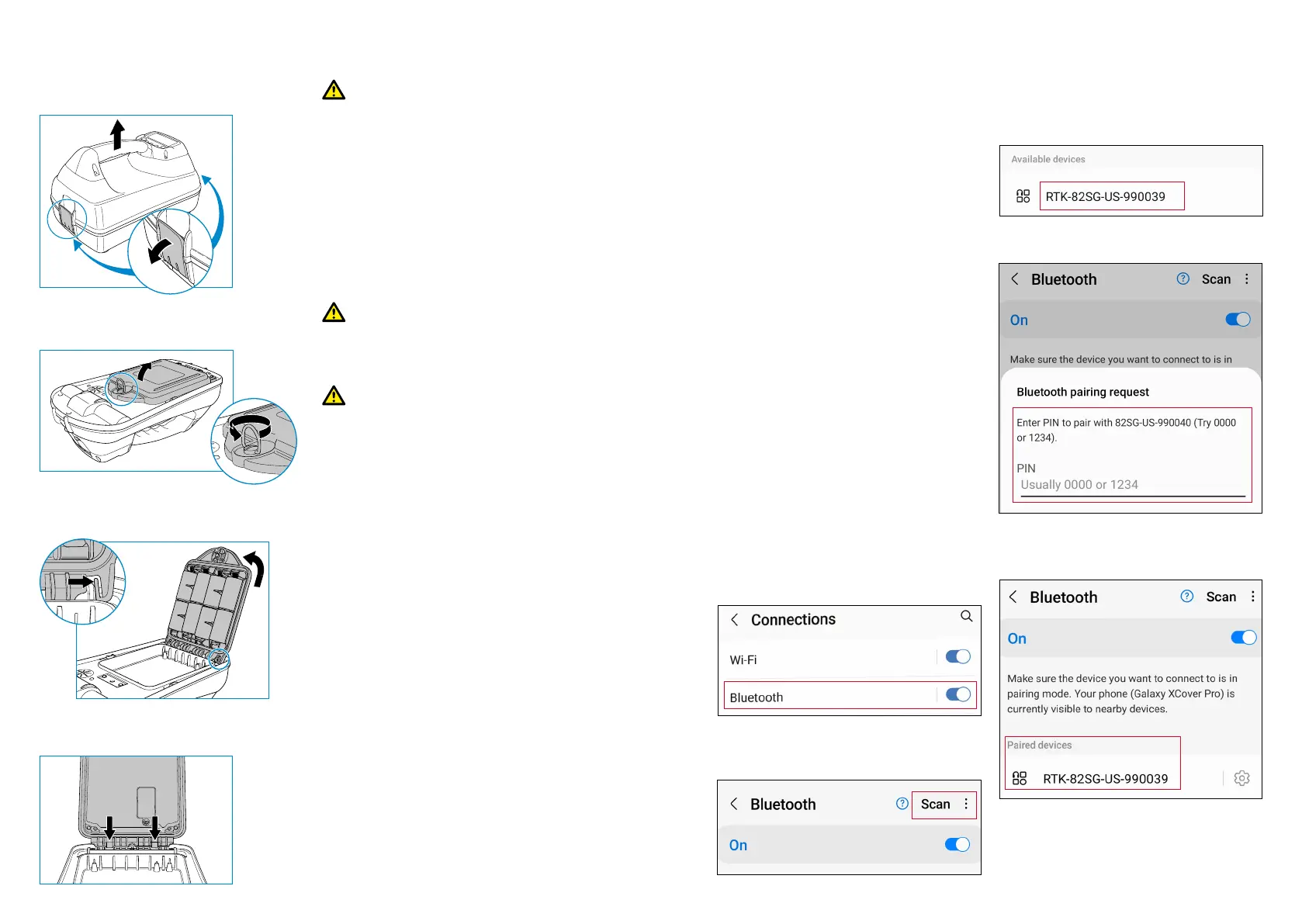
1. Release clips then remove the
accessory tray
Charging the battery packs
WARNING! Only use charging
equipment provided by Radiodetection.
The use of alternative chargers may
cause a safety hazard and/or reduce the
life of the battery.
CAUTION: Do not let your battery
completely discharge as this may reduce
its life or damage it permanently. If
you are not using your equipment for a
long period charge them at least once a
month.
WARNING! Batteries can get hot
after prolonged use at full output power.
Take care while Replacing or handling
batteries.
WARNING! Do not tamper with,
or attempt to disassemble the battery
packs.
CAUTION: If battery failure is suspected
or if the battery shows any sign of
discoloration / physical damage return
the entire unit to an authorized repair
center for investigation and repair. Local,
national or IATA transport regulations may
restrict the shipment of faulty batteries.
Check with your courier for restrictions
and best practice guidelines. Your local
Radiodetection representative will be
able to direct you to our authorized
repair centers.
You can re-charge your batteries using
the Radiodetection mains or automotive
chargers.
NOTE: The charging temperature range
is 0 to 45 °C, 32 to 113°F. Do not attempt
to recharge your batteries outside this
temperature range.
2. Open the battery compartment by
rotating the metal clip clockwise
3. Press the release catch and lift
the battery pack away
4. Line up the battery pack
and press into position
Pairing Bluetooth Modules
The RD8200SG is tted with multiple
Bluetooth modules. You need to connect to
2 Bluetooth modules to enable survey grade
accuracy and send Survey Measurements
to your compatible Android device.
1. GNSS Bluetooth module.
This Bluetooth module enables survey
grade accuracy.
2. Locator Bluetooth module.
This Bluetooth module allows you
to send locator Survey Measurements
to compatible Android devices.
Pairing the GNSS antenna
Bluetooth module to an
Android device
The GNSS Bluetooth module is always
on and does not need to be enabled in
the locator.
Switch on the RD8200SG locator.
On your Android device:
1. Navigate to Settings > Bluetooth.
2. Ensure that Bluetooth connectivity is
switched on.
3. Scan for a new device to add to the list
of paired devices.
4. Select the RTK82SG-XXXXXX in
Available devices.
5. When asked for a passkey, enter 1234.
6. RTK-82SG-XXXXXX should now be
shown in Paired devices.
NOTE: If the GNSS Bluetooth module
is not advertising, you can reset the
Bluetooth module via
MENU > GPS > RTK > RESET.






 To Next Page