4
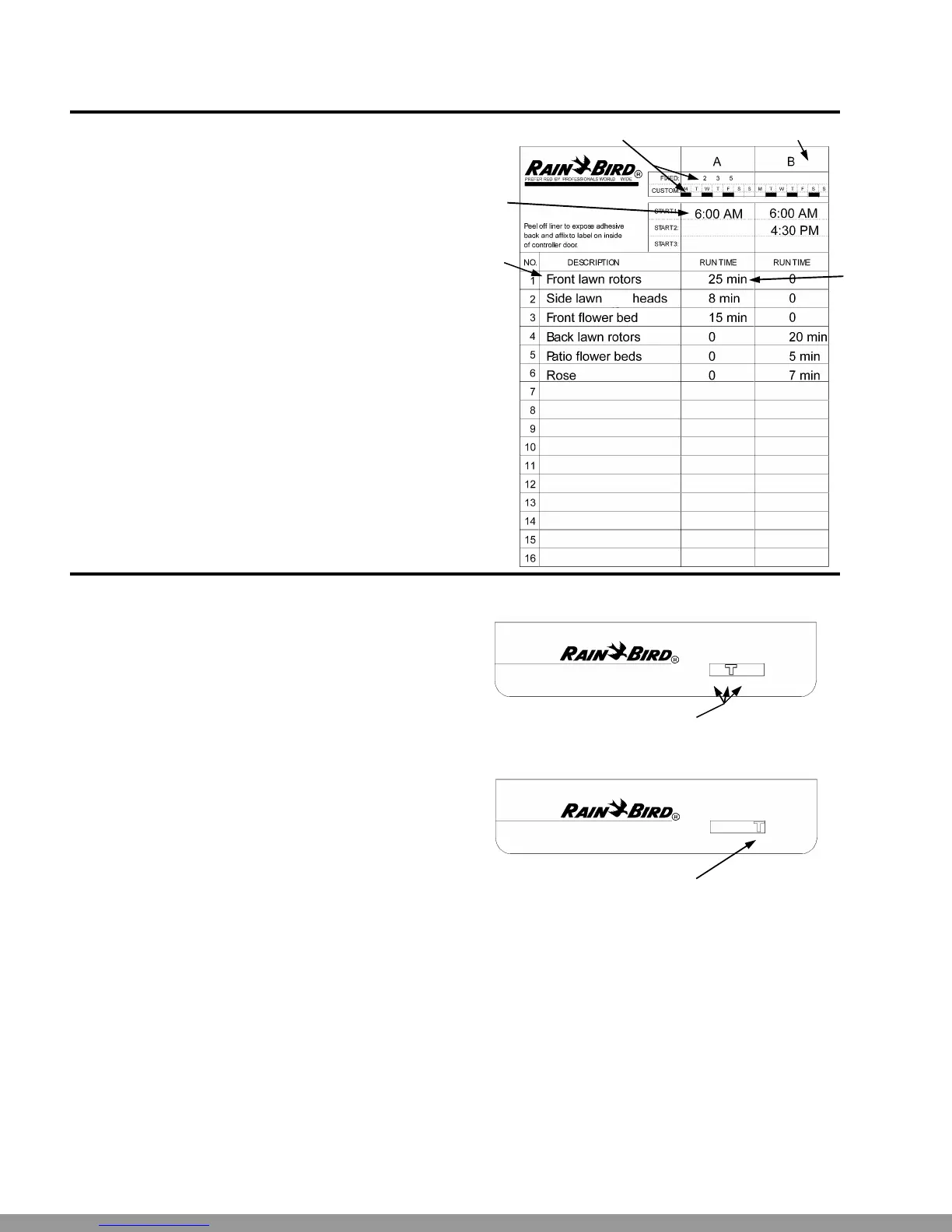
Fill Out Program Schedule Sheet
Before you begin programming, fill out the ESP
Controller Program Sheet and attach it to the label on the
inside of the controller door. A sample Program Sheet is
shown in this illustration.
Ê Enter a brief description of each station on the con-
troller.
Ë In the Program A column, mark the watering schedule.
Either circle one of the fixed intervals, or fill in the wa-
tering days in the “Custom” row.
Ì Enter the starting time(s) for Program A. You may
have up to three separate start times for each pro-
gram.
Í Enter the run time for each station assigned to Pro-
gram A. Enter “0” for stations that are not used in Pro-
gram A.
Î Repeat steps 2 - 4 for Program B. If you are using a
fixed schedule, Program B will have the same water-
ing days as Program A.
••
Ž
ESP Controller
Program Sheet
Œ
•
Select Watering Schedule
The ESP-Si has two types of watering schedules, either
fixed or custom. The fixed schedule sets watering to oc-
cur every second, third, or fifth day. The custom sched-
ule lets you select specific days of the week on which
watering is to occur.
The type of schedule you select applies to both pro-
grams, A and B. For example, you cannot set Pro-
gram A to a fixed schedule and Program B to a cus-
tom schedule.
Ê To use a fixed schedule, move the Schedule Slide
Switch to one of the FIXED positions:
2 = every other day
3 = every third day
5 = every fifth day
Ë To use the custom schedule, move the Schedule Slide
Switch to the “C” position.
ESP-6Si
FIXED CUSTOM
SCHEDULE
2 3 5 C
ESP-6Si
FIXED CUSTOM
SCHEDULE
2 3 5 C
Œ
•
This Manual: http://www.manuallib.com/file/2721363



 To Next Page
 Loading...