5
Ž ‘
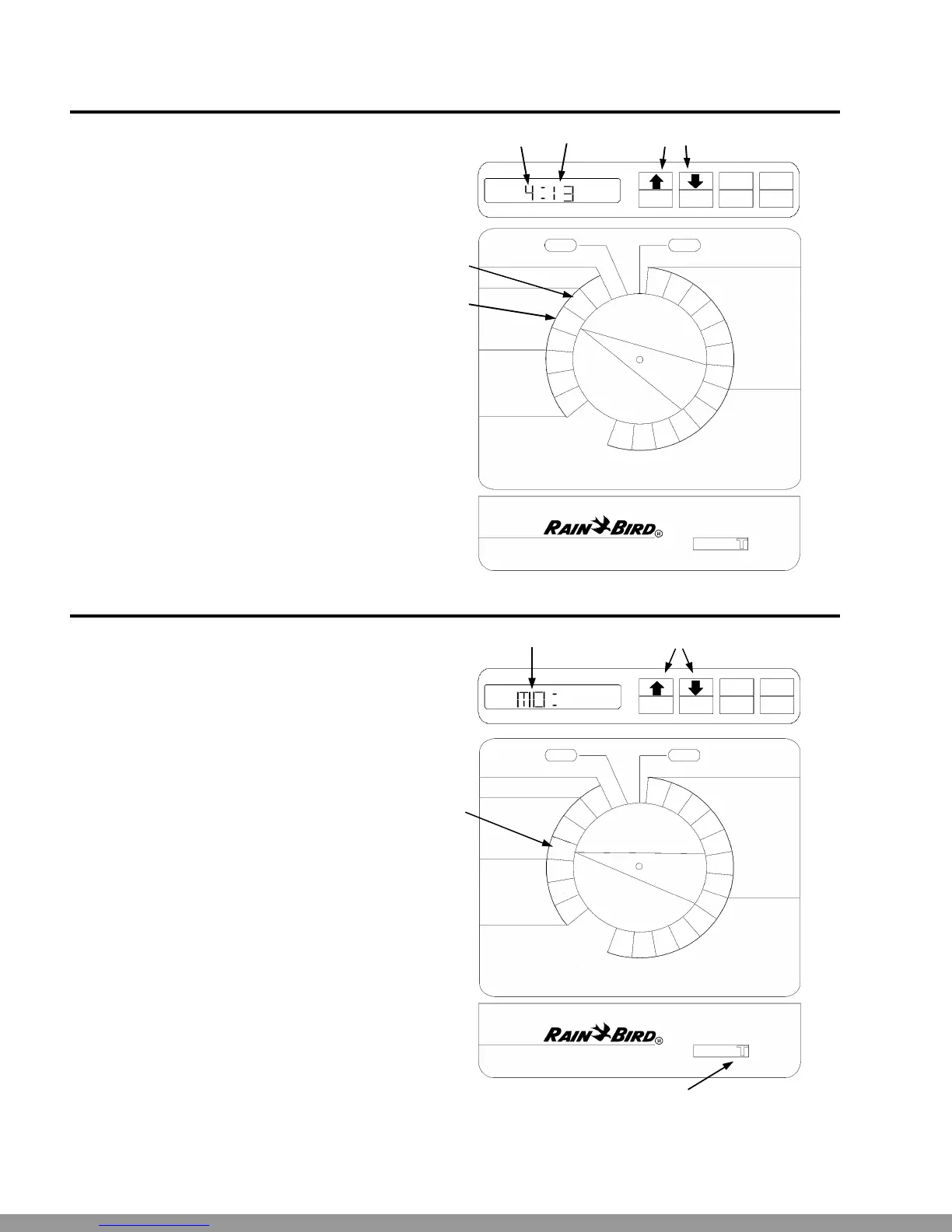
Set Current Time
Ê Turn the dial to “HR.”
Ë The display shows the hour that is currently set,
either AM or PM.
Ì Press ñ or ò to set the current hour.
Í Turn the dial to “MIN.”
Î The display shows the minute currently set.
Ï Press ñ or ò to set the current minute.
Œ
•
•
PM
ON OFF
A
B
MAN
START
ADV.
OFF AUTO
ADJUST WATER %
CURRENT TIME
AND DAY
WATERING
START TIMES
WATERING TIME PER STATION
DAYS TO WATER
CUSTOM
SCHEDULE
MIN
HR
DAY
3
2
1
6
5
4
3
2
1
SUN
SAT
FRI
THU
WED
TUE
MON
ESP-6Si
FIXED CUSTOM
SCHEDULE
2 3 5 C
PGM
A
•
Set Current Day
Setting the current day varies somewhat depend-
ing on whether you are using a custom schedule or
a fixed schedule.
Custom Schedule
Ê Make sure the Schedule Slide switch is set to
“C.”
Ë Turn the dial to “DAY.”
Ì The display shows the day of the week that is
currently set (for example, “MO” for Monday).
• Press ñ or ò to change the display to the cur-
rent day of the week.
Ž
ON OFF
A
B
MAN
START
ADV.
ESP-6Si
FIXED CUSTOM
SCHEDULE
2 3 5 C
PGM
A
DAY
•
Œ
Technical Support:1-800-RAIN BIRD
•
OFF AUTO
ADJUST WATER %
CURRENT TIME
AND DAY
WATERING
START TIMES
WATERING TIME PER STATION
DAYS TO WATER
CUSTOM
SCHEDULE
MIN
HR
DAY
3
2
1
6
5
4
3
2
1
SUN
SAT
FRI
THU
WED
TUE
MON
This Manual: http://www.manuallib.com/file/2721363


 To Next Page
 Loading...