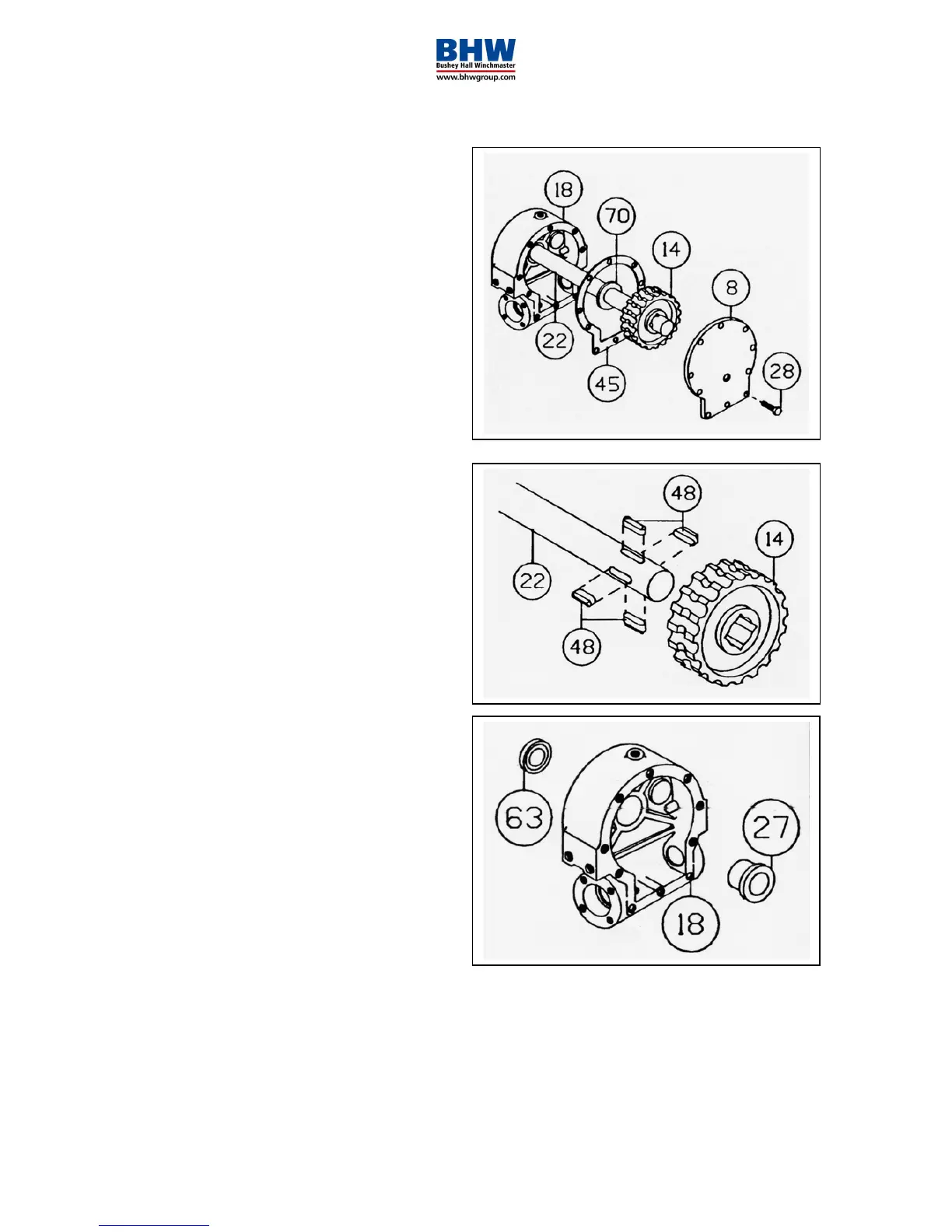
6. Remove gear housing cover (item 8)
from gear housing (item 18) by
unscrewing five remaining capscrews
(item 28). Place capscrews into two
tapped holes of cover and tighten. This
will pull the cover loose from gear
housing.
Remove cover gasket (item 45) and pull
shaft (item 22), with gear attached, and
thrust washer (item 70) from gear
housing.
7. Check for signs of wear on gear teeth.
If replacement of gear is necessary,
gear must be replaced as follows:
1. Press gear (item 14) from shaft (item
22).
2. Examine shaft keys and keyways. If
distortion of keys and/or keyways are
evident, shaft and keys should be
replaced.
3. Use a soft hammer to gently tap keys
(item 48) into keyways. Press gear
(item 14) over shaft and keys. Gear
must be centred over keys.
8. Remove seal (item 63) from back of
gear housing (item 18). Check bushing
(item 27) for signs of wear. Press
bushing (item 27) from gear housing
and replace if necessary. Press new
bushing and seal back into place.



 To Next Page