6
Truck GPS
>
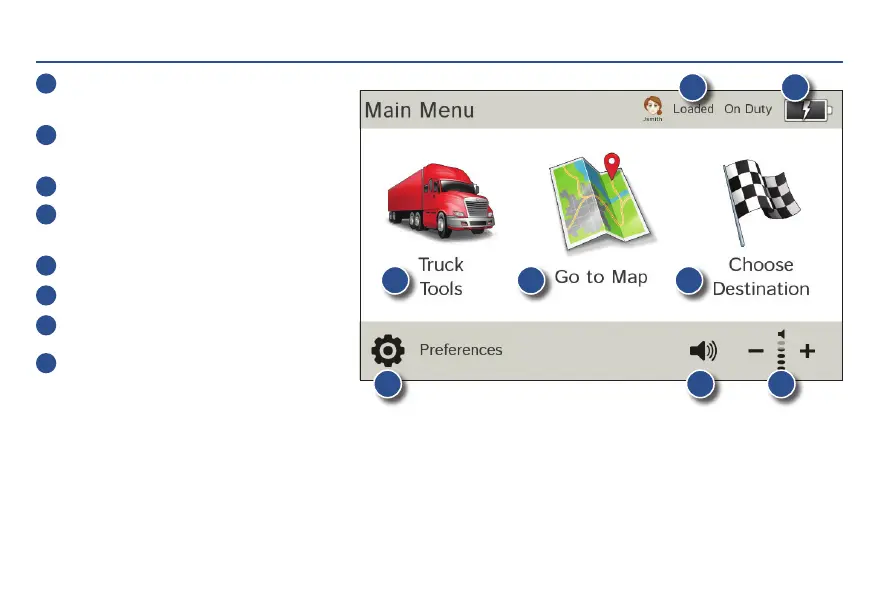
Main Menu
1
Enter truck information and access
truck-specific use tools.
2
Show location on the map and view
navigation instructions.
3
Choose a destination.
4
Select device, route and map preferences.
Access the tutorial.
5
Mute/unmute the speaker.
6
Adjust speaker volume.
7
Indicates charge when running on battery.
8
Change driver profile, trailer load,
or driver status.
Note: You can select different color schemes in Preferences > General > Skin Style. The following screen images
appear in the “Ice” style. Some screens may appear different, based on model number.
Note: From other screens, tap the Main Menu icon in the bottom right corner to return to the Main Menu.
1
4 5
8
6
7
2
3
For Sales Information Please Contact RoadTrucker Inc (www.RoadTrucker.com)
8312 Sidbury Rd.; Wilmington, NC 28411 - (800) 507-0482 / (910) 686-4281














 To Next Page