EasyManua.ls Logo

Rand McNally TND tablet - Page 8

Rand McNally TND tablet
22 pages
Print Icon
To Next Page IconTo Next Page
To Previous Page IconTo Previous Page
Loading...
7
Truck GPS
>
Truck Info and Warnings
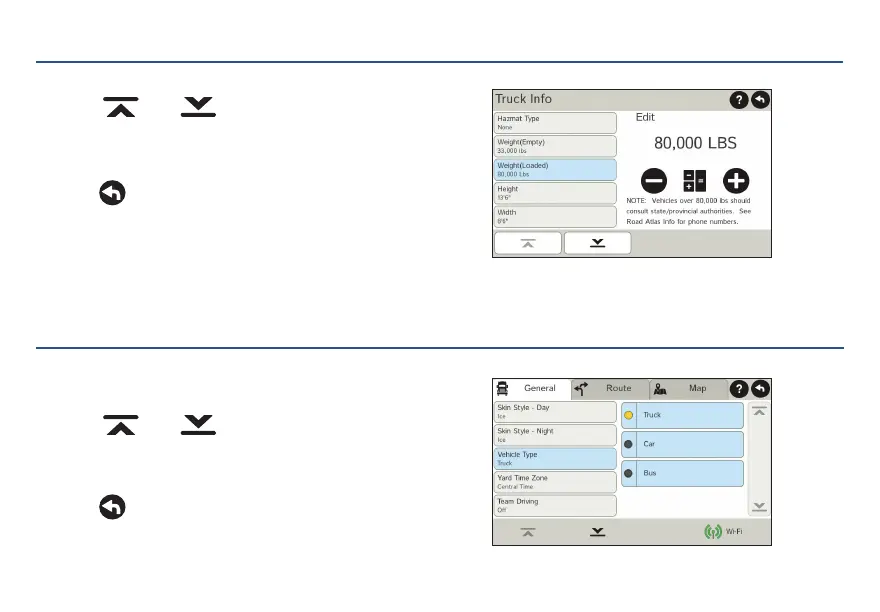
1. Tap Truck Tools > Truck Info or Warnings.
2. Tap
and to view options.
3. Tap the option button to be changed.
4. Enter new settings.
5. Tap
to save changes.
Truck GPS
>
Preferences
1. Tap Preferences.
2. Tap the General, Route or Map tab.
3. Tap
and
to view options.
4. Tap the option button to be changed.
5. Enter new settings.
6. Tap
to save changes.
On the left,
tap on an
option
On the left,
tap on an
option
On the
right,
enter
settings
for the
option
On the
right,
enter
settings
for the
option
For Sales Information Please Contact RoadTrucker Inc (www.RoadTrucker.com)
8312 Sidbury Rd.; Wilmington, NC 28411 - (800) 507-0482 / (910) 686-4281

Related product manuals