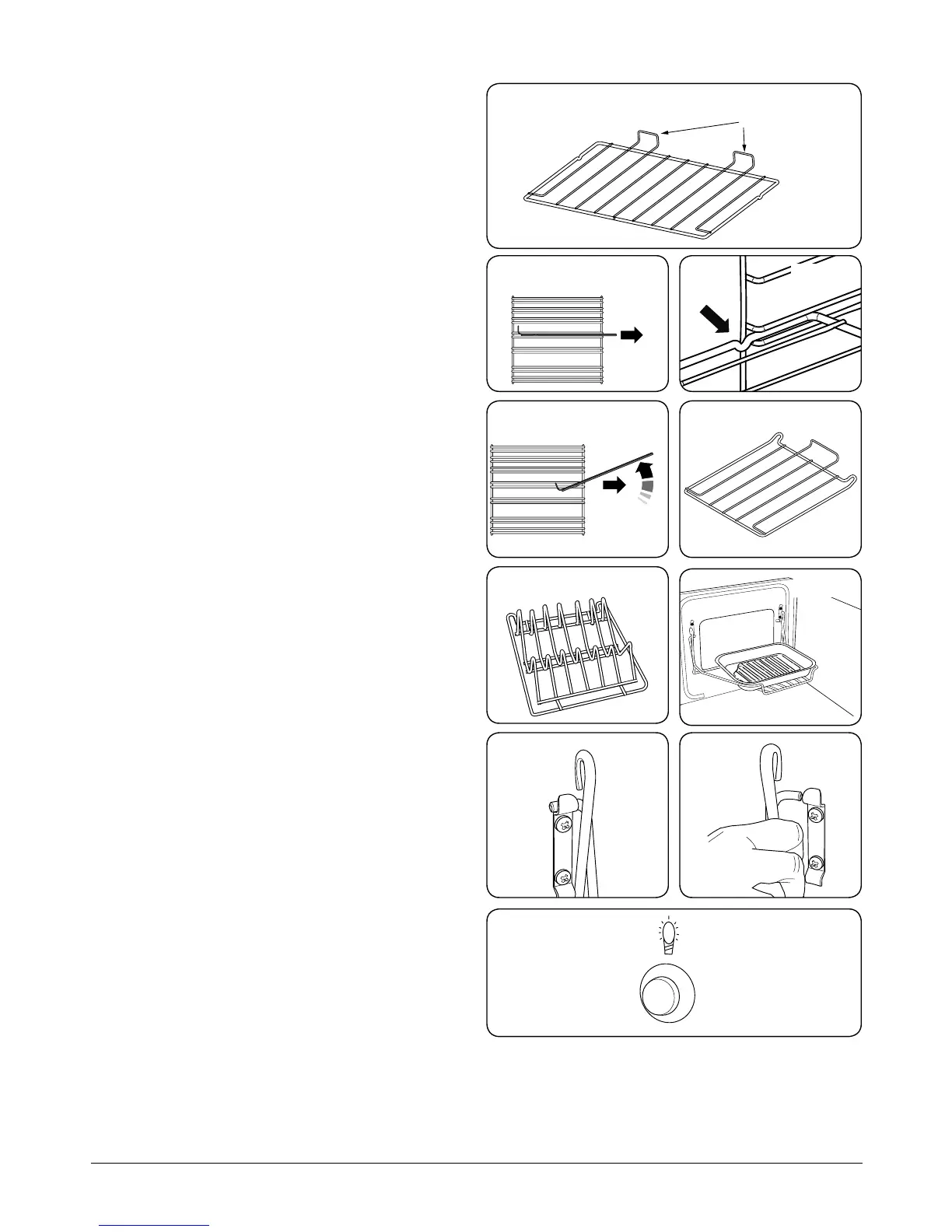
ArtNo.324-0002 Oven shelf
ArtNo.320-0012 Removing the shelf 2
ArtNo.324-0010 Plate warming shelf
Accessories
Oven Shelves
Your cooker is supplied with two at shelves (Fig. 2-15).
Removing and Refitting the Oven Shelves
The shelf has a small kink on either side (Fig. 2-16). To remove
the shelf, line these up with the stops in the shelf support
(Fig. 2-17). Lift the shelf upwards so that it will pass over the
shelf stop (Fig. 2-18) and then pull it forwards.
Ret in the reverse order, making sure to push it fully back.
Oven Shelves – Right-hand (Tall) Oven
The tall oven is supplied with four at cooking shelves
(Fig. 2-19) and a plate warming shelf (Fig. 2-20).
When using the tall oven, you can cook on all four shelves at
the same time, but make sure that they are well spaced out to
allow the hot air to circulate.
The Handyrack (Main Oven)
The Handyrack (Fig. 2-21) ts to the left-hand oven door
only. Food cooking on it is easy to attend to, because it is
accessible when the door is open.
The maximum weight that can be held by the Handyrack
is 5.5 kg (12 lb). It should only be used with the supplied
roasting tin, which is designed to t the Handyrack. Any other
vessel could be unstable.
It can be tted at two dierent heights. One of the oven
shelves must be removed and the other positioned to suit.
When the Handyrack is used in its highest position, other
dishes can be cooked on the bottom shelf position or base of
the oven.
When the Handyrack is used in its lowest position, other
dishes can be cooked on the second shelf position or base of
the oven.
To t the Handyrack, locate one side of it on the door bracket
(Fig. 2-22).
Then spring the other side out to clip it onto the other
bracket (Fig. 2-23).
Oven Light
Press the button to turn the light on (Fig. 2-24).
If the oven light fails, turn o the power supply before
changing the bulb. See the ‘Troubleshooting’ section for
details on how to change the bulb.
ArtNo.320-0024



 To Next Page