Glass Fronted Door Panels
The oven door front panels can be taken o so that the glass
panels can be cleaned. Move the cooker forward to gain
access to the sides (see the ‘Moving the Cooker’ section under
‘Installation’).
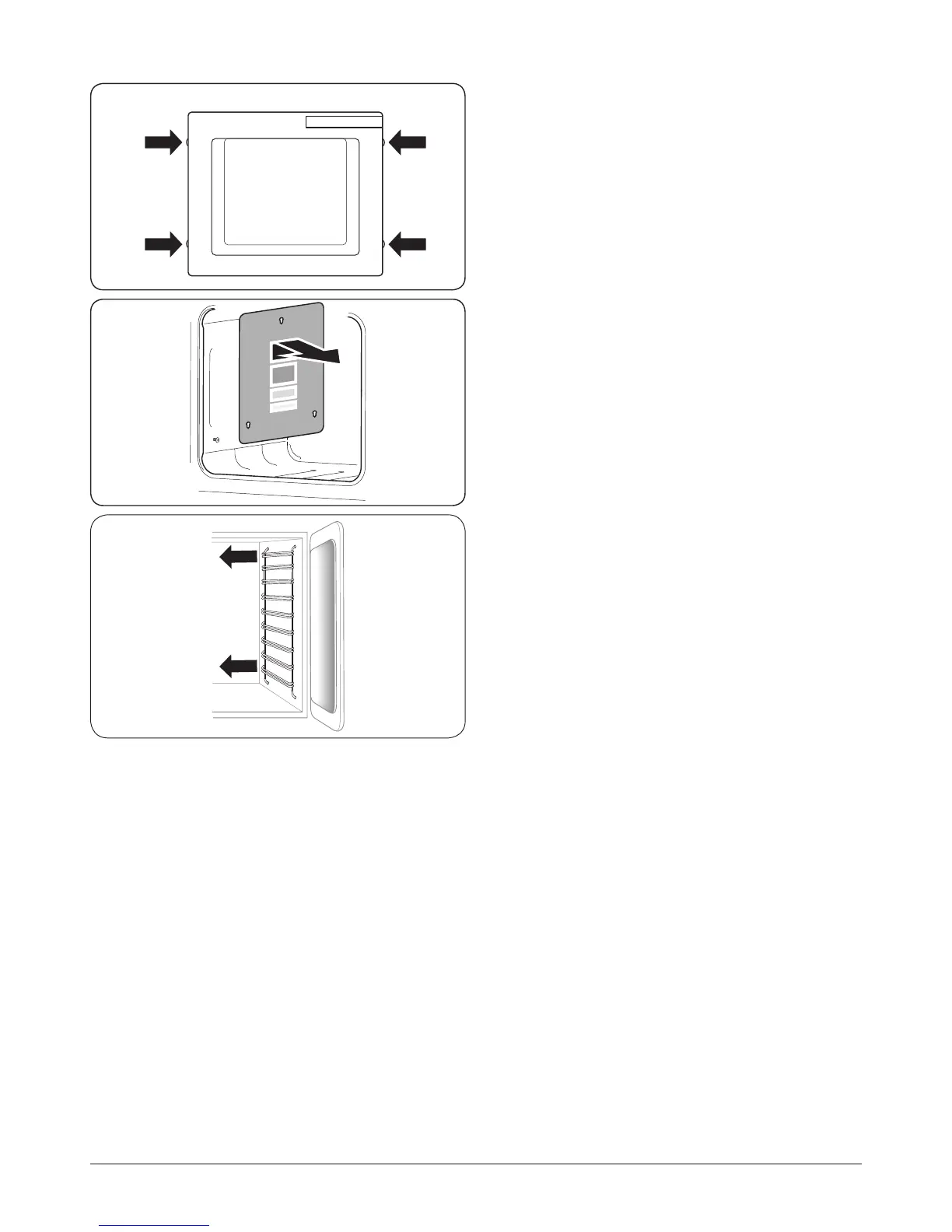
Open the oven door slightly and remove the front panel
xing screws from the door sides, two each side (Fig. 6.10).
Carefully lift o the outer door panel. The inside face of the
glass panels can now be cleaned – take care not to disturb or
wet the door insulation.
Note: If the door is triple glazed then the inner two panels are
xed together and should not be separated. After cleaning,
carefully ret the outer door panel and replace the side xing
screws.
DO NOT use harsh abrasive cleaners or sharp metal
scrapers to clean the oven door glass since they can
scratch the surface, which may result in shattering of
the glass.
Ovens
‘Cook & Clean’ Panels
The main oven has panels which have been coated with a
special enamel that partly cleans itself. This does not stop
all marks on the lining, but helps to reduce the amount of
manual cleaning needed.
The ‘Cook & Clean’ panels work better above 200 °C. If you do
most of your cooking below this temperature, occasionally
remove the panels and wipe with a lint free cloth and hot
soapy water. The panels should then be dried and replaced
and the oven heated at 200 °C for about one hour. This
will make sure that the ‘Cook & Clean’ panels are working
eectively.
DO NOT use steel wool, oven cleaning pads, or any other
materials that will scratch the surface.
Removing the Main Oven Linings
Some of the lining panels can be removed for cleaning.
If you wish to clean the enamel interior of the oven, you will
need to remove the shelves, followed by the ‘Cook & Clean’
panels. To remove the side panels, simply lift the panel and
slide forwards (Fig. 6.11).
Once the panels have been removed, the oven enamel
interior can be cleaned.
Ret in the reverse order.
The Tall Oven
To clean the oven sides, slide out the shelves, unhook the
supports from the oven sides, and lift out (Fig. 6.12).
Fig. 6.10
Fig. 6.11
Fig. 6.12


 To Next Page