EasyManua.ls Logo

Ravas 3200 - 5.10 Changing the time and date (on the printout)

Ravas 3200
36 pages
Print Icon
To Next Page IconTo Next Page
To Previous Page IconTo Previous Page
Loading...
USER MANUAL
RAVAS-3200
24
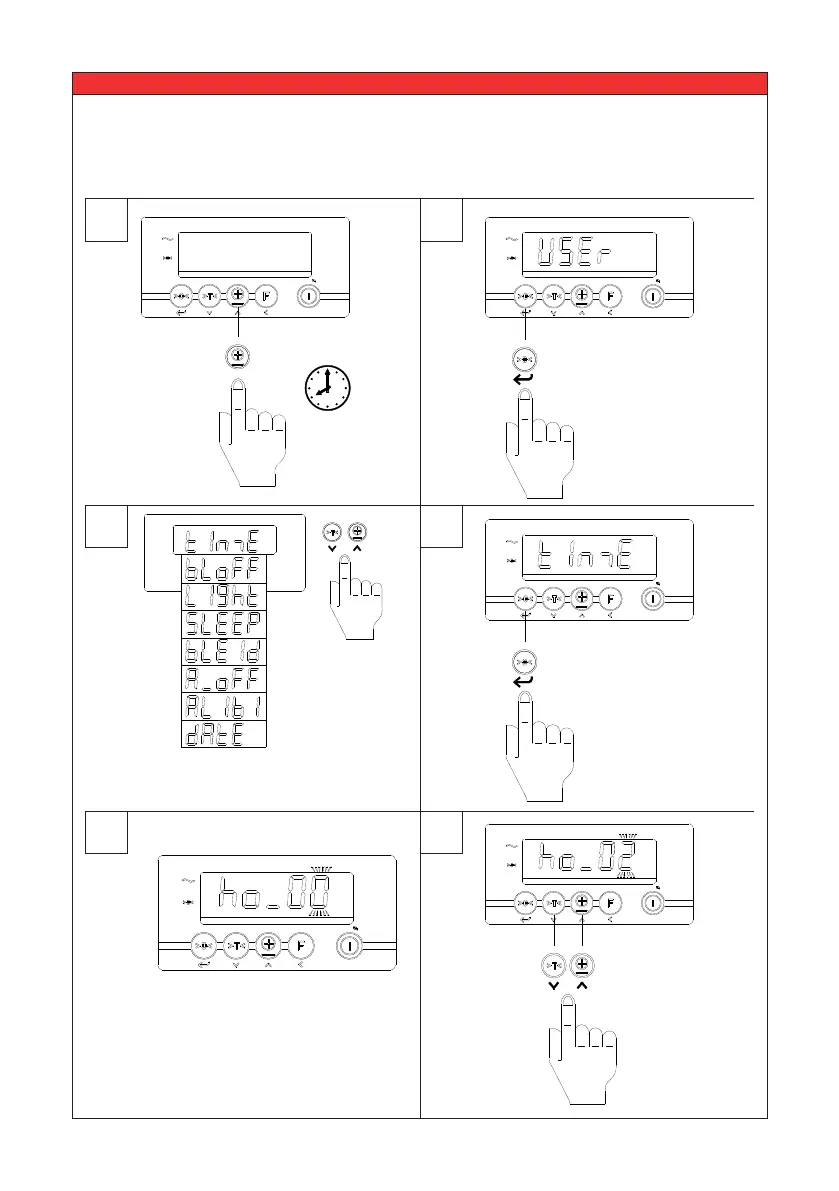
5.10 Changing the time and date (on the printout)
1
3
4
5
6
2
e1 e2 e3 F1 F2
NET
ID CODE PT TOTAL KG/LB
CLR
e1 e2 e3 F1 F2
NET
ID CODE PT TOTAL KG/LB
CLR
Press the up /
down key until
the desired value
is reached.
The display will show
“ho_00” or the previous
hour time setting
e1 e2 e3 F1 F2
NET
ID CODE PT TOTAL KG/LB
CLR
10 sec.
??
The user menu
can be entered
by pressing the
TOTAL key for 10
sec.
Select “TIME” in the user menu to change the
time.
e1 e2 e3 F1 F2
NET
ID CODE PT TOTAL KG/LB
CLR
Press enter to
change the time.
e1 e2 e3 F1 F2
NET
ID CODE PT TOTAL KG/LB
CLR
Press enter to
Select.

Related product manuals